Canis C2 Exposed: Previously Undocumented Cross-Platform Surveillance Framework Targeting Japan
Canis C2 Exposed: Previously Undocumented Cross-Platform Surveillance Framework Targeting Japan
Published on

On March 19, researcher KesaGataMe0 on X posted a suspicious Android APK tied to a phishing page impersonating Paidy, a Japanese buy-now-pay-later service. A quick look at the infrastructure behind it revealed an unauthenticated API sitting wide open, with endpoints exposing payloads, command logs, and the C2 source code itself.
The server wasn't running a simple credential harvester. Agents for Android, iOS, Windows, Linux, and macOS were present, alongside a canvas-based device fingerprinting system and code that references iOS sandboxing mechanisms by name. The actor behind it is clearly comfortable with Japanese, and large portions of the codebase show signs of LLM-assisted development.
That APK was the only starting point we needed. Here is what we found.
Key Findings
Canis C2 is a previously undocumented cross-platform surveillance system with agents targeting Android, iOS, Windows, Linux, and macOS.
Initial access through custom phishing pages. Potential victims are directed to a webpage displaying an invoice to pay an electric bill that can only be viewed after installing the malicious APK.
Browser-based JavaScript agent supports 20+ commands. Upon installing and granting the app permissions, the operator has access to: GPS tracking, camera and audio capture, credential overlay injection, and arbitrary code execution via a registered ServiceWorker.
Desktop operating systems targeted as well. Some of the agents include a PowerShell-based Active Directory enumeration payload, indicating enterprise networks can also be compromised.
Active C2 infrastructure. The phishing infrastructure is hosted at 161.33.154[.]144, with a login panel accessible on port 5000. A campaign identifier of CANIS_2026_FEB was also identified, providing a likely starting point for the activity.
This is how the investigation unfolded.
Discovery & Infrastructure Pivots
On March 19, the above-referenced Android APK became the starting point for our investigation. The app, available for download on the webpage info-payeasy[.]com/pages/overview.html, impersonates Paidy, a Japanese buy-now-pay-later service, presenting the victim with a billing statement due by March 31, 2026. At the bottom of the page, instructions for the victim to install an application and grant permissions to access additional details about the fabricated bill, which is the mechanism used to deliver the malicious APK.
The domain spoofs Pay-Easy, a separate Japanese payment service that allows users to pay for purchases and federal taxes via PC, smartphone, or ATM without visiting a bank. Mimicking two distinct brands suggests the attacker either changed targets mid-build or deliberately used the company names to strengthen credibility and improve chances of malware install.
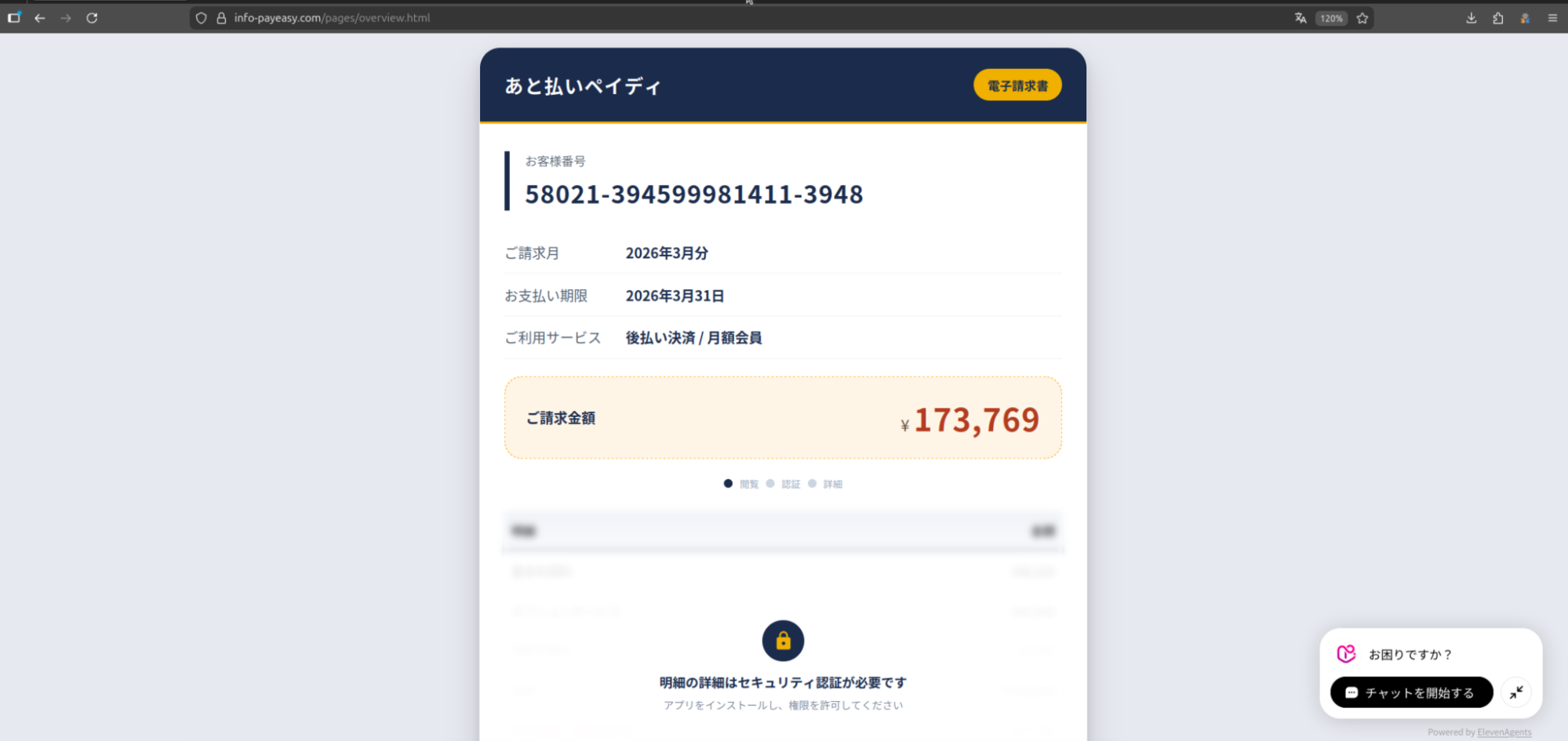 Figure 1: Screenshot of the initial phishing page spoofing Paidy, including a chatbot.
The image shared on social media was from a mobile browser, indicating smishing was likely the initial access vector. Unfortunately, we have not observed any messages pushing the Pay-Easy impersonated domain.
Infrastructure Analysis
The domain, info-payeasy[.]com resolves to 161.33.154[.]144, hosted on the Oracle Corporation network (AS31898, Japan). The domain was registered via Name[.]com on March 6, 2026, and uses the same service for DNS nameservers.
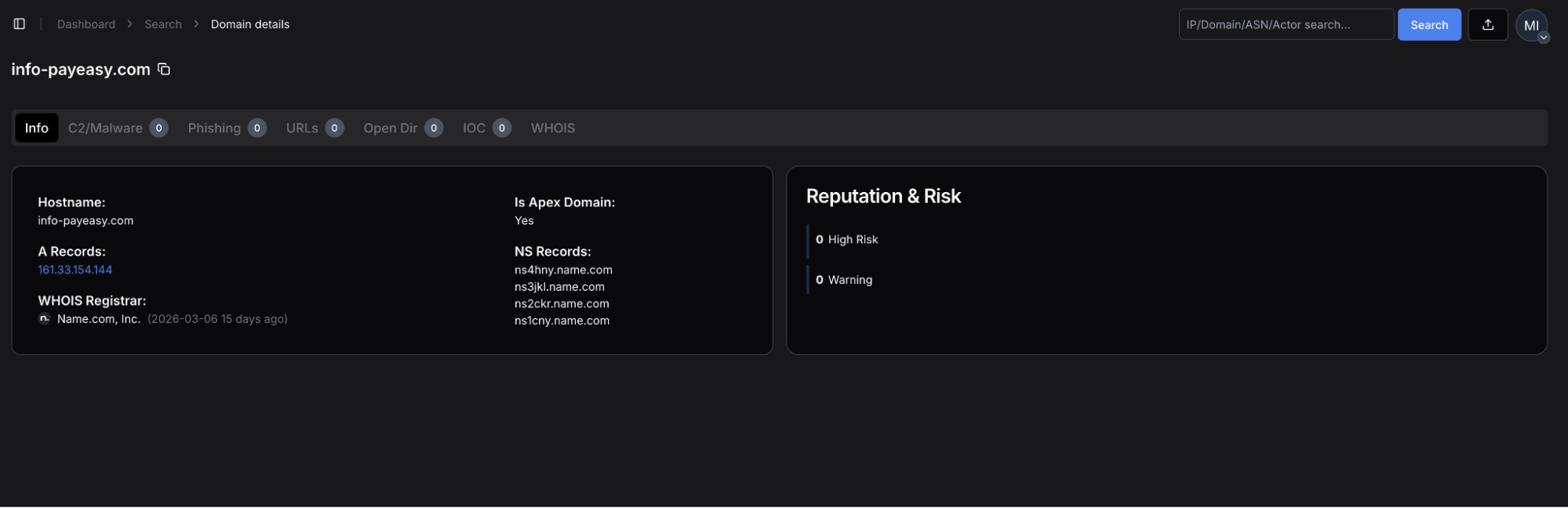 Figure 2: Hunt.io domain profile for info-payeasy[.]com, showing A record of 161.33.154[.]144, Name[.]com registrar (2026-03-06).
The server has five ports open: 22, 80, 443, 5000, and 5432.
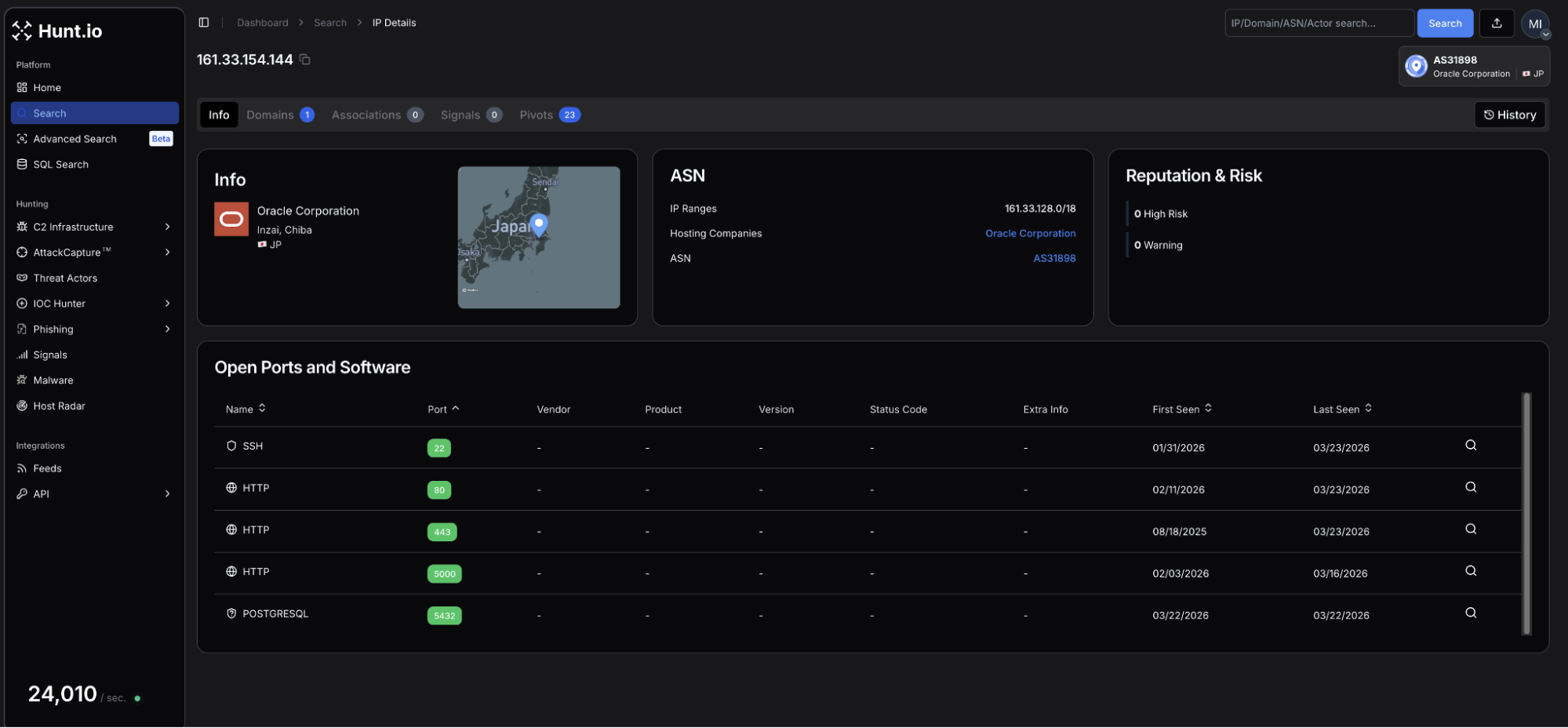 Figure 3: Hunt.io IP profile for 161.33.154[.]144 (Oracle Corporation, Inzai, Chiba, Japan) showing SSH services on port 22, HTTP on ports 80, 443, and 5000, and PostgreSQL on 5432.
| Port | Service | Usage |
|---|---|---|
| 22 | SSH-2.0-OpenSSH_8.7 | Remote management of the host |
| 80 | nginx/1.20.1 | Web services |
| 443 | nginx/1.20.1 - TLS | HTTP/S |
| 5000 | HTTP | Login panel |
| 5432 | PostgreSQL | Database services for credential storage |
A Let's Encrypt certificate (SHA-256: F8E9A720468C89F191D8CB12D46D81EF67B87A9EF95A307835C556A0885BD181) for the phishing domain was issued on the same day of registration.
Navigating to port 5000 revealed a login panel titled "Security Research Dashboard". The default username field is pre-populated with 'admin'. This panel is the operator-facing interface for CANIS C2, which we will discuss later below. The exposed login page is just one of many operational security mistakes made by the attacker.
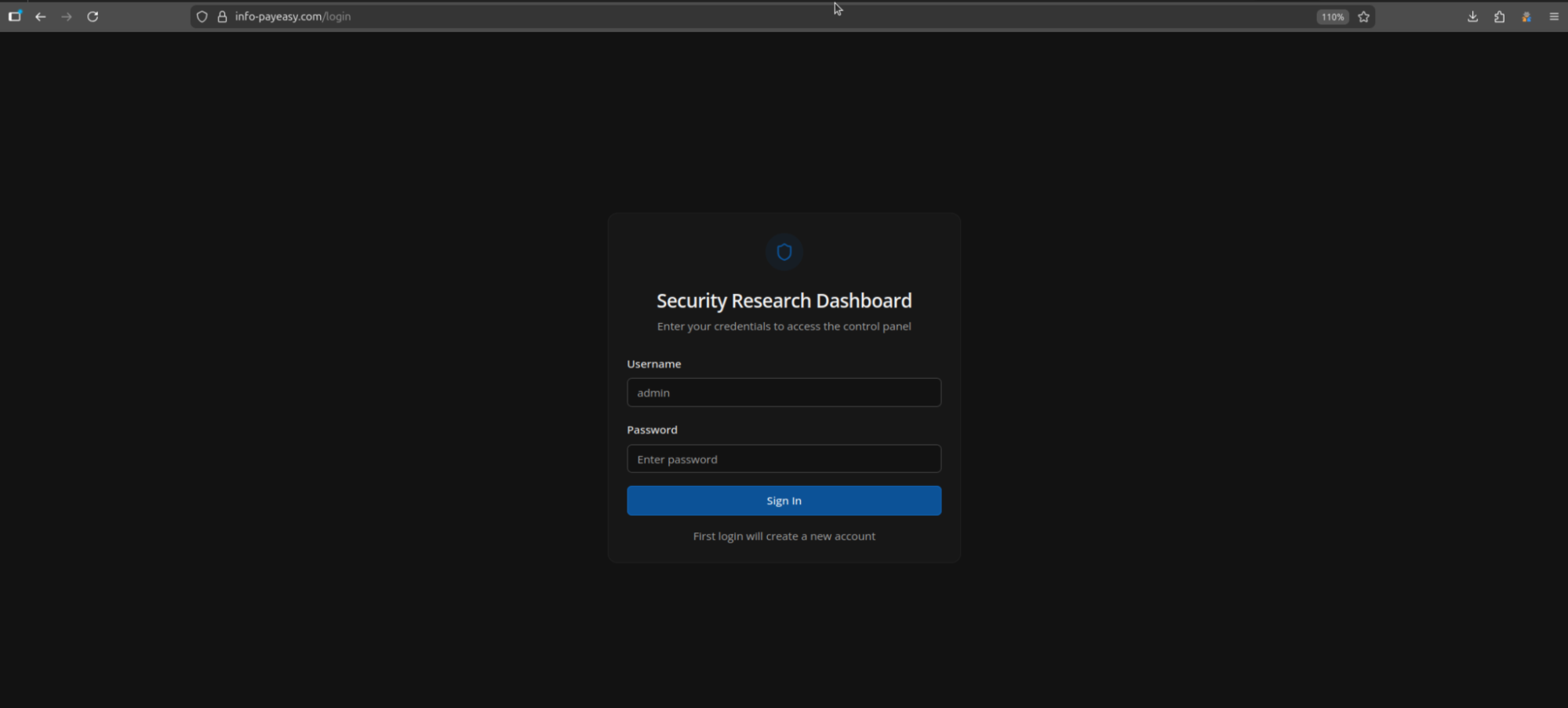 Figure 4: Login panel at info-payeasy[.]com.
Related Infrastructure
During our investigation, we found an additional six domains that we assess with moderate confidence are linked to this campaign. All share similarities with info-payeasy[.]com: Name[.]com domain registration and nameservers and are parked on shared hosting at 34.111.179[.]208 prior to activity commencing. The domains are listed below:
android-protect[.]com
applesecurity[.]pro
devicesecurity[.]pro
ios-deviceprotect[.]com
ios-inc[.]app
iosdevicepolicy[.]app
Many of the domains were registered in early January 2026. Using HuntSQL, we can query on the above to see if our network scans may have picked up previous webpages that may predate this phishing campaign.
Query:
SELECT
  timestamp, url, status, title, body
FROM
  crawler
WHERE
  (
url LIKE '%ios-inc.app%'
OR url LIKE '%android-protect.com%'
OR url LIKE '%devicesecurity.pro%'
OR url LIKE '%iosdevicepolicy.app%'
OR url LIKE '%ios-deviceprotect.com%'
OR url LIKE '%applesecurity.pro%'
  )
AND timestamp > '2026-01-10'
GROUP BY timestamp, url, status, title, body

                Copy
Output:
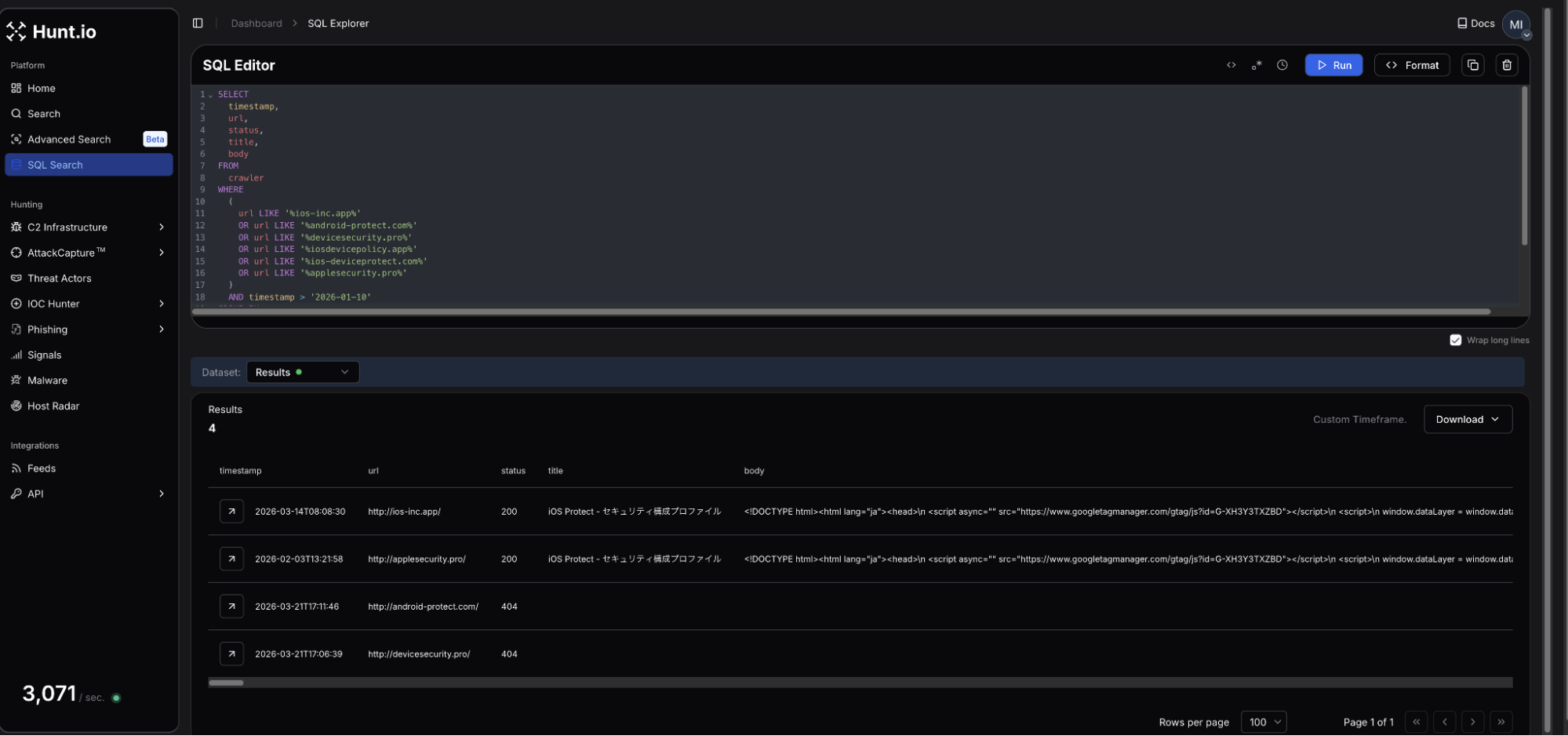 Figure 5: HuntSQL output showing 4 of the 6 domains were observed, and two of them led to fake iOS update pages.
Four of the six domains were crawled during our scans, with two returning webpages targeting iOS. The webpage titles for both ios-inc[.]app and applesecurity[.]pro shared the title "iOS Protect - セキュリティ構成プロファイル," which translates to iOS Protect - Security Configuration Profile.
Interestingly, a review of the returned HTML at the time it was scanned did not reveal a download button, indicating the attacker could have been testing the webpages and C2.
Scope of Exposure
Looking at the webpage source code and JavaScript served by the login panel at info-payeasy[.]com/assets/index-DdmV8luQ.js displayed a minified React frontend referencing multiple internal API endpoints, including /api/c2/commands, /api/module-deployments, and /api/stats, among many others.
This offered direct visibility into the backend infrastructure without requiring authentication, and led to easily the most interesting endpoint, /payloads, containing components of the malicious project, which will be covered in the following sections.
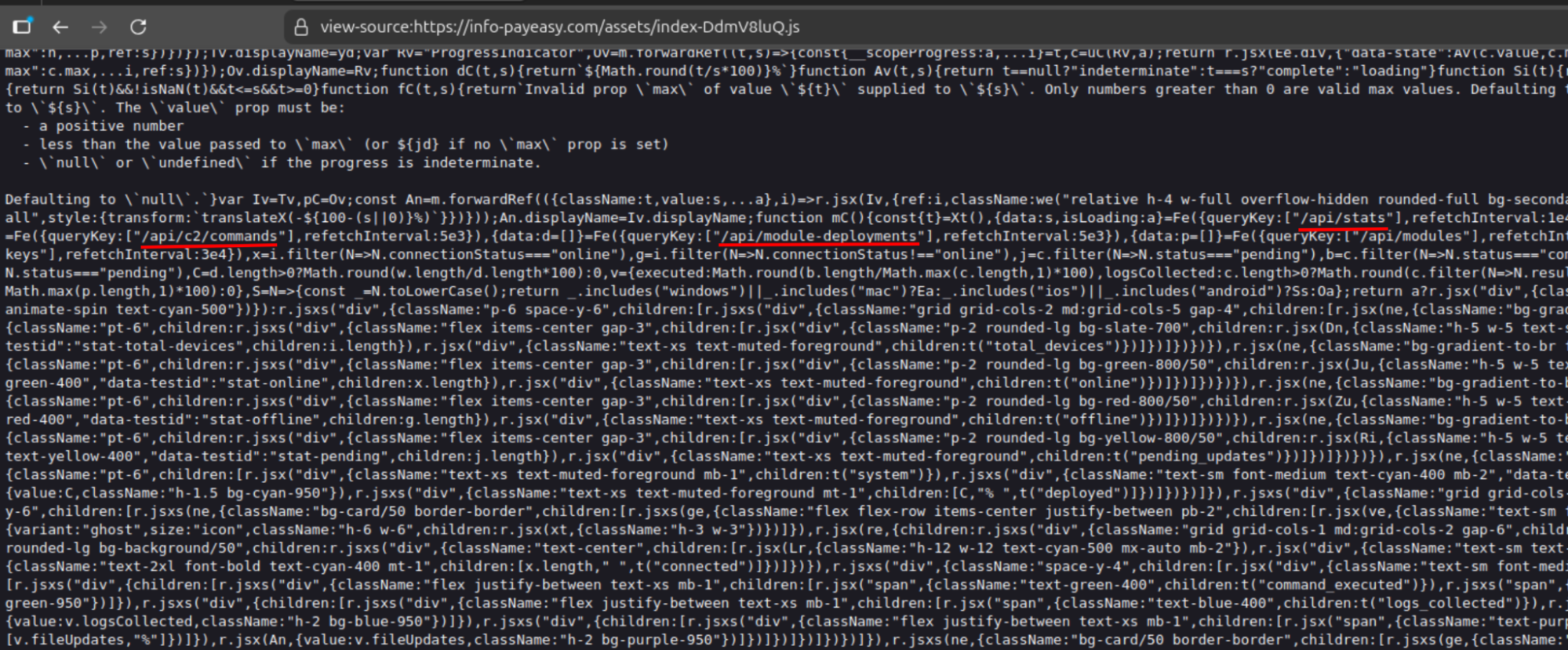 Figure 6: Exposed API endpoints connected to the C2 framework.
With the API surface mapped, we turned our attention to how victims end up on the server in the first place.
The Infection Chain
Presented as a mandatory security verification step to view the electric bill, victims are presented with an application named Device Shield. This APK presents itself as a supposed security and storage optimization tool, which requests all device permissions be granted before returning to the billing page.
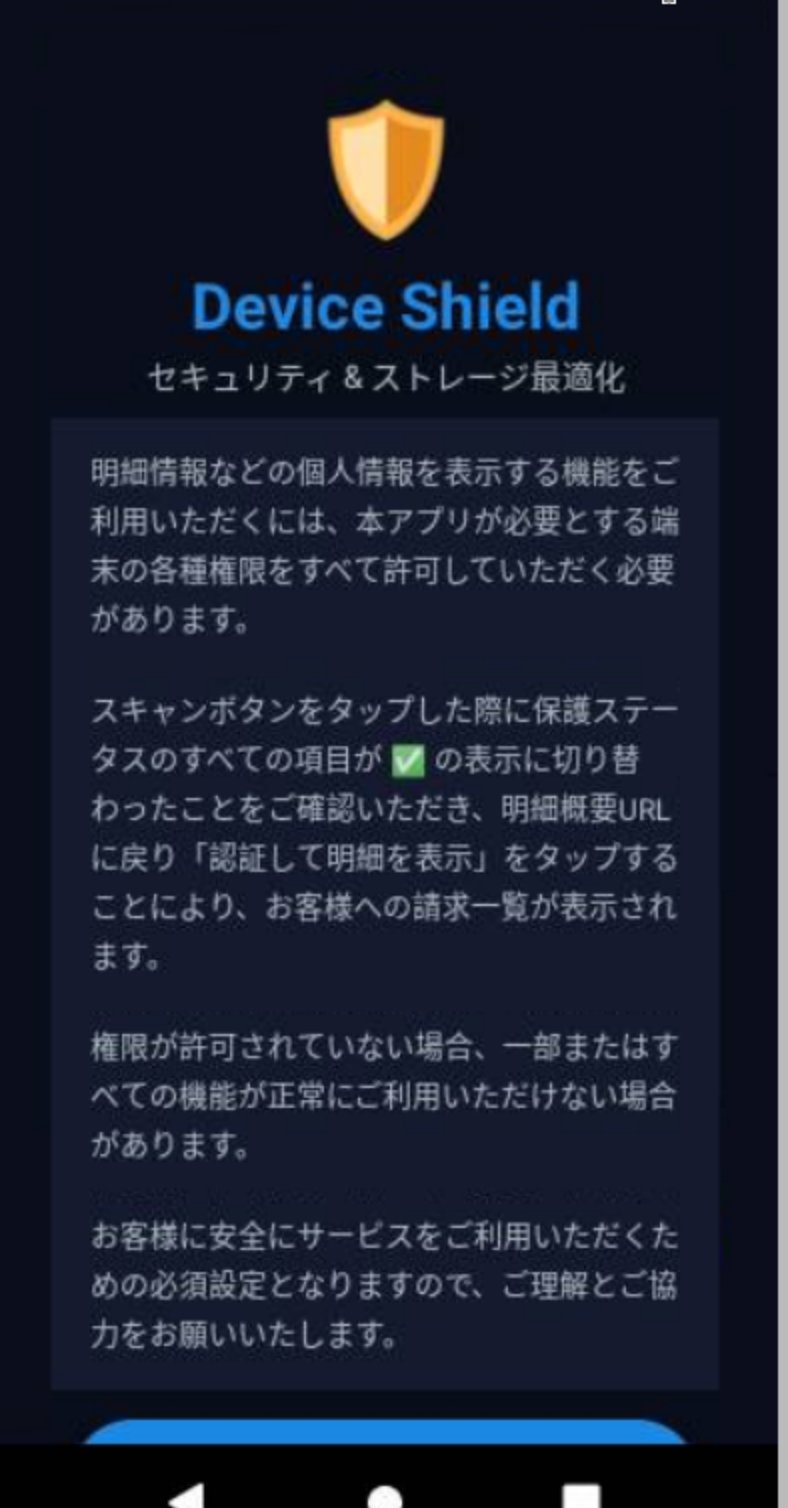 Figure 7: 'Device Shield' landing page presented to victim (Source Hatching Triage).
The APK prompts the user to initiate a scan of their phone before moving forward and accessing the bill information. The app makes use of the Accessibility Services, enabling input injection, screen capture, keylogging, and GUI input capture under com.deviceshield.service. Foreground persistence is established via android.app.IActivityManager.setServiceForeground, and requests battery optimization permissions, allowing the malware to run in the background.
Network Communications
Following installation, a network connection is made to info-payeasy[.]com over HTTP/S. The device checks in with the controller via a POST request sent to /api/public/perm-status. Device registration is sent to /api/agent/register, after which the agent begins polling /api/agent/commands, awaiting operator instructions. Heartbeat checks are at /api/agent/heartbeat.
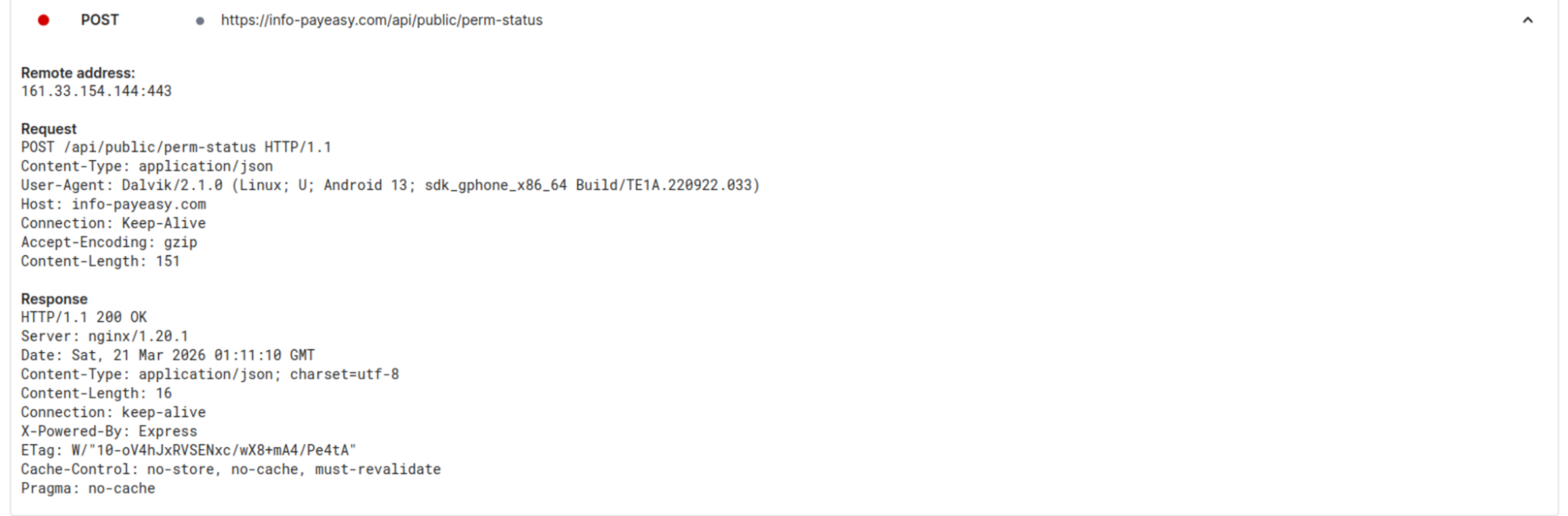 Figure 8: C2 check-in upon APK installation tested on Android 15. (Source: Hatching Triage).
Taking a further look at the commands available to the operator, we decided to dig into the /api/c2/commands endpoint. The logs contained just two unique device IDs, one of which seemed to be the attacker conducting testing of their own phone. In the early morning of March 21st, a number of commands were made to a specific ID, under the 'media_inventory' command, the result was the following Windows desktop path:
C:\Users\cotti\Downloads\aitm-phishing-platform\android-complete-20260309-230759
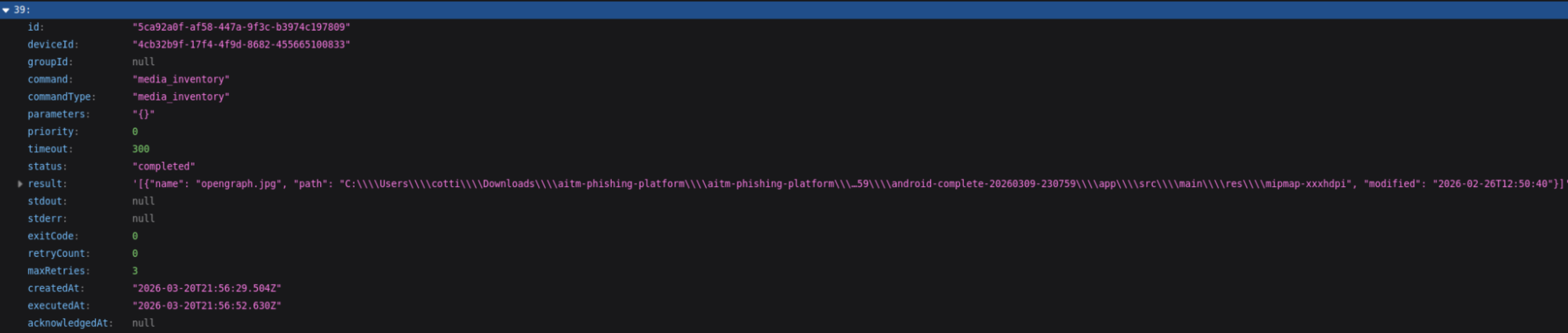 Figure 9: Screenshot showing the folder path for user 'cotti' and mentioning an AITM platform.
Of the 20+ commands listed, many are indicative of common mobile targeting malware (steal credentials, read contacts & sms, list files, etc.). What sets this apart is that the system is designed for sustained (persistent) access, surveillance, and broad collection of system information and credentials, rather than a single-purpose operation.
We believe the aitm (Adversary-In-The-Middle) platform referenced is part of the underlying infrastructure running the phishing pages. Additional logs for the same ID also show a user located within Japan, specifically Kanagawa prefecture, which possibly could be the attacker testing out the C2.
The command structure and endpoints visible through the testing activity point to a system well beyond the standard cybercriminal phishing campaign. The following section will examine our findings in full.
/payloads
With active phishing infrastructure and probable attacker testing confirmed, we decided to further enumerate the server's API surface, landing us at /api/payloads. This endpoint contains the framework's core components, including a JSON listing of 17 entries, the majority labeled in Japanese. HTML, JavaScript, Python, and bash were the primary tools used to interact with potential victims and fingerprint compromised devices.
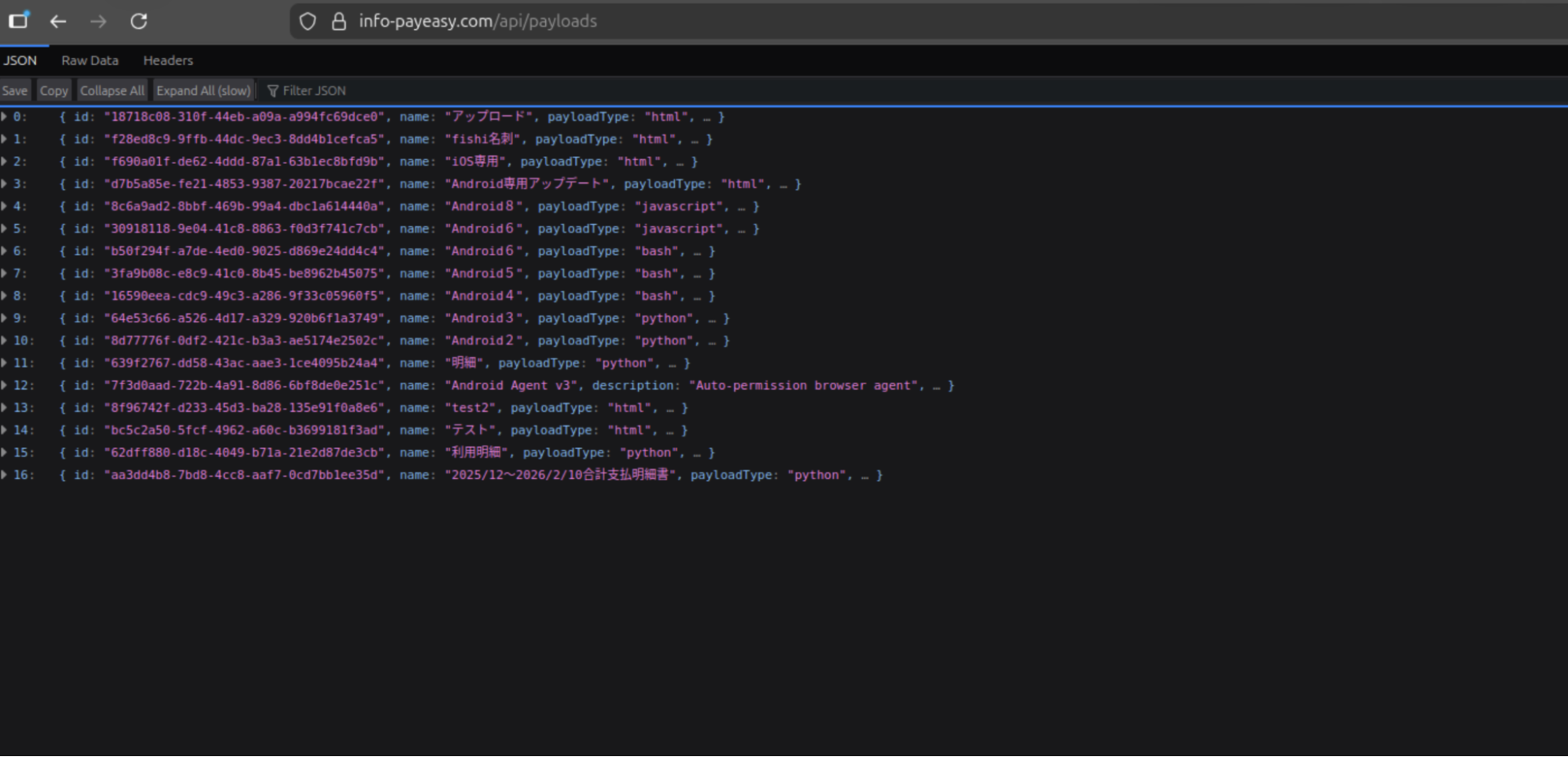 Figure 10: Screenshot of the JSON items located in /payloads.
Several of the entries from the above Figure are worth mentioning, and their use cases are described below:
| Payload # | Title | Usage |
|---|---|---|
| 1 | fishi名列 | (English: Phishing List) Credential harvesting - contains embedded code (console.log("Phishing page active - credentials will be captured via C2"); |
| 2 | iOS専用 | (English: iOS Update) Specific iOS targeting |
| 3 | Android専用アップデート | Translated: "Android exclusive update". Phishing payloads specific to Android. |
| 16 | 2025/12〜2026/2/10合計支払明細書 | Translates to "December 2025 to February 2026 total payment statement". Linked to the C2 server described below. |
Payload 16 indicates the campaign has been ongoing since possibly the end of 2025. The 'python' scripts targeting Android versions 2 - 8 are actually PowerShell code designed to seek and steal credentials and map out Active Directory. The bash scripts survey Linux/Unix systems and establish persistence using Systemd by creating a "System Update" service that restarts every 30 seconds.
It is unknown if the mistake was made on the part of the threat actor or is a by-product of automation. Below, we'll dive deeper into the more interesting payloads, numbers 15 & 16.
CANIS C2
Further exploring the payloads, specifically number 16, we found the Canis C2 server. The code functions as a self-contained Python HTTP server functioning as the backend portion of the malicious activity. A hardcoded campaign identifier, CANIS_2026_FEB, signaling the start of this particular campaign.
We named this framework Canis after that identifier. The victim-facing cover page was also themed around a fictional dog photo competition, which may or may not be a coincidence.
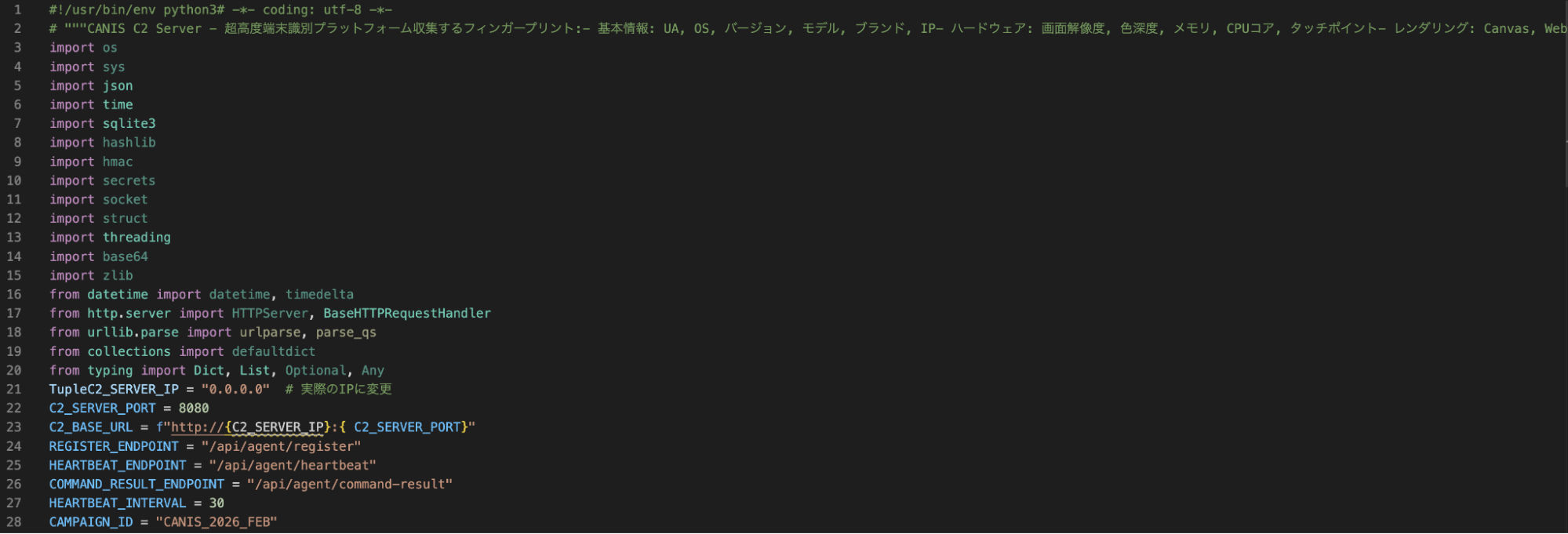 Figure 11: Snippet of CANIS C2, showing Japanese code comments and a hardcoded campaign ID.
The C2 is built entirely on Python's HTTP server standard library, with a SQLite backend, meaning it does not require any external dependencies. Port 8080, which is set as the default C2 listening port was not observed open on the server, consistent with nginx proxying activity. The PostgreSQL instance on port 5432 suggested there were additional components beyond Canis, possibly supporting credential storage.
Victim fingerprinting data (device ID, first and last seen timestamps, IP address, user-agent, OS name and version, device model, brand, and campaign ID) is stored in the SQLite database.
Operator Dashboard
The admin interface, titled "CANIS C2 超高度端末識別," or CANIS C2 Ultra-High Precision Device Identification, presents enrolled victims organized by ID, OS and version, model, IP, and more. The total number of enrolled devices, fingerprints collected, heartbeats received, and devices active within the last hour are present at the top of the page.
The page is bare bones and focuses on presenting the information to the attacker, free of bells and whistles seen on some C2 panels. Figure 12 below shows a cleaned-up version of what the threat actor would see (Python code keeping track of victim devices removed).
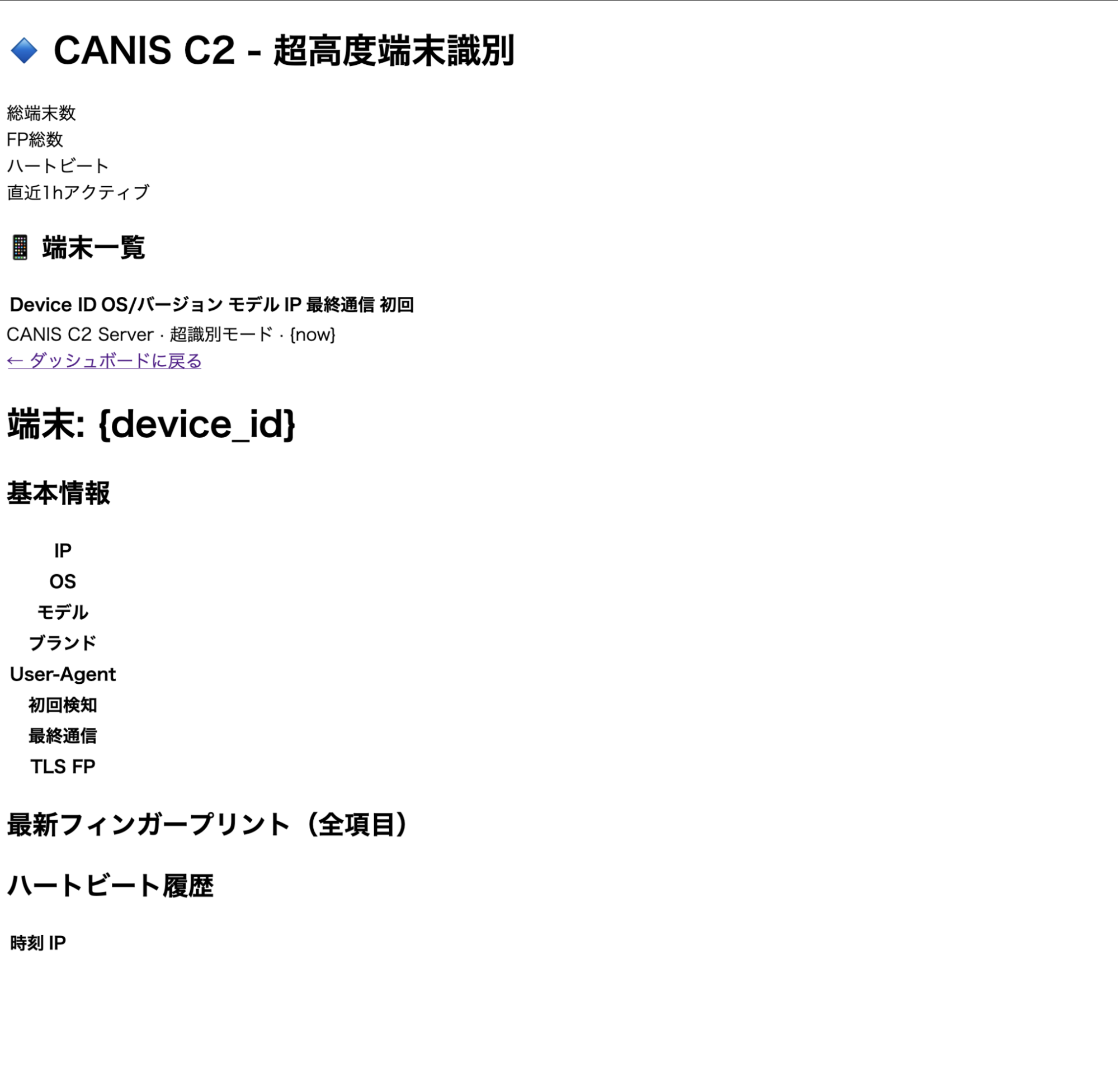 Figure 12: Screenshot of the CANIS C2 admin dashboard
Again, we see that the C2 code and much of the dashboard use Japanese. Using specific languages for credential harvesting lures is a common tactic, building tooling that only the actor is supposed to see, hints further that the author is Japanese or understands it very well.
Cover Page and Device Fingerprinting
In addition to the source code for the dashboard, Canis contains a victim-facing HTML page generated by the FingerprintPage.generate_html() method served at the root endpoint. The page is displayed as the "International Dog Photo Awards 2026," allowing potential victims to upload photos. This displays a progress bar with sequential messages in Japanese until a completion message is displayed.
While the user believes they are uploading photos, an intricate fingerprinting process is actually occurring in the background, which we'll discuss in the next section. In short, when a victim loads the page, their browser executes the embedded JavaScript fingerprinting payload and sends the data to /api/agent/register.
Querying historical scan data for webpages presenting the above title did not produce results. This could mean the website goes back farther than our search, or the page has not been used outside of internal testing.
iOS-Specific Targeting
Prior to installing additional payloads or obtaining persistence, Canis subjects devices to an intensive fingerprinting session executed entirely within the victim's browser via the dog photo page as described above. Ten collection functions run concurrently, detecting the local IP, battery states, sensor readings, timezone, network characteristics, etc. The webdriver property is checked on each item, suggesting the actor is actively attempting to filter out automated analysis environments/sandboxes.
The most interesting component in this implementation was the canvas fingerprinting function. A technique documented in Kaspersky's Operation Triangulation research, Canis uses the Canvas 2D API (as opposed to WebGL) to render the text "CANIS" and "FP" in multiple fonts, and creates a circle and two rectangles, and the last six characters of the device ID.
Mobile phones produce subtly different pixel outputs due to variations in GPU drivers. A rolling djb2 hash is then applied to the output, and the hardware-level differences in rendering are converted to a numeric identifier unique to the device.
A snippet of the relevant fingerprinting code is below.
const canvas = document.createElement('canvas'); canvas.width = 400; canvas.height = 100; const ctx = canvas.getContext('2d'); ctx.textBaseline = 'top'; // 異なるフォント、色、透明度を組み合わせて描画 ctx.font = 'bold 28px "Arial", sans-serif'; ctx.fillStyle = '#f60'; ctx.fillText('CANIS', 10, 10); ctx.font = 'italic 24px "Times New Roman", serif'; ctx.fillStyle = '#36c'; ctx.fillText('FP', 180, 10); ctx.font = '20px "Helvetica", "Roboto", sans-serif'; ctx.fillStyle = '#282'; ctx.fillText(DEVICE_ID.slice(-6), 260, 10); // 複雑な図形描画 ctx.beginPath(); ctx.arc(300, 60, 30, 0, Math.PI*2); ctx.fillStyle = '#a0a'; ctx.fill(); ctx.strokeStyle = '#0aa'; ctx.lineWidth = 3; ctx.strokeRect(50, 50, 150, 30); // シャドウ ctx.shadowColor = '#000'; ctx.shadowBlur = 10; ctx.fillStyle = '#f0f';

                Copy
That fingerprint feeds directly into the next stage, a delivery validation system that decides how to proceed against each target.
Delivery Validation
Payload 15 contains additional Python code and, more specifically, a class named ComprehensiveDeliveryValidator that takes the collected fingerprint as input and evaluates the feasibility of seven delivery methods against the target device. The code is operating system aware and contains checks for iOS, Android, Windows, and macOS. A ThreatIntelligenceFeed integration is also present, indicating the threat actor may check device identifiers against threat intel sources before proceeding.
For each delivery method, the validator produces an assessment containing a feasibility rating, success probability, detection risk score, blocking factors, bypass requirements, and mitigation suggestions. A recommended method is selected and returned with its feasibility score. The verbose reporting and named fields in the code lead us to believe a significant portion of the code was likely LLM-developed.
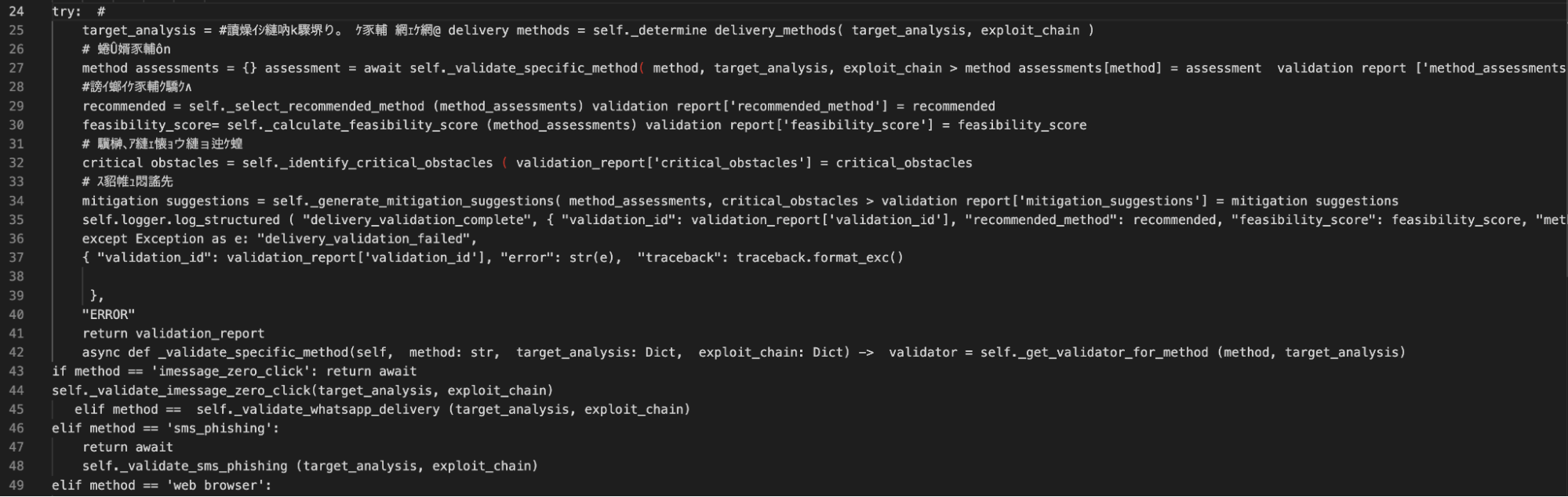 Figure 13: Code snippet from the delivery validation and exploit suggestion section.
Confirmed iOS Techniques
From the recovered code identified in the Figure above, the iMessage zero-click validator is the most technically significant. The iPhone security mechanisms below are referenced and evaluated as blocking factors prior to a score being assigned.
BlastDoor - Apple's sandboxing layer was introduced to isolate iMessage processing. The validator checks whether the service is active, and if so, sets the success probability to 0.01 if a bypass is assessed as not feasible.
Media pipeline isolation - This checks whether the media processing pipeline, which also uses a sandbox-based approach, ensures data processing for media is separated from the main processor.
ImageIO sandbox - Checks for an active ImageIO sandbox and appends an explicit sandbox escape requirement if present.
With BlastDoor active, the base probability is reduced by 10% of its starting value. The media pipeline isolation is 30%, and ImageIO is reduced by 40%.
While we are not suggesting the above is similar or a variation of the spyware seen in Operation Triangulation, the findings suggest a determined actor (even with the help of an LLM) well-versed in iOS exploits. Of note, security features like BlastDoor and ImageIO were introduced in iOS 14 as enabled by default and not configurable. Absent a new zero-day, Canis is believed to use some variation of ForcedEntry, an NSO exploit targeting the same features from 2021.
Unfortunately, we were not able to recover the exploit code from the server, and just hours later, on 21 March JST, the API was properly secured. This could be for several reasons, but it is believed the exploits are either stored separately and served dynamically only if a target passes validation, or the exploits are sourced externally and will be integrated at a later date.
Hours after we began pulling on the API, the actor noticed.
A Second Try?
A new Cloudflare certificate was issued on the same server shortly after, and a new phishing domain turned up in the DNS name field: americanexpress-site[.]com.
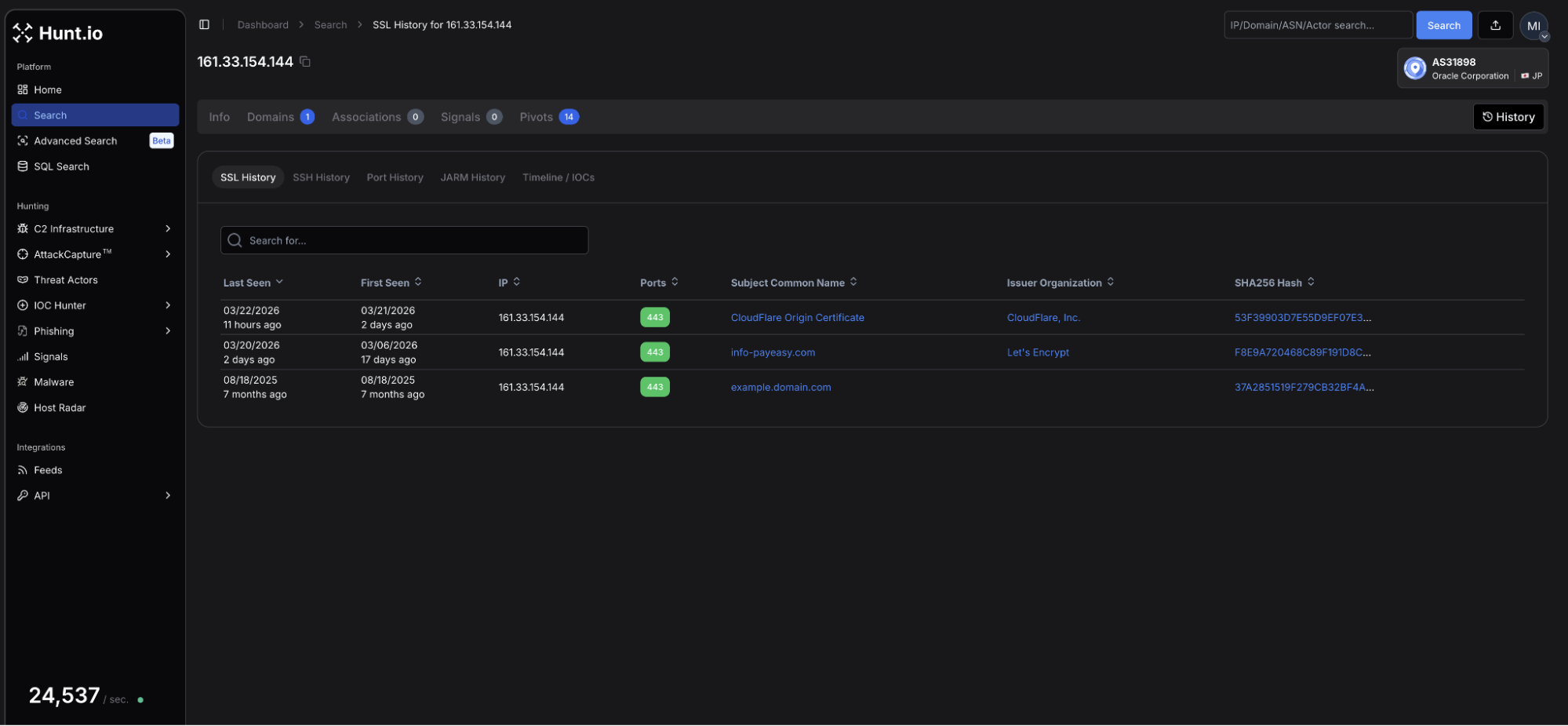 Figure 14: Hunt.io TLS profile for 161.33.154[.]144 showing an updated certificate issued on 21 March using Cloudflare as a proxy.
The page, once again targeting Japanese speakers, bears similar hallmarks to the page that started our investigation.
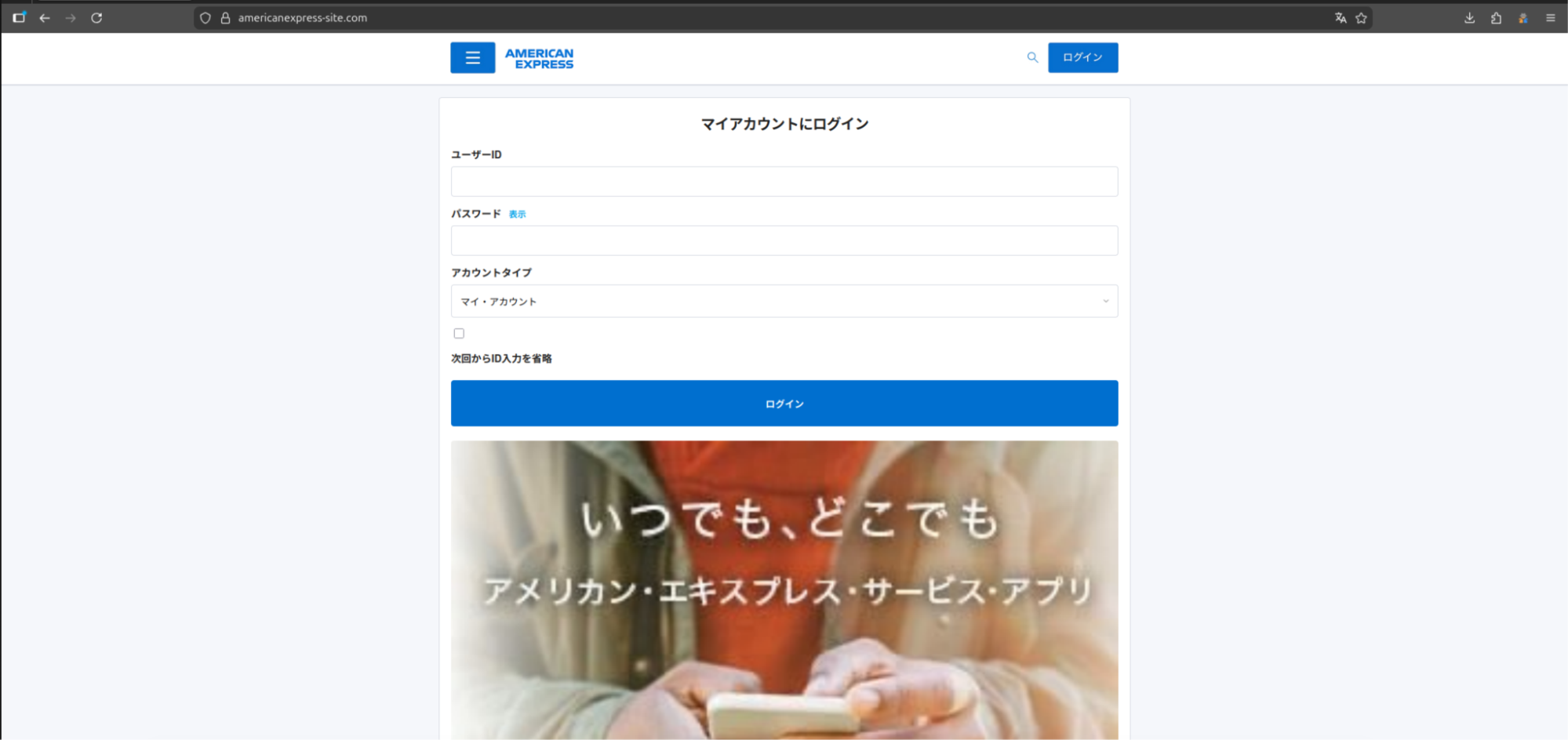 Figure 15: Webpage for americanexpress-site[.]com.
This iteration features a standard login page for the American Express credit card account without any prompts to download applications. A review of the HTML source identified JavaScript with several mentions to "/api/proxy/", "/aitm_capture", and others, which lets us know the attacker is still targeting unsuspecting users.
We will continue monitoring this infrastructure and update as new activity emerges.
The techniques observed across this campaign map are associated with the following MITRE ATT&CK entries.
MITRE ATT&CK Mapping
| ID | Technique | Implementation |
|---|---|---|
| T1660 | Phishing | Japanese-language lures targeting credential theft and malicious downloads. |
| T1541 | Foreground persistence | Device Shield APK establishes persistence via android.app.IActivityManager.setServiceForeground |
| T1430 | Location Tracking | Continuous_location streams GPS coordinates with real-time C2 updates. |
| T1512 | Video Capture | Camera_capture and camera_stream exfil still and multi-frame video. |
| T1429 | Audio Capture | record_audio and record_video commands capture device microphone output |
| T1411 | Input Prompt | Phishing_overlay injects dynamic credential harvesting forms over any active page. |
| T1516 | Input Injection | Accessibility service abuse enables GUI input capture via com.deviceshield.service |
| T1623 | Unix Shell | shell command executes code via subprocess on Linux and macOS agents |
| T1655.001 | Masquerading | Linux persistence is achieved using a service named sysupdate, spoofing the legit update process |
The following indicators were identified during this investigation.
Indicators of Compromise
| IP addresses | Domains (resolved during campaign) | Details |
|---|---|---|
| 161.33.154[.]144 | info-payeasy[.]com americanexpress-site[.]com | Initial and follow-on domains presenting phishing lures |
| 34.111.179[.]208 | android-protect[.]com applesecurity[.]pro devicesecurity[.]pro ios-deviceprotect[.]com ios-inc[.]app iosdevicepolicy[.]app | Domains using the same registrar, nameservers, and similar webpages are engaging in credential harvesting/compromise. |
File Indicators
| Filename | Hash | Description |
|---|---|---|
| PayEasy-Viewer.apk | 564b381dc3e6fc737fd9b46fb5ee1e06f4e333d2886f0805514af44947a4c271 | Android APK discovered and posted on X. |
Mitigation Strategies
For managed devices, defenders should monitor and prioritize:
Enable Lockdown Mode on iOS devices for high-risk individuals. Canis specifically evaluates BlastDoor, ImageIO, and media pipeline isolation as blocking factors before proceeding against a target.
Block recently registered domains and monitor for Name[.]com registered domains resolving to Oracle Corporation (AS31898) infrastructure in Japan.
Monitor for APKs requesting Accessibility Services permissions outside of approved applications. Device Shield abuses this to enable keylogging, screen capture, and input injection.
Watch for outbound connections polling at regular intervals to unknown hosts, particularly POST requests to paths matching /api/agent/heartbeat or /api/agent/commands patterns.
Audit Active Directory environments for unexpected enumeration activity. Canis deploys PowerShell-based AD enumeration payloads against Windows systems.
Educate users on smishing lures using payment urgency as a hook, particularly those prompting app installation outside the official store to view a document or bill.
Conclusion
The exposed API puts the entire framework on the table. Agents for every major OS, Active Directory enumeration payloads, and references to known iOS exploit mitigations all point to an actor investing real effort into this tooling, not someone running a quick campaign.
The infrastructure was locked down fast, and a new phishing domain was already up before we finished the report. Hunt.io tracks this kind of infrastructure continuously.
If you want to see how Hunt.io tracks C2 infrastructure like Canis before it reaches your users, book a demo.
On March 19, researcher KesaGataMe0 on X posted a suspicious Android APK tied to a phishing page impersonating Paidy, a Japanese buy-now-pay-later service. A quick look at the infrastructure behind it revealed an unauthenticated API sitting wide open, with endpoints exposing payloads, command logs, and the C2 source code itself.
The server wasn't running a simple credential harvester. Agents for Android, iOS, Windows, Linux, and macOS were present, alongside a canvas-based device fingerprinting system and code that references iOS sandboxing mechanisms by name. The actor behind it is clearly comfortable with Japanese, and large portions of the codebase show signs of LLM-assisted development.
That APK was the only starting point we needed. Here is what we found.
Key Findings
Canis C2 is a previously undocumented cross-platform surveillance system with agents targeting Android, iOS, Windows, Linux, and macOS.
Initial access through custom phishing pages. Potential victims are directed to a webpage displaying an invoice to pay an electric bill that can only be viewed after installing the malicious APK.
Browser-based JavaScript agent supports 20+ commands. Upon installing and granting the app permissions, the operator has access to: GPS tracking, camera and audio capture, credential overlay injection, and arbitrary code execution via a registered ServiceWorker.
Desktop operating systems targeted as well. Some of the agents include a PowerShell-based Active Directory enumeration payload, indicating enterprise networks can also be compromised.
Active C2 infrastructure. The phishing infrastructure is hosted at 161.33.154[.]144, with a login panel accessible on port 5000. A campaign identifier of CANIS_2026_FEB was also identified, providing a likely starting point for the activity.
This is how the investigation unfolded.
Discovery & Infrastructure Pivots
On March 19, the above-referenced Android APK became the starting point for our investigation. The app, available for download on the webpage info-payeasy[.]com/pages/overview.html, impersonates Paidy, a Japanese buy-now-pay-later service, presenting the victim with a billing statement due by March 31, 2026. At the bottom of the page, instructions for the victim to install an application and grant permissions to access additional details about the fabricated bill, which is the mechanism used to deliver the malicious APK.
The domain spoofs Pay-Easy, a separate Japanese payment service that allows users to pay for purchases and federal taxes via PC, smartphone, or ATM without visiting a bank. Mimicking two distinct brands suggests the attacker either changed targets mid-build or deliberately used the company names to strengthen credibility and improve chances of malware install.
Figure 1: Screenshot of the initial phishing page spoofing Paidy, including a chatbot.The image shared on social media was from a mobile browser, indicating smishing was likely the initial access vector. Unfortunately, we have not observed any messages pushing the Pay-Easy impersonated domain.
Infrastructure Analysis
The domain, info-payeasy[.]com resolves to 161.33.154[.]144, hosted on the Oracle Corporation network (AS31898, Japan). The domain was registered via Name[.]com on March 6, 2026, and uses the same service for DNS nameservers.
Figure 2: Hunt.io domain profile for info-payeasy[.]com, showing A record of 161.33.154[.]144, Name[.]com registrar (2026-03-06).The server has five ports open: 22, 80, 443, 5000, and 5432.
Figure 3: Hunt.io IP profile for 161.33.154[.]144 (Oracle Corporation, Inzai, Chiba, Japan) showing SSH services on port 22, HTTP on ports 80, 443, and 5000, and PostgreSQL on 5432.| Port | Service | Usage |
|---|---|---|
| 22 | SSH-2.0-OpenSSH_8.7 | Remote management of the host |
| 80 | nginx/1.20.1 | Web services |
| 443 | nginx/1.20.1 - TLS | HTTP/S |
| 5000 | HTTP | Login panel |
| 5432 | PostgreSQL | Database services for credential storage |
A Let's Encrypt certificate (SHA-256: F8E9A720468C89F191D8CB12D46D81EF67B87A9EF95A307835C556A0885BD181) for the phishing domain was issued on the same day of registration.
Navigating to port 5000 revealed a login panel titled "Security Research Dashboard". The default username field is pre-populated with 'admin'. This panel is the operator-facing interface for CANIS C2, which we will discuss later below. The exposed login page is just one of many operational security mistakes made by the attacker.
Figure 4: Login panel at info-payeasy[.]com.Related Infrastructure
During our investigation, we found an additional six domains that we assess with moderate confidence are linked to this campaign. All share similarities with info-payeasy[.]com: Name[.]com domain registration and nameservers and are parked on shared hosting at 34.111.179[.]208 prior to activity commencing. The domains are listed below:
android-protect[.]com
applesecurity[.]pro
devicesecurity[.]pro
ios-deviceprotect[.]com
ios-inc[.]app
iosdevicepolicy[.]app
Many of the domains were registered in early January 2026. Using HuntSQL, we can query on the above to see if our network scans may have picked up previous webpages that may predate this phishing campaign.
Query:
SELECT
  timestamp, url, status, title, body
FROM
  crawler
WHERE
  (
url LIKE '%ios-inc.app%'
OR url LIKE '%android-protect.com%'
OR url LIKE '%devicesecurity.pro%'
OR url LIKE '%iosdevicepolicy.app%'
OR url LIKE '%ios-deviceprotect.com%'
OR url LIKE '%applesecurity.pro%'
  )
AND timestamp > '2026-01-10'
GROUP BY timestamp, url, status, title, body

                Copy
Output:
Figure 5: HuntSQL output showing 4 of the 6 domains were observed, and two of them led to fake iOS update pages.Four of the six domains were crawled during our scans, with two returning webpages targeting iOS. The webpage titles for both ios-inc[.]app and applesecurity[.]pro shared the title "iOS Protect - セキュリティ構成プロファイル," which translates to iOS Protect - Security Configuration Profile.
Interestingly, a review of the returned HTML at the time it was scanned did not reveal a download button, indicating the attacker could have been testing the webpages and C2.
Scope of Exposure
Looking at the webpage source code and JavaScript served by the login panel at info-payeasy[.]com/assets/index-DdmV8luQ.js displayed a minified React frontend referencing multiple internal API endpoints, including /api/c2/commands, /api/module-deployments, and /api/stats, among many others.
This offered direct visibility into the backend infrastructure without requiring authentication, and led to easily the most interesting endpoint, /payloads, containing components of the malicious project, which will be covered in the following sections.
Figure 6: Exposed API endpoints connected to the C2 framework.With the API surface mapped, we turned our attention to how victims end up on the server in the first place.
The Infection Chain
Presented as a mandatory security verification step to view the electric bill, victims are presented with an application named Device Shield. This APK presents itself as a supposed security and storage optimization tool, which requests all device permissions be granted before returning to the billing page.
Figure 7: 'Device Shield' landing page presented to victim (Source Hatching Triage).The APK prompts the user to initiate a scan of their phone before moving forward and accessing the bill information. The app makes use of the Accessibility Services, enabling input injection, screen capture, keylogging, and GUI input capture under com.deviceshield.service. Foreground persistence is established via android.app.IActivityManager.setServiceForeground, and requests battery optimization permissions, allowing the malware to run in the background.
Network Communications
Following installation, a network connection is made to info-payeasy[.]com over HTTP/S. The device checks in with the controller via a POST request sent to /api/public/perm-status. Device registration is sent to /api/agent/register, after which the agent begins polling /api/agent/commands, awaiting operator instructions. Heartbeat checks are at /api/agent/heartbeat.
Figure 8: C2 check-in upon APK installation tested on Android 15. (Source: Hatching Triage).Taking a further look at the commands available to the operator, we decided to dig into the /api/c2/commands endpoint. The logs contained just two unique device IDs, one of which seemed to be the attacker conducting testing of their own phone. In the early morning of March 21st, a number of commands were made to a specific ID, under the 'media_inventory' command, the result was the following Windows desktop path:
C:\Users\cotti\Downloads\aitm-phishing-platform\android-complete-20260309-230759
Figure 9: Screenshot showing the folder path for user 'cotti' and mentioning an AITM platform.Of the 20+ commands listed, many are indicative of common mobile targeting malware (steal credentials, read contacts & sms, list files, etc.). What sets this apart is that the system is designed for sustained (persistent) access, surveillance, and broad collection of system information and credentials, rather than a single-purpose operation.
We believe the aitm (Adversary-In-The-Middle) platform referenced is part of the underlying infrastructure running the phishing pages. Additional logs for the same ID also show a user located within Japan, specifically Kanagawa prefecture, which possibly could be the attacker testing out the C2.
The command structure and endpoints visible through the testing activity point to a system well beyond the standard cybercriminal phishing campaign. The following section will examine our findings in full.
/payloads
With active phishing infrastructure and probable attacker testing confirmed, we decided to further enumerate the server's API surface, landing us at /api/payloads. This endpoint contains the framework's core components, including a JSON listing of 17 entries, the majority labeled in Japanese. HTML, JavaScript, Python, and bash were the primary tools used to interact with potential victims and fingerprint compromised devices.
Figure 10: Screenshot of the JSON items located in /payloads.Several of the entries from the above Figure are worth mentioning, and their use cases are described below:
| Payload # | Title | Usage |
|---|---|---|
| 1 | fishi名列 | (English: Phishing List) Credential harvesting - contains embedded code (console.log("Phishing page active - credentials will be captured via C2"); |
| 2 | iOS専用 | (English: iOS Update) Specific iOS targeting |
| 3 | Android専用アップデート | Translated: "Android exclusive update". Phishing payloads specific to Android. |
| 16 | 2025/12〜2026/2/10合計支払明細書 | Translates to "December 2025 to February 2026 total payment statement". Linked to the C2 server described below. |
Payload 16 indicates the campaign has been ongoing since possibly the end of 2025. The 'python' scripts targeting Android versions 2 - 8 are actually PowerShell code designed to seek and steal credentials and map out Active Directory. The bash scripts survey Linux/Unix systems and establish persistence using Systemd by creating a "System Update" service that restarts every 30 seconds.
It is unknown if the mistake was made on the part of the threat actor or is a by-product of automation. Below, we'll dive deeper into the more interesting payloads, numbers 15 & 16.
CANIS C2
Further exploring the payloads, specifically number 16, we found the Canis C2 server. The code functions as a self-contained Python HTTP server functioning as the backend portion of the malicious activity. A hardcoded campaign identifier, CANIS_2026_FEB, signaling the start of this particular campaign.
We named this framework Canis after that identifier. The victim-facing cover page was also themed around a fictional dog photo competition, which may or may not be a coincidence.
Figure 11: Snippet of CANIS C2, showing Japanese code comments and a hardcoded campaign ID.The C2 is built entirely on Python's HTTP server standard library, with a SQLite backend, meaning it does not require any external dependencies. Port 8080, which is set as the default C2 listening port was not observed open on the server, consistent with nginx proxying activity. The PostgreSQL instance on port 5432 suggested there were additional components beyond Canis, possibly supporting credential storage.
Victim fingerprinting data (device ID, first and last seen timestamps, IP address, user-agent, OS name and version, device model, brand, and campaign ID) is stored in the SQLite database.
Operator Dashboard
The admin interface, titled "CANIS C2 超高度端末識別," or CANIS C2 Ultra-High Precision Device Identification, presents enrolled victims organized by ID, OS and version, model, IP, and more. The total number of enrolled devices, fingerprints collected, heartbeats received, and devices active within the last hour are present at the top of the page.
The page is bare bones and focuses on presenting the information to the attacker, free of bells and whistles seen on some C2 panels. Figure 12 below shows a cleaned-up version of what the threat actor would see (Python code keeping track of victim devices removed).
Figure 12: Screenshot of the CANIS C2 admin dashboardAgain, we see that the C2 code and much of the dashboard use Japanese. Using specific languages for credential harvesting lures is a common tactic, building tooling that only the actor is supposed to see, hints further that the author is Japanese or understands it very well.
Cover Page and Device Fingerprinting
In addition to the source code for the dashboard, Canis contains a victim-facing HTML page generated by the FingerprintPage.generate_html() method served at the root endpoint. The page is displayed as the "International Dog Photo Awards 2026," allowing potential victims to upload photos. This displays a progress bar with sequential messages in Japanese until a completion message is displayed.
While the user believes they are uploading photos, an intricate fingerprinting process is actually occurring in the background, which we'll discuss in the next section. In short, when a victim loads the page, their browser executes the embedded JavaScript fingerprinting payload and sends the data to /api/agent/register.
Querying historical scan data for webpages presenting the above title did not produce results. This could mean the website goes back farther than our search, or the page has not been used outside of internal testing.
iOS-Specific Targeting
Prior to installing additional payloads or obtaining persistence, Canis subjects devices to an intensive fingerprinting session executed entirely within the victim's browser via the dog photo page as described above. Ten collection functions run concurrently, detecting the local IP, battery states, sensor readings, timezone, network characteristics, etc. The webdriver property is checked on each item, suggesting the actor is actively attempting to filter out automated analysis environments/sandboxes.
The most interesting component in this implementation was the canvas fingerprinting function. A technique documented in Kaspersky's Operation Triangulation research, Canis uses the Canvas 2D API (as opposed to WebGL) to render the text "CANIS" and "FP" in multiple fonts, and creates a circle and two rectangles, and the last six characters of the device ID.
Mobile phones produce subtly different pixel outputs due to variations in GPU drivers. A rolling djb2 hash is then applied to the output, and the hardware-level differences in rendering are converted to a numeric identifier unique to the device.
A snippet of the relevant fingerprinting code is below.
const canvas = document.createElement('canvas'); canvas.width = 400; canvas.height = 100; const ctx = canvas.getContext('2d'); ctx.textBaseline = 'top'; // 異なるフォント、色、透明度を組み合わせて描画 ctx.font = 'bold 28px "Arial", sans-serif'; ctx.fillStyle = '#f60'; ctx.fillText('CANIS', 10, 10); ctx.font = 'italic 24px "Times New Roman", serif'; ctx.fillStyle = '#36c'; ctx.fillText('FP', 180, 10); ctx.font = '20px "Helvetica", "Roboto", sans-serif'; ctx.fillStyle = '#282'; ctx.fillText(DEVICE_ID.slice(-6), 260, 10); // 複雑な図形描画 ctx.beginPath(); ctx.arc(300, 60, 30, 0, Math.PI*2); ctx.fillStyle = '#a0a'; ctx.fill(); ctx.strokeStyle = '#0aa'; ctx.lineWidth = 3; ctx.strokeRect(50, 50, 150, 30); // シャドウ ctx.shadowColor = '#000'; ctx.shadowBlur = 10; ctx.fillStyle = '#f0f';

                Copy
That fingerprint feeds directly into the next stage, a delivery validation system that decides how to proceed against each target.
Delivery Validation
Payload 15 contains additional Python code and, more specifically, a class named ComprehensiveDeliveryValidator that takes the collected fingerprint as input and evaluates the feasibility of seven delivery methods against the target device. The code is operating system aware and contains checks for iOS, Android, Windows, and macOS. A ThreatIntelligenceFeed integration is also present, indicating the threat actor may check device identifiers against threat intel sources before proceeding.
For each delivery method, the validator produces an assessment containing a feasibility rating, success probability, detection risk score, blocking factors, bypass requirements, and mitigation suggestions. A recommended method is selected and returned with its feasibility score. The verbose reporting and named fields in the code lead us to believe a significant portion of the code was likely LLM-developed.
Figure 13: Code snippet from the delivery validation and exploit suggestion section.Confirmed iOS Techniques
From the recovered code identified in the Figure above, the iMessage zero-click validator is the most technically significant. The iPhone security mechanisms below are referenced and evaluated as blocking factors prior to a score being assigned.
BlastDoor - Apple's sandboxing layer was introduced to isolate iMessage processing. The validator checks whether the service is active, and if so, sets the success probability to 0.01 if a bypass is assessed as not feasible.
Media pipeline isolation - This checks whether the media processing pipeline, which also uses a sandbox-based approach, ensures data processing for media is separated from the main processor.
ImageIO sandbox - Checks for an active ImageIO sandbox and appends an explicit sandbox escape requirement if present.
With BlastDoor active, the base probability is reduced by 10% of its starting value. The media pipeline isolation is 30%, and ImageIO is reduced by 40%.
While we are not suggesting the above is similar or a variation of the spyware seen in Operation Triangulation, the findings suggest a determined actor (even with the help of an LLM) well-versed in iOS exploits. Of note, security features like BlastDoor and ImageIO were introduced in iOS 14 as enabled by default and not configurable. Absent a new zero-day, Canis is believed to use some variation of ForcedEntry, an NSO exploit targeting the same features from 2021.
Unfortunately, we were not able to recover the exploit code from the server, and just hours later, on 21 March JST, the API was properly secured. This could be for several reasons, but it is believed the exploits are either stored separately and served dynamically only if a target passes validation, or the exploits are sourced externally and will be integrated at a later date.
Hours after we began pulling on the API, the actor noticed.
A Second Try?
A new Cloudflare certificate was issued on the same server shortly after, and a new phishing domain turned up in the DNS name field: americanexpress-site[.]com.
Figure 14: Hunt.io TLS profile for 161.33.154[.]144 showing an updated certificate issued on 21 March using Cloudflare as a proxy.The page, once again targeting Japanese speakers, bears similar hallmarks to the page that started our investigation.
Figure 15: Webpage for americanexpress-site[.]com.This iteration features a standard login page for the American Express credit card account without any prompts to download applications. A review of the HTML source identified JavaScript with several mentions to "/api/proxy/", "/aitm_capture", and others, which lets us know the attacker is still targeting unsuspecting users.
We will continue monitoring this infrastructure and update as new activity emerges.
The techniques observed across this campaign map are associated with the following MITRE ATT&CK entries.
MITRE ATT&CK Mapping
| ID | Technique | Implementation |
|---|---|---|
| T1660 | Phishing | Japanese-language lures targeting credential theft and malicious downloads. |
| T1541 | Foreground persistence | Device Shield APK establishes persistence via android.app.IActivityManager.setServiceForeground |
| T1430 | Location Tracking | Continuous_location streams GPS coordinates with real-time C2 updates. |
| T1512 | Video Capture | Camera_capture and camera_stream exfil still and multi-frame video. |
| T1429 | Audio Capture | record_audio and record_video commands capture device microphone output |
| T1411 | Input Prompt | Phishing_overlay injects dynamic credential harvesting forms over any active page. |
| T1516 | Input Injection | Accessibility service abuse enables GUI input capture via com.deviceshield.service |
| T1623 | Unix Shell | shell command executes code via subprocess on Linux and macOS agents |
| T1655.001 | Masquerading | Linux persistence is achieved using a service named sysupdate, spoofing the legit update process |
The following indicators were identified during this investigation.
Indicators of Compromise
| IP addresses | Domains (resolved during campaign) | Details |
|---|---|---|
| 161.33.154[.]144 | info-payeasy[.]com americanexpress-site[.]com | Initial and follow-on domains presenting phishing lures |
| 34.111.179[.]208 | android-protect[.]com applesecurity[.]pro devicesecurity[.]pro ios-deviceprotect[.]com ios-inc[.]app iosdevicepolicy[.]app | Domains using the same registrar, nameservers, and similar webpages are engaging in credential harvesting/compromise. |
File Indicators
| Filename | Hash | Description |
|---|---|---|
| PayEasy-Viewer.apk | 564b381dc3e6fc737fd9b46fb5ee1e06f4e333d2886f0805514af44947a4c271 | Android APK discovered and posted on X. |
Mitigation Strategies
For managed devices, defenders should monitor and prioritize:
Enable Lockdown Mode on iOS devices for high-risk individuals. Canis specifically evaluates BlastDoor, ImageIO, and media pipeline isolation as blocking factors before proceeding against a target.
Block recently registered domains and monitor for Name[.]com registered domains resolving to Oracle Corporation (AS31898) infrastructure in Japan.
Monitor for APKs requesting Accessibility Services permissions outside of approved applications. Device Shield abuses this to enable keylogging, screen capture, and input injection.
Watch for outbound connections polling at regular intervals to unknown hosts, particularly POST requests to paths matching /api/agent/heartbeat or /api/agent/commands patterns.
Audit Active Directory environments for unexpected enumeration activity. Canis deploys PowerShell-based AD enumeration payloads against Windows systems.
Educate users on smishing lures using payment urgency as a hook, particularly those prompting app installation outside the official store to view a document or bill.
Conclusion
The exposed API puts the entire framework on the table. Agents for every major OS, Active Directory enumeration payloads, and references to known iOS exploit mitigations all point to an actor investing real effort into this tooling, not someone running a quick campaign.
The infrastructure was locked down fast, and a new phishing domain was already up before we finished the report. Hunt.io tracks this kind of infrastructure continuously.
If you want to see how Hunt.io tracks C2 infrastructure like Canis before it reaches your users, book a demo.
Related Posts
Related Posts
Related Posts