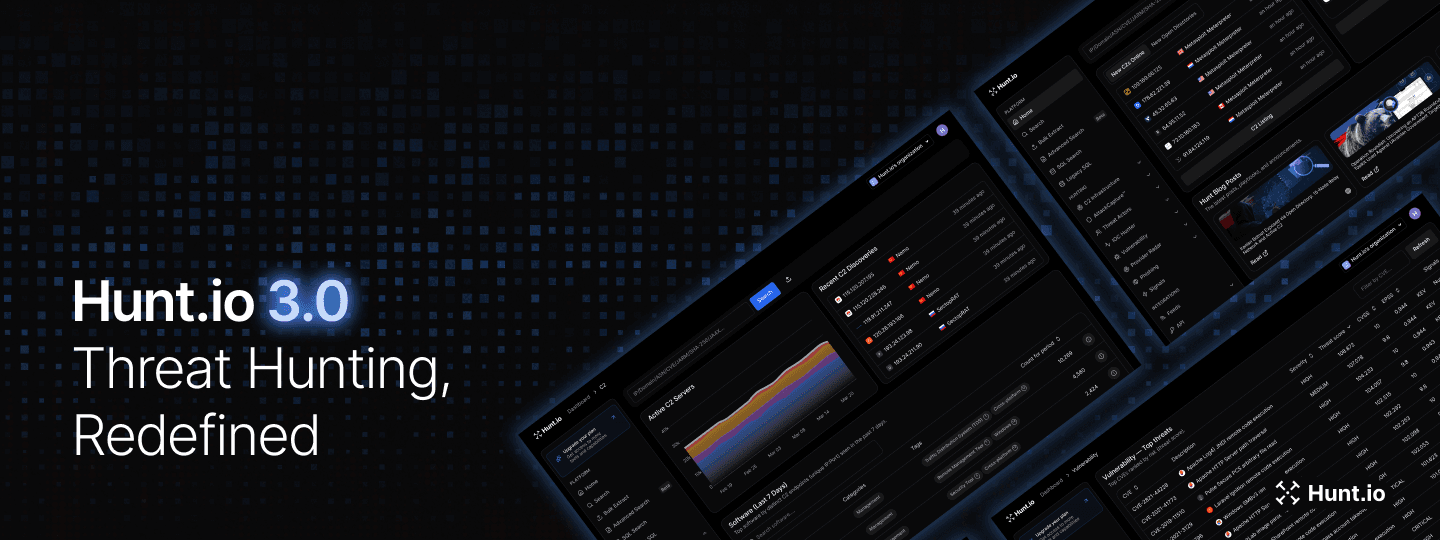
One IP. One domain. One hash. In the hands of a good hunter, that's enough to unravel an entire campaign. But most tools stop at the lookup. Hunt 3.0 doesn't.
This release is built around the idea that every indicator is a doorway, and your job is to walk through it without hitting a dead end. We rebuilt the whole platform to make that possible, giving investigators full infrastructure context from a single indicator, inside one platform.
Here's a quick look at what's new:
| Highlights | What's New? |
|---|---|
| Data Improvements | Flattened Data Architecture, Cloudflare Buster, Passive DNS History, Threat Activity Enablers, Provider Radar with Registrar intelligence |
| Usability Improvements | Visual Netblock Browsing, Vulnerability Intelligence workflow (CVE drilldowns, cross-CVE navigation, enriched daily digest), AttackCapture Code Search (AI categorization, negative facets, keyword highlighting), Attack Reports, Exploit Capture, Threat Actor Time Range, JARM Lookup Pages, SQL Events Over Time |
| General Improvements | Full platform rebuild, Dashboard redesign, Authentication updates, Provider Radar renamed from Host Radar, AttackCapture search filter dimensions (Intent, Package type, Function, Locale), Exploit Capture Similarity tab, Alerts, Phishing Kit CSV Export, SQL Table Names |
| API | 60+ new endpoints across C2, AttackCapture, Vulnerability Intelligence, SQL, IP Enrichment, IOC Hunter, and DNS. OpenAPI 3.0 with JSON and YAML spec downloads. Remote MCP server at mcp.hunt.io with OAuth, dedicated MCP API keys, 18 tools available. |
API, Rebuilt
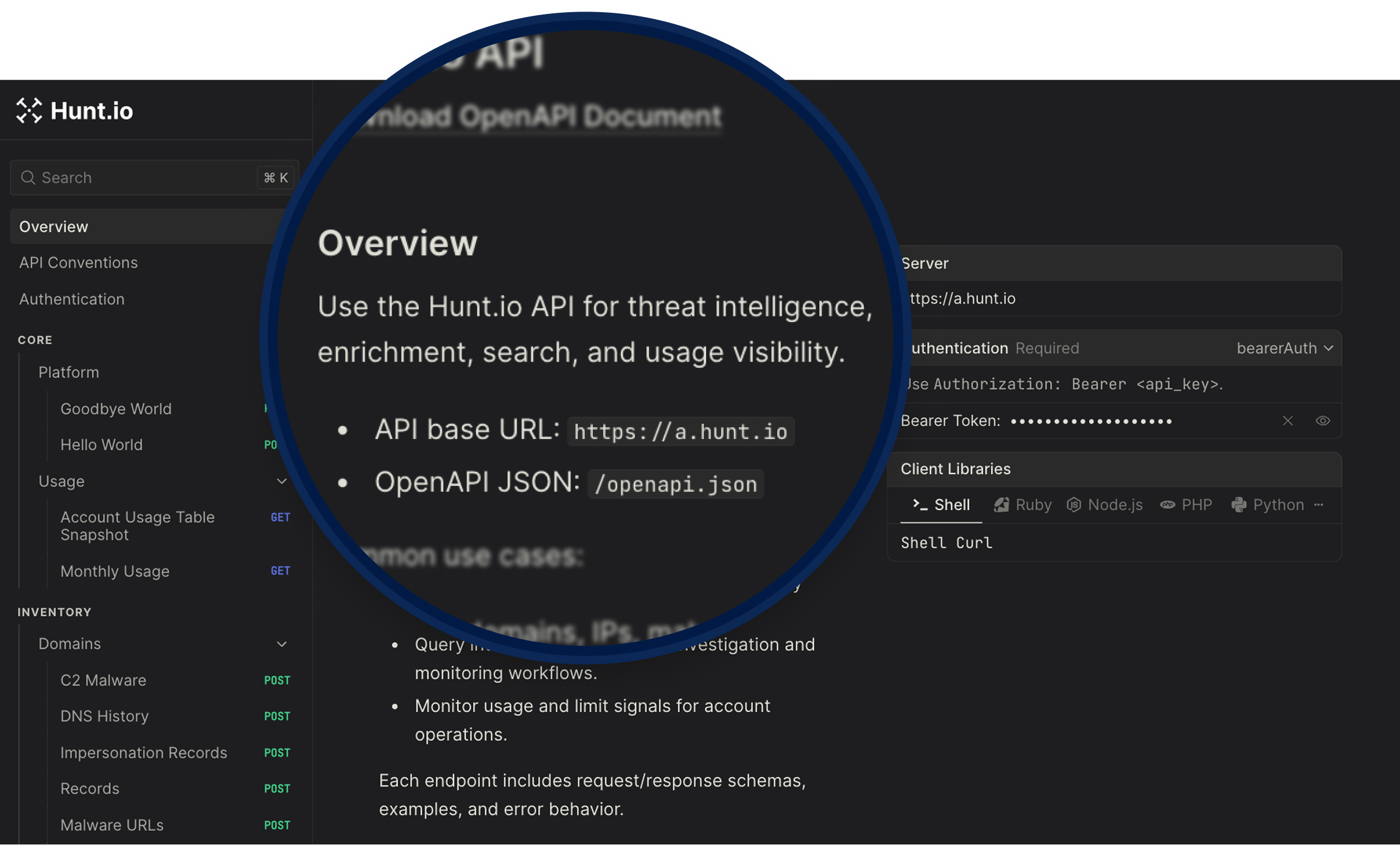
Hunt 3.0 ships over 60 endpoints covering the full platform. The API is built on OpenAPI 3.0 with JSON and YAML spec files available to download, so you can import directly into Postman or generate a client in Python, Go, or whatever your pipeline runs on.
C2 Feed - Download the full C2 infrastructure feed as gzip-compressed NDJSON, with options to exclude domains by popularity list or custom blocklist.
AttackCapture - Browse open directories, search staged files and code, pull exploit listings, query by SHA256, preview file content, download host archives, and pull AI-generated host and file briefs without touching the UI.
IP Enrichment - Full enrichment per IP including risk profile, port history, JARM, SSH, SSL, pivot rankings, IOC timeline, and AttackCapture exposure history.
Bulk Extract & Enrich - Extract IPs, domains, CIDRs, and SHA256s from raw text, then run triage summaries and drill-down history across C2, AttackCapture, and IOC Hunter in batch.
SQL - Run HuntSQL rules programmatically across all supported tables, with pagination, histogram mode, export, and streaming download support.
IOC Hunter - Search posts, IPs, hosts, and SHA256s to pull context from Hunt.io's research corpus, including daily activity counts for trend tracking.
Threat Actors - Query threat actor profiles, aliases, IP IOCs, enabler records, and provider-level data programmatically.
Signals - Pull enriched threat signal profiles and search across the signals dataset by IP, country, actor, tag, and more.
Vulnerability Intelligence - Query CVEs, pull weaponized and top threat views, and access daily threat counts for pipeline integration.
DNS Enrichment - rDNS lookups, DNS history, and Cloudflare Buster available via API, so you can pull domain-level infrastructure pivots directly into your pipelines.
If you're building detection pipelines, enrichment workflows, or custom tooling, the full endpoint list is in the API v3 documentation.
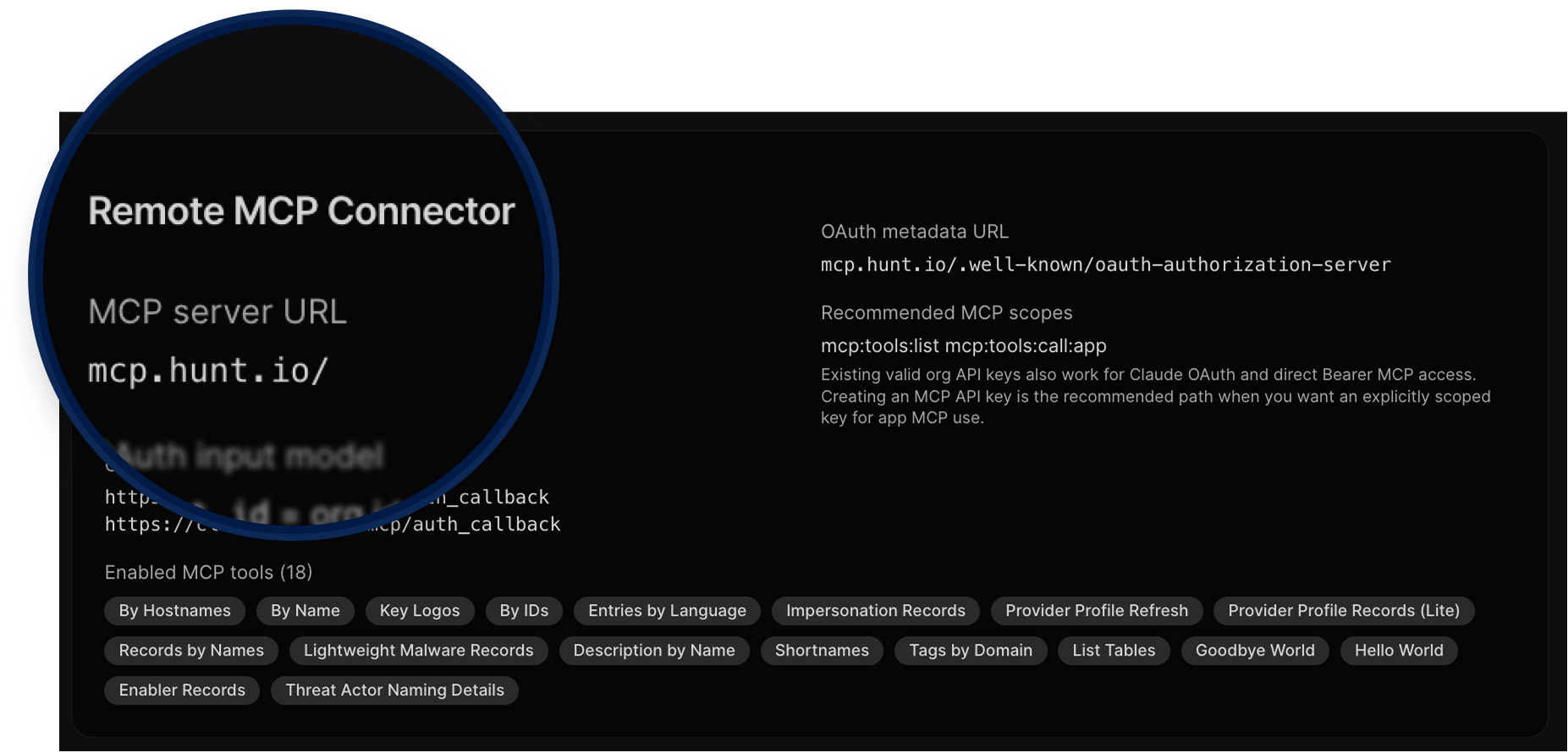
Remote MCP Server
Hunt.io now has a remote MCP server at
mcp.hunt.io with OAuth support, so you can connect AI tools like Claude directly to Hunt data without building a custom integration. Authentication uses your existing API key, dedicated MCP API keys can be created with fixed scopes, and PKCE S256 is supported for browser-based clients. 18 tools available out of the box. Organizations can manage MCP activation and access gating at the org level.
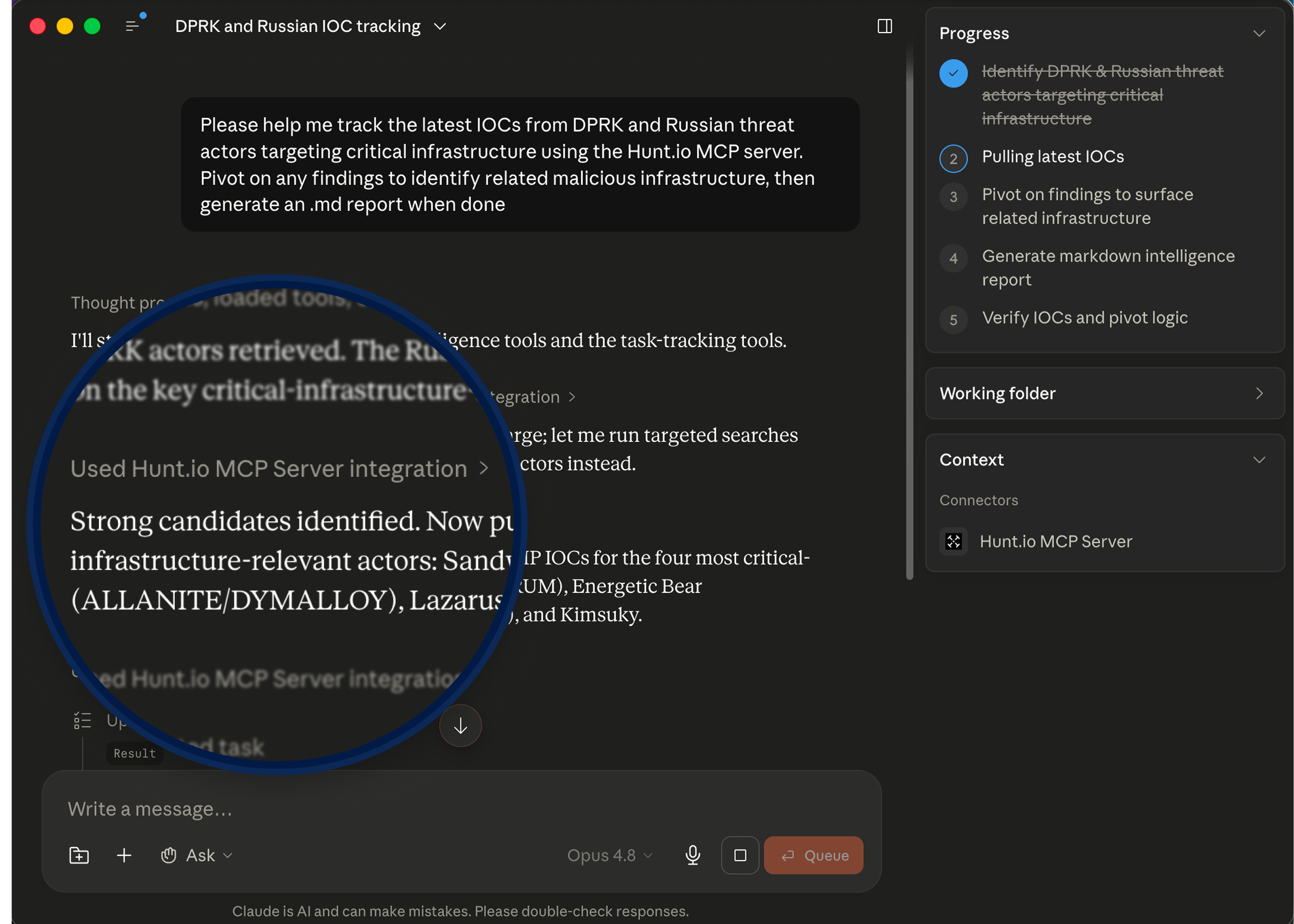
Here's what that looks like in practice. The screenshot below shows Claude connected to the Hunt.io MCP server, tracking IOCs from DPRK and Russian threat actors, pivoting on findings to map related infrastructure, and generating a full markdown report, all from a single prompt.
General Updates
Flattened Data Architecture
Hunt 3.0 introduces a new
ip table that wasn't available in our previous version. It holds the current state of an IP and its services as flat SQL fields, which means data that used to require separate queries and manual correlation now lives in one place.
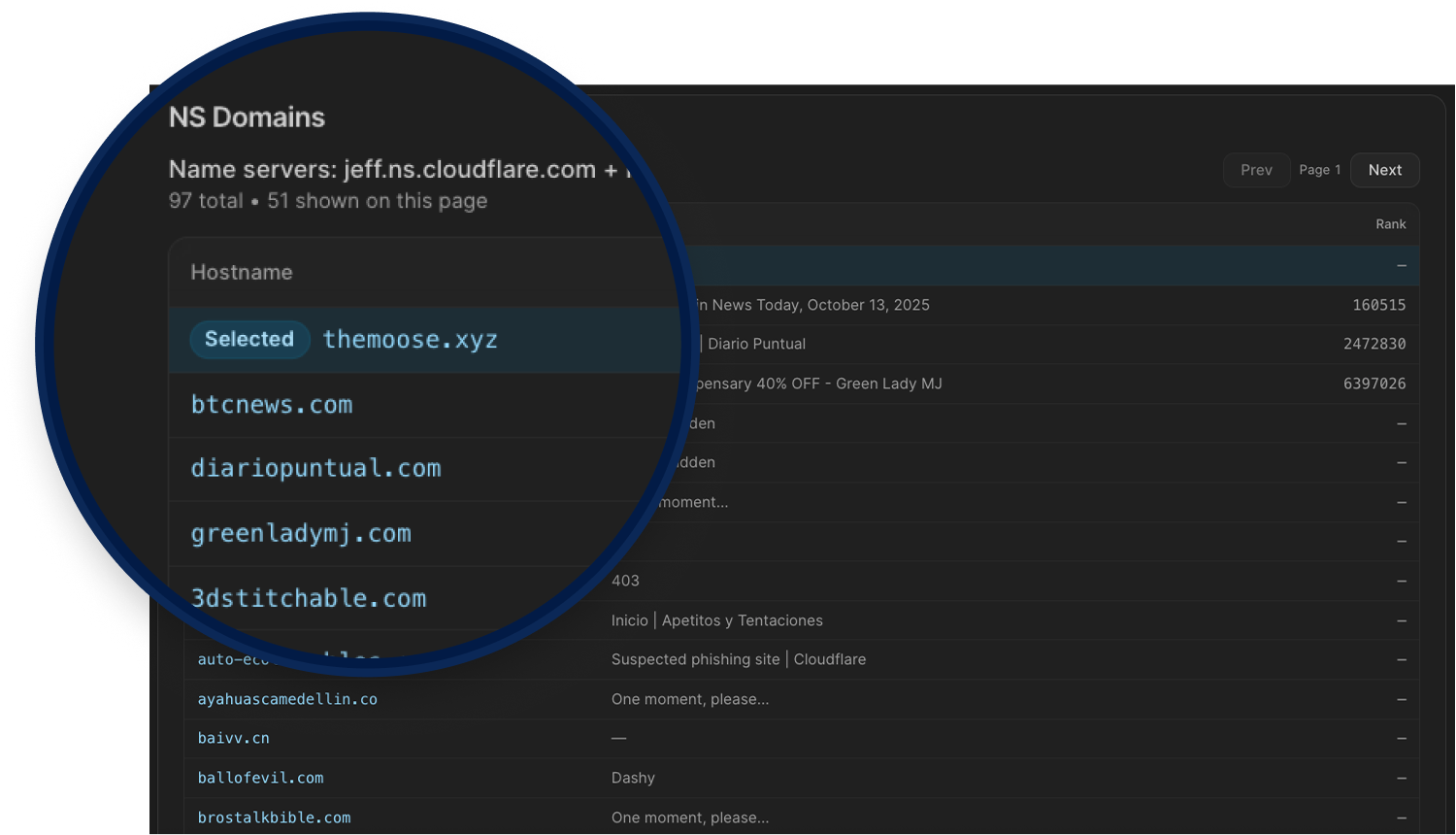
Cloudflare Buster
Amplifies one bad domain into a broader infrastructure view. Pivoting on Cloudflare nameserver pairs helps investigators avoid dead ends, uncover adjacent hosts, and quickly expand threat actor infrastructure clusters.
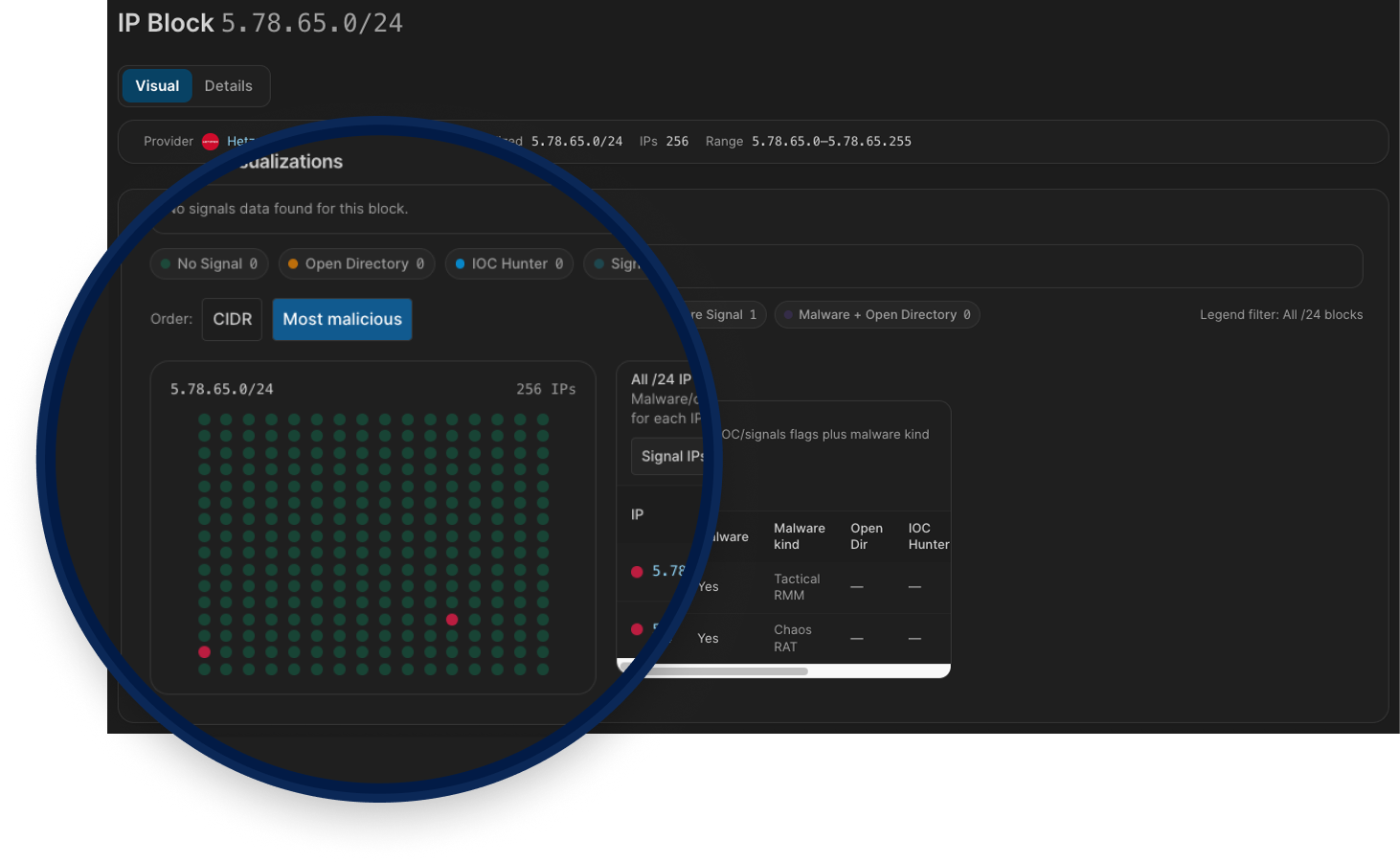
Visual Netblock Browsing
Browsing Netblocks turns a CIDR into an interactive /24 map so you can quickly expand from one indicator to surrounding infrastructure.
It helps you find:
Malicious neighbors in adjacent /24 blocks
Deduce unknown malicious activity across the same netblock
Overlapping risk signals (C2s, AttackCapture, IOC Hunter, Signals)
Blocks that stand out for bulletproof-like, dense, repeated malicious patterns
Passive DNS History
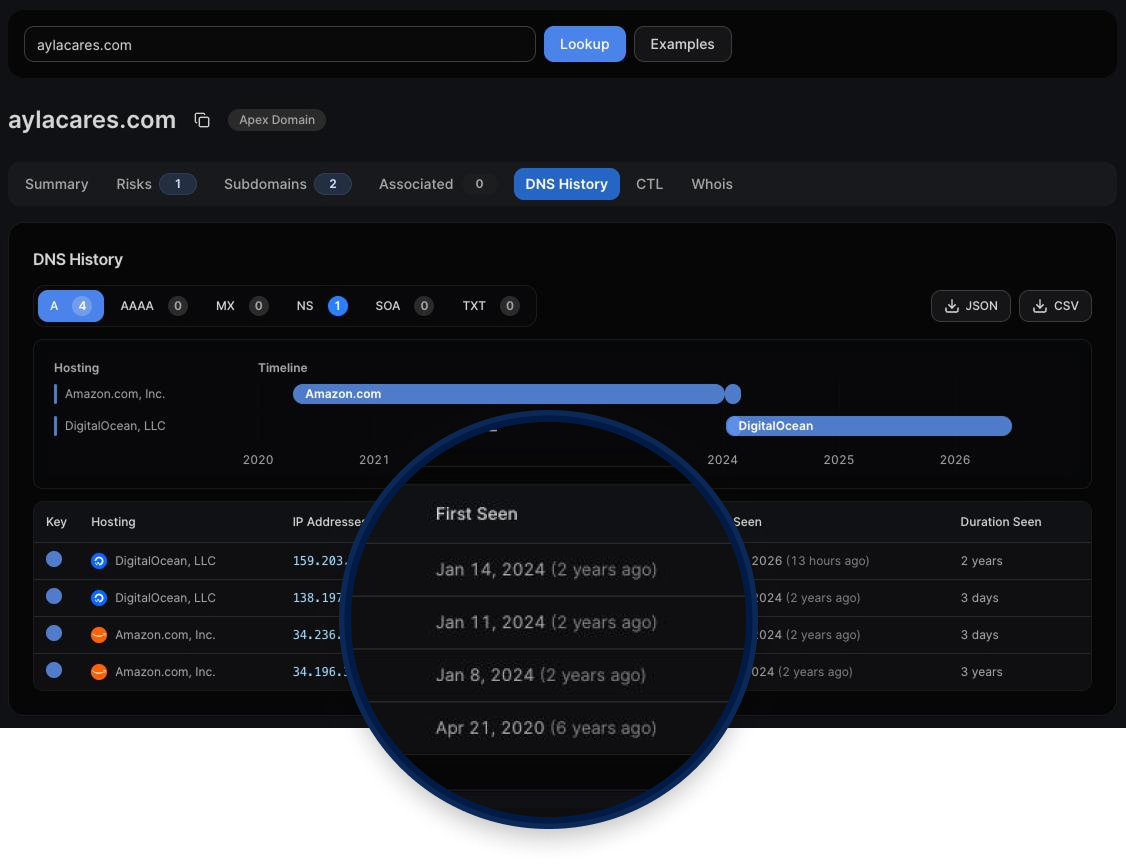
Turns passive DNS telemetry into a clear timeline of A, AAAA, MX, NS, SOA, and TXT changes, so you can see what changed, when it changed, and how long it stayed in place.
It helps you quickly spot:
Hosting/provider migrations over time
Malicious pivots between IPs, name servers, and mail routes
Short-lived or rotating records that point-in-time lookups miss
Related infrastructure you can pivot into from historical values
Threat Activity Enablers
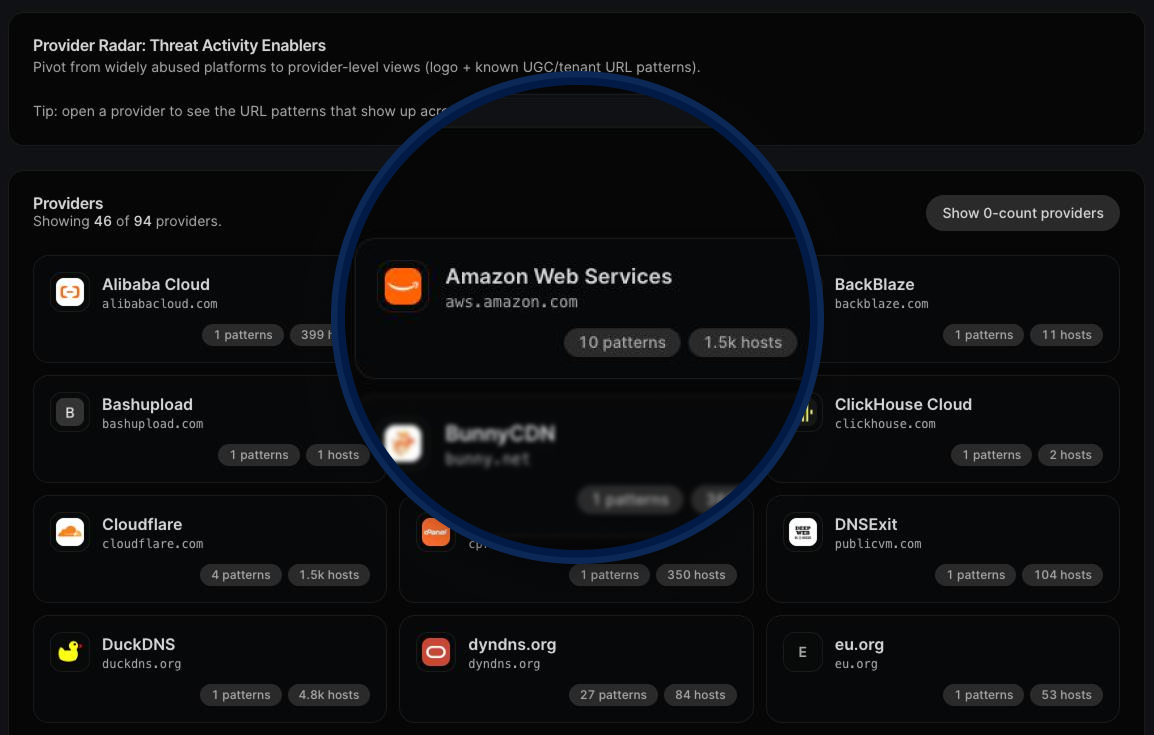
Turns abused legitimate services into a structured map of attacker infrastructure so teams can investigate faster.
It helps you find:
Reused tenant domains and URL patterns across Dynamic DNS, PaaS, CDN/object storage, and other service categories
High-churn Dynamic DNS/tunneling infrastructure used for disposable phishing and C2 operations
Trusted cloud and PaaS surfaces where malicious activity blends into normal platform traffic
Provider-level enabler patterns that complement Hosting Radar by showing why a hosting company appears hot
Vulnerability intelligence
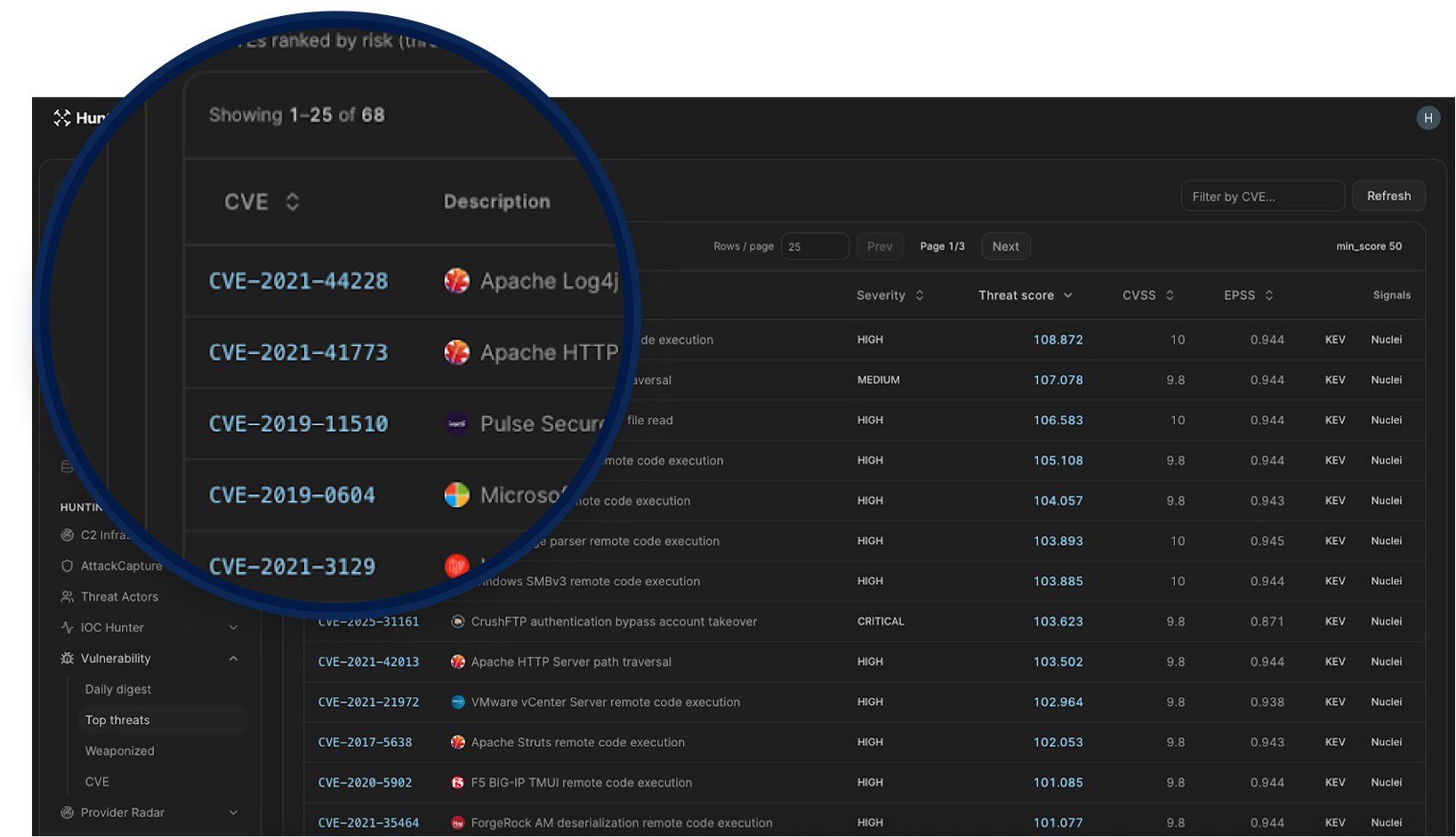
Adds a connected workflow so you can move from trend detection to CVE-level investigation without context switching.
Linked views across the Vulnerability section: Daily digest, Top threats, and Weaponized now flow into the same CVE drilldown path.
Direct CVE drilldowns: CVE IDs open dedicated pages with tabs for Intel, Exploits, and Nuclei.
Cross-CVE navigation: CVE mentions inside vulnerability descriptions are linkified, so related CVEs are one click away.
Richer daily signal view: Daily digest now combines Hot in news, Reddit discussion, new KEV additions, and new exploits with rolling lookback windows.
Better prioritization signals: Top/Weaponized views surface threat score, CVSS, EPSS, KEV status, ransomware indicators, and exploit/detection evidence.
Integrated evidence links: CVE detail pages connect to IOC Hunter stories and primary sources like NVD, CISA KEV, EPSS, ExploitDB, GitHub, and ProjectDiscovery.
Registrar Radar
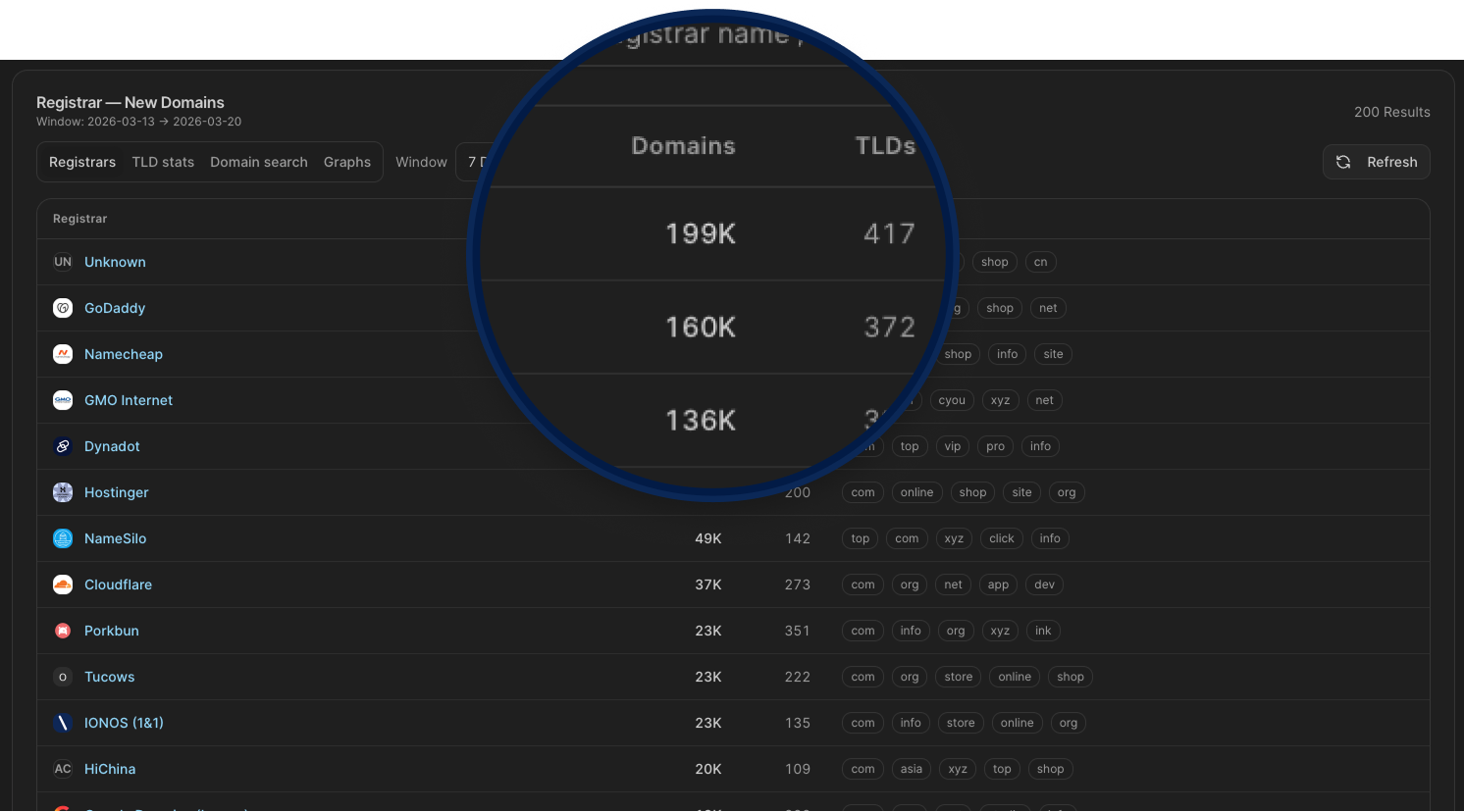
Host Radar is now Provider Radar, and includes Domain Registrar intelligence so you can track newly registered domains across 200+ registrars, monitor registration volume by TLD, spot unusual spikes in domain creation activity, and drill into specific registrars to see exactly what's being registered and when.
For hunters tracking threat actor infrastructure, this means catching domain provisioning patterns early, identifying registrars commonly abused for malicious campaigns, and correlating new domain activity with known attacker behavior before those domains go live in an attack.
JARM Lookup Pages
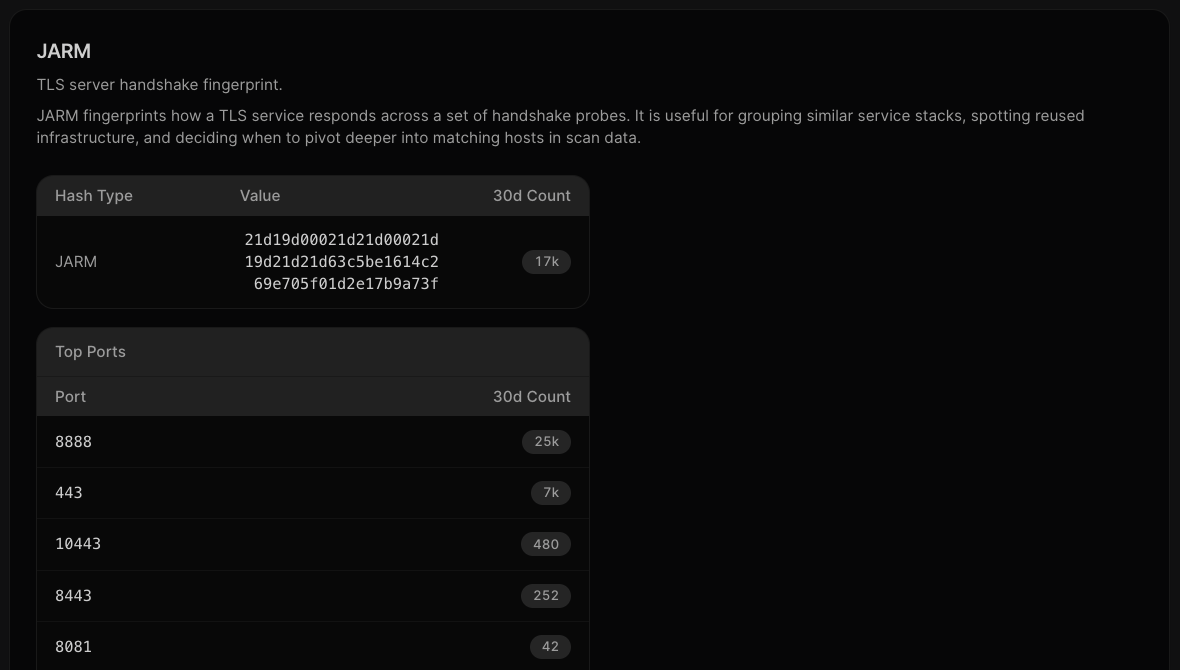
Searching a JARM hash now lands on a dedicated page instead of routing straight into SQL. The page shows the 30-day hit count, a top ports breakdown, and a recent sightings table with IP, port, and last seen timestamps. If you're fingerprinting a TLS stack to find reused infrastructure or pivot across a C2 cluster, the context is already there without having to write a query first.
Phishing Kit CSV Export
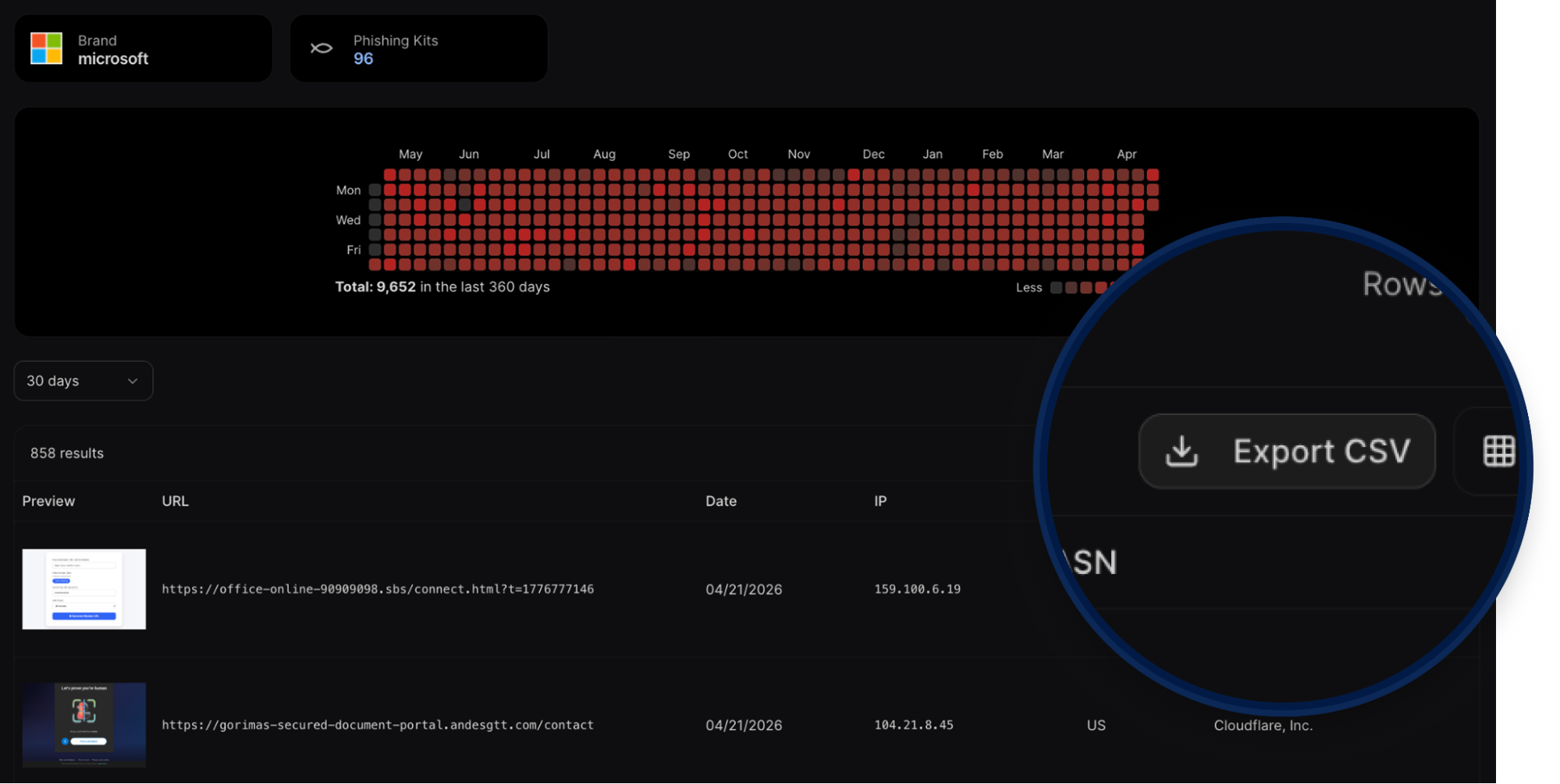
Brand and threat-actor phishing pages now include a CSV export of the full results table. Each row includes the URL, date, IP, country, and ASN. If you're tracking Microsoft phishing infrastructure or any other brand getting heavily targeted, you can pull the full dataset into your own workflow without copying rows manually.
Threat Actor Time Range
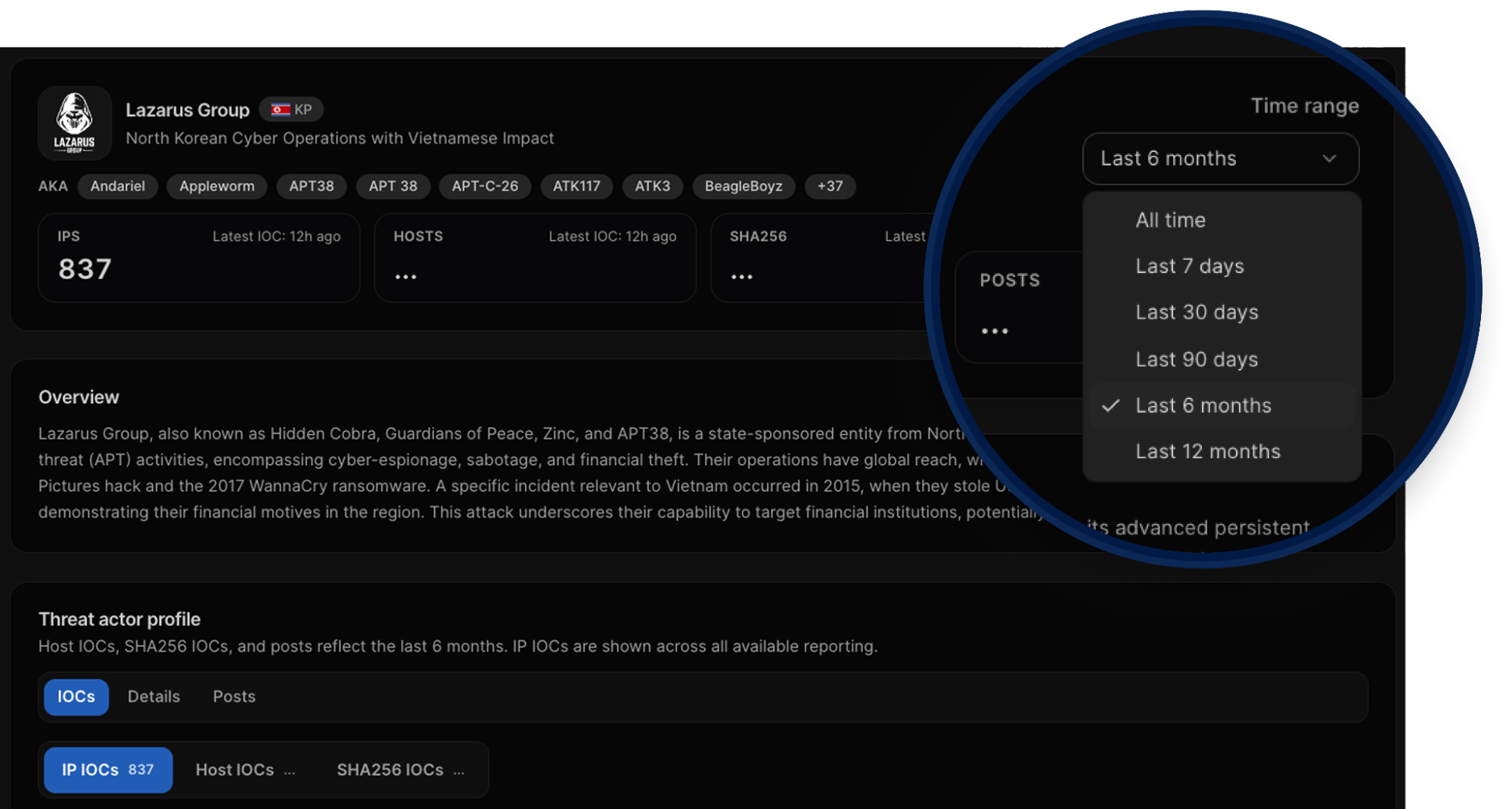
Threat actor pages now include a time range selector covering Last 7 days, Last 30 days, Last 90 days, Last 6 months, Last 12 months, and All time. IPs, hosts, and SHA256 IOCs all update to match the selected window, so you're not stuck with a fixed view when you need to scope an investigation to a specific period or pull the full historical picture.
IPv6 Search
IPv6 addresses now have their own search and detail page. If an indicator you're working with is IPv6, you can search it directly and navigate from there the same way you would an IPv4 address.
Dashboard Redesign
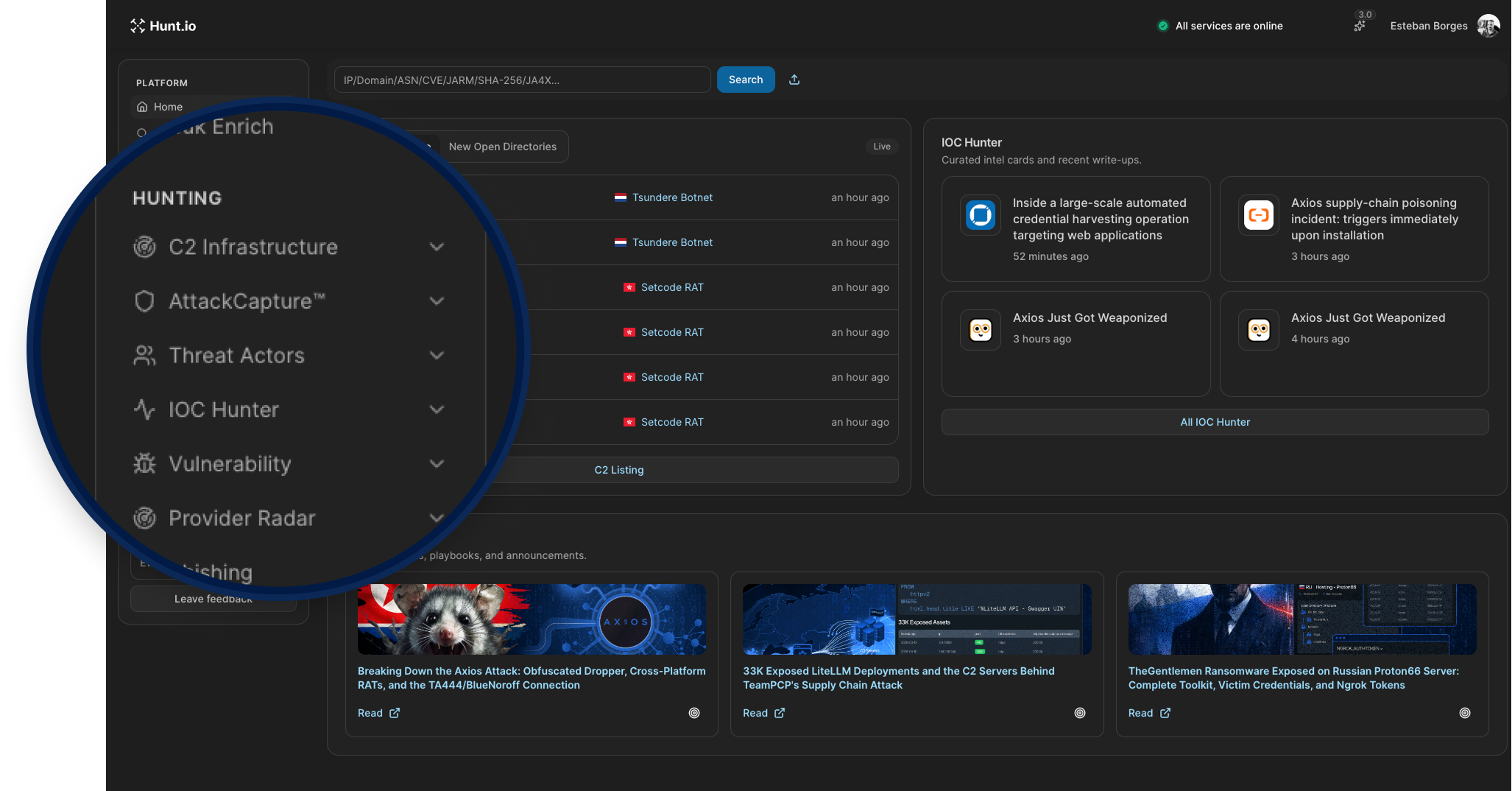
Hunt 3.0 ships with a redesigned dashboard. Both versions keep the dark theme, but the new design feels less dense with more breathing room between nav items, cards, and sections. Typography is better spaced, and the layout is easier to scan at a glance. The search bar moves to the top and now accepts CVE, JARM, SHA-256, and JA4X alongside the usual IP, domain, and ASN inputs.
The left nav was reorganized with cleaner section labels, Vulnerability and Provider Radar added as first-class sections, and Bulk Enrich under Platform. A system status indicator and workspace selector were added to the top bar, and the events/sec counter at the bottom left now includes a bar chart visualization.
Authentication Updates
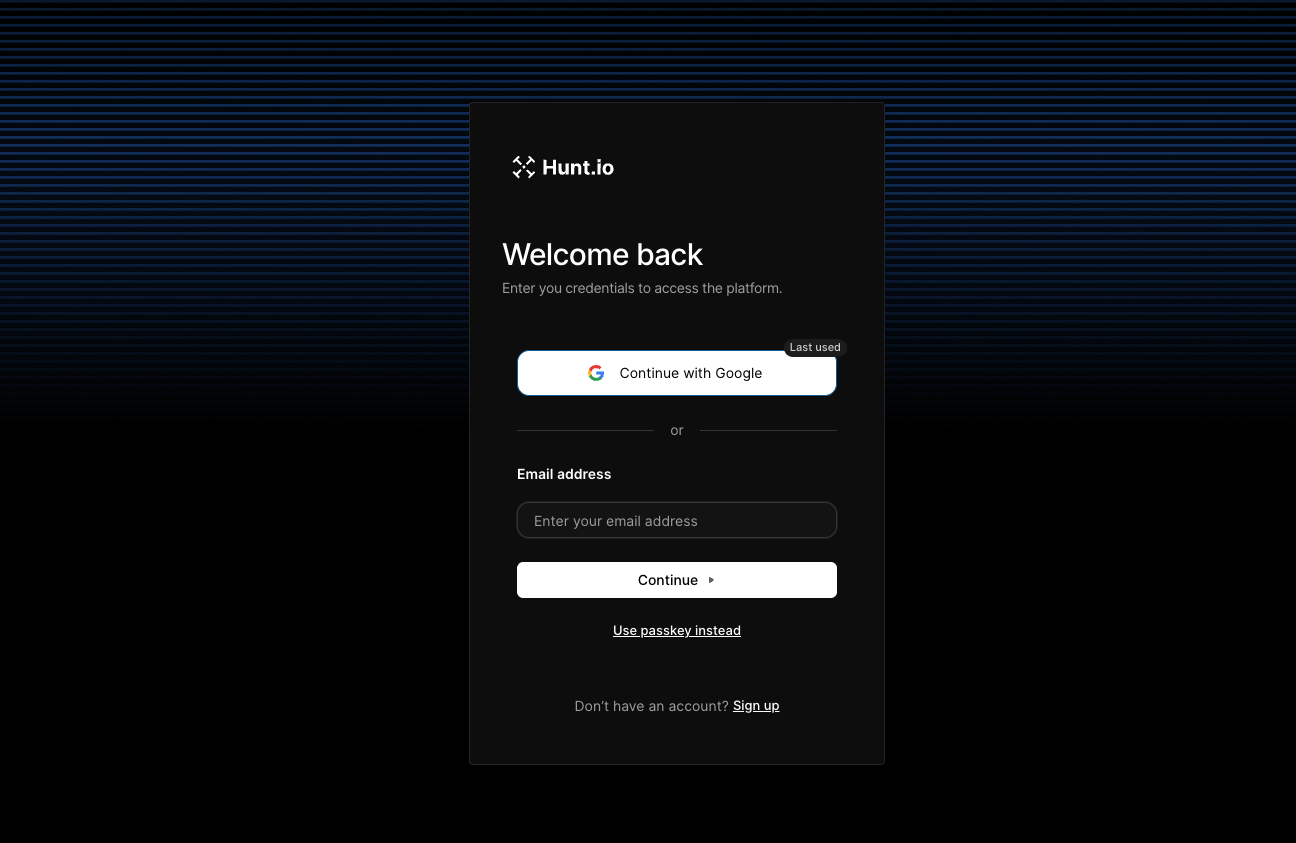
The login page was also updated in v3. You can now sign in with Google, use a passkey, or go the traditional email route. The Google SSO option removes the friction of managing a separate password, and passkey support means you can authenticate without a password at all. For teams running Hunt.io as part of a daily workflow, this makes getting in faster and keeps credential management out of the picture.
SQL Search
SQL History
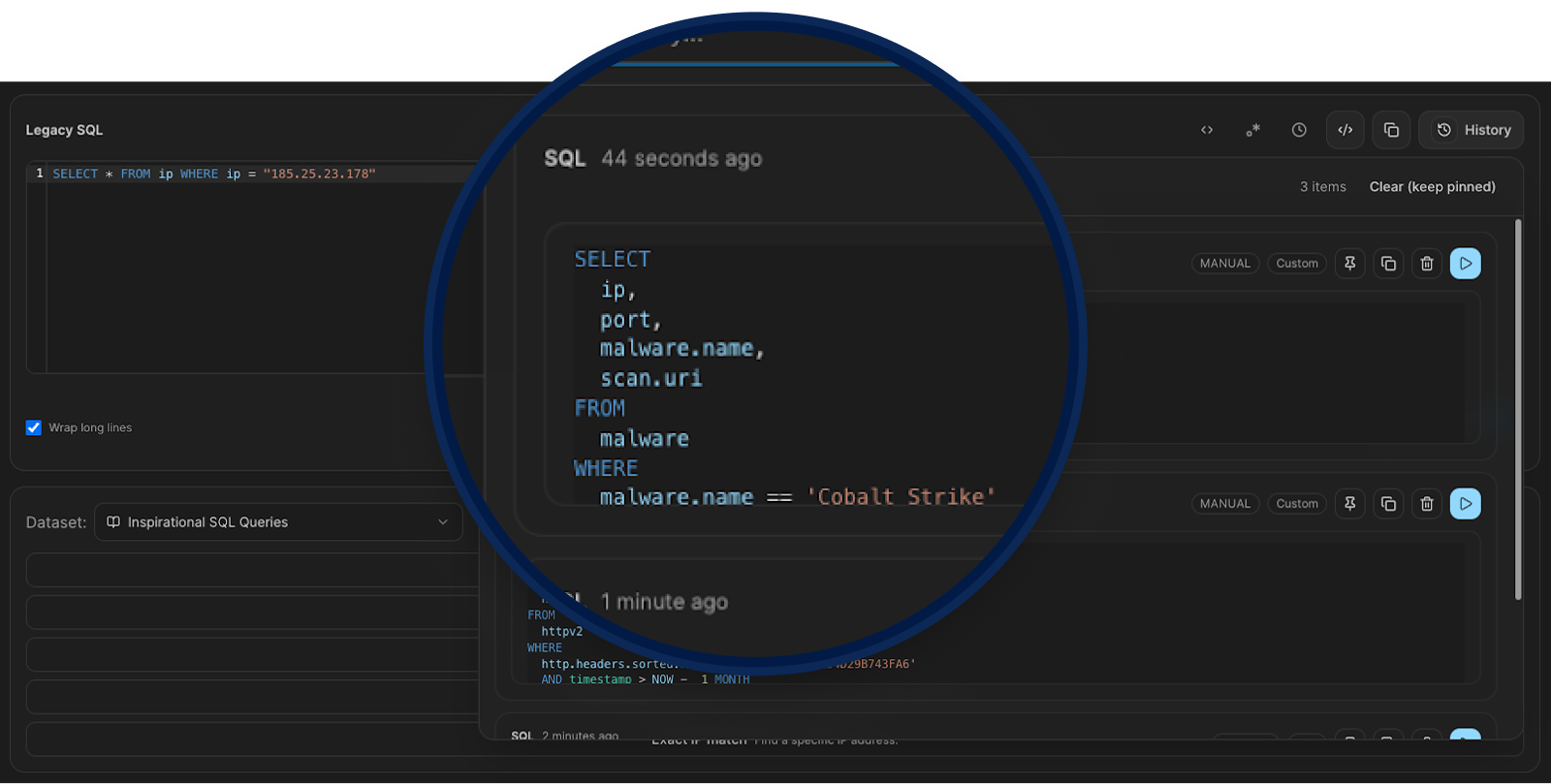
SQL Search now saves your query history so you can backtrack without rewriting from scratch. Past queries are stored with timestamps, filterable, and can be pinned or re-run directly from the history panel. Useful when you're mid-investigation and need to revisit a query you ran ten minutes ago without losing your current work.
Events Over Time
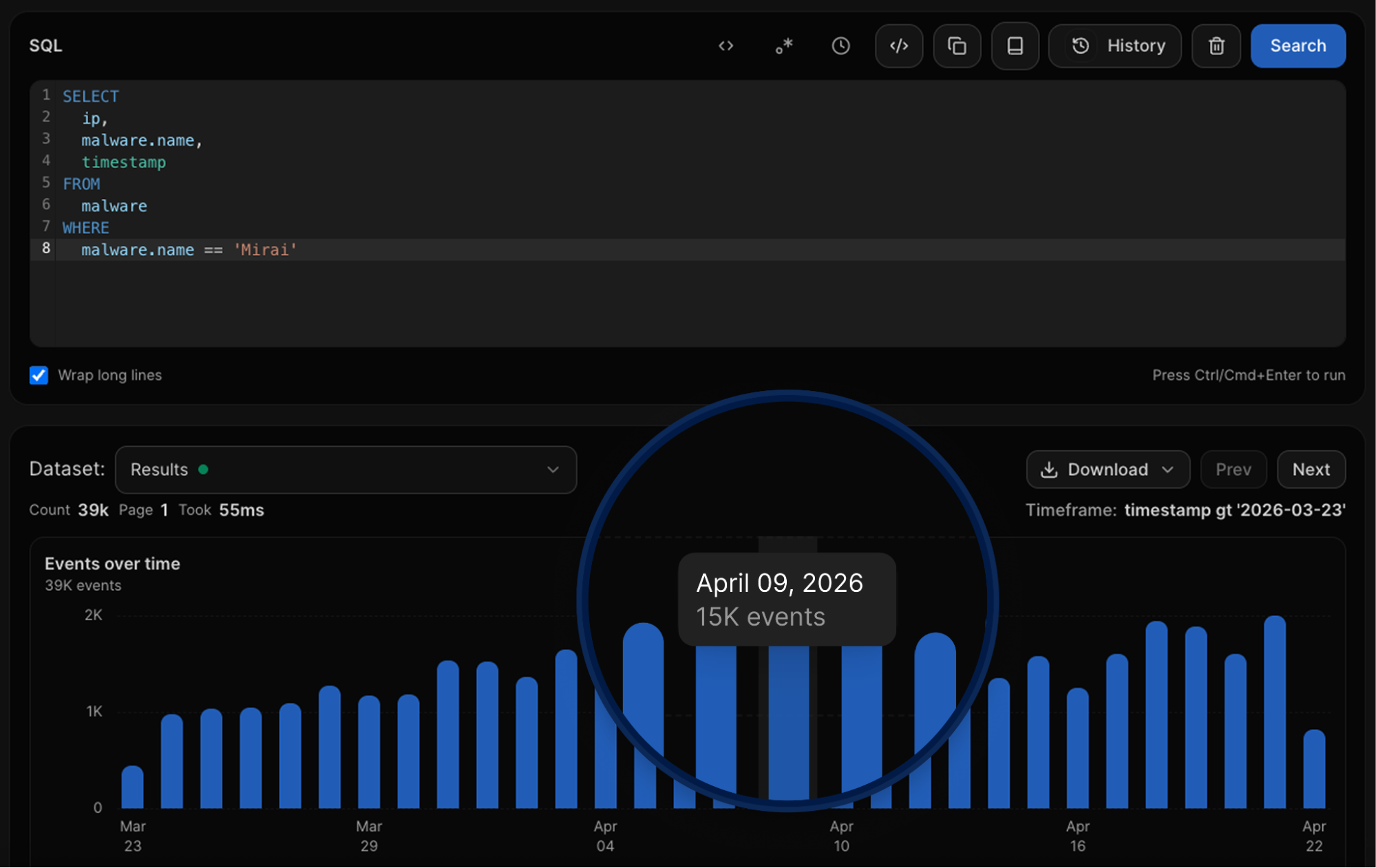
SQL queries now come with an Events over Time chart built right into the results, so you can see activity patterns without building a separate visualization. Hover any bar for the exact count on that date. In this example, a search for Mirai infections returned 39K events total, with a clear spike of 15K events on April 9, the kind of pattern that's easy to miss in a table but obvious in the chart.
Alerts
Save SQL queries, threat actor searches, and AttackCapture searches as persistent monitors that check for new matches at a configurable interval. New matches stay flagged until you acknowledge them, and browser notifications are optional. Useful when you're tracking a specific piece of infrastructure or an actor cluster and don't want to re-run the same query manually every day.
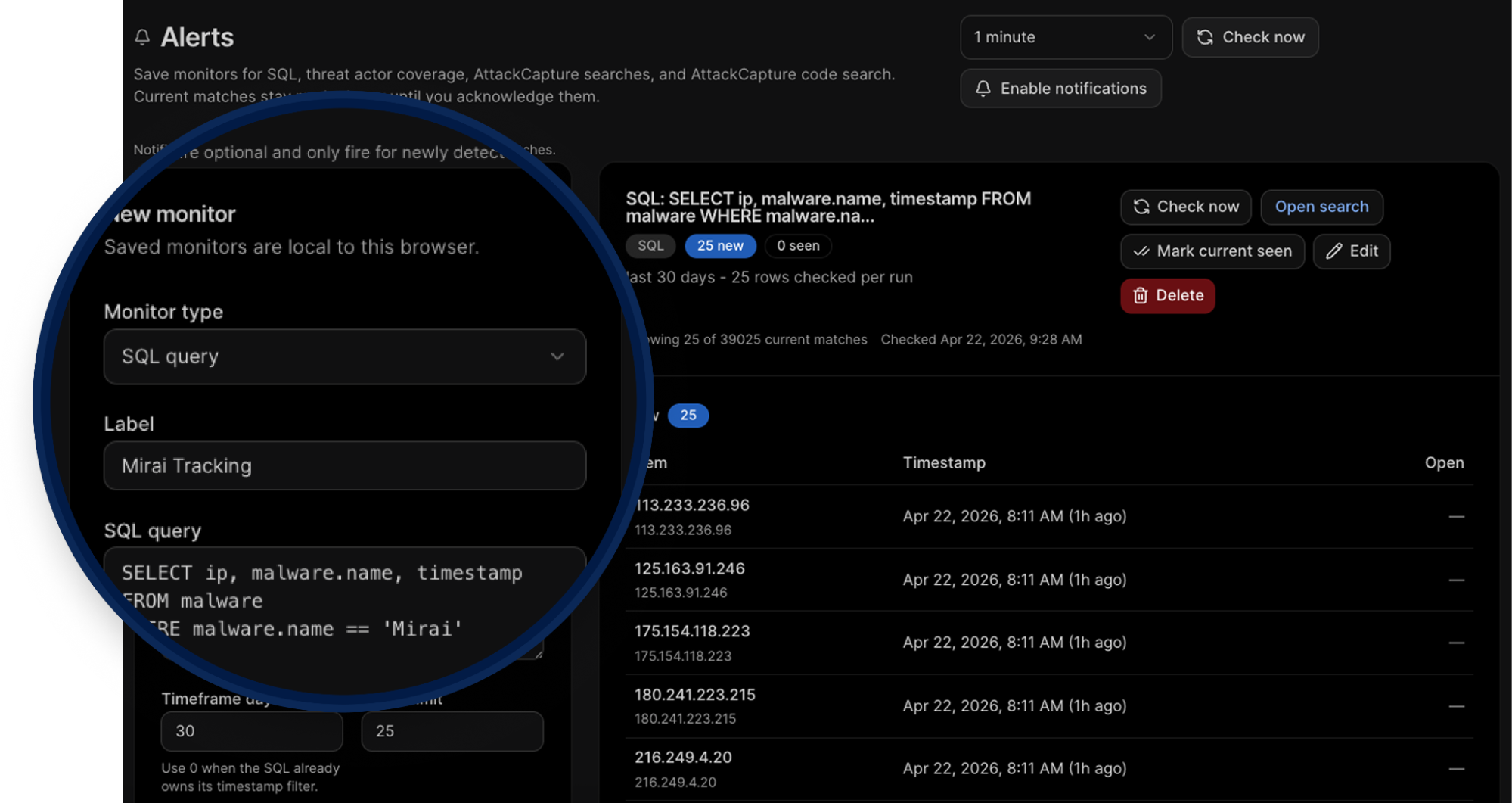
New SQL Table Names
SQL docs and table discovery now use canonical names across the board. If you have existing queries using the old names, they still work as aliases; nothing breaks. The updated naming is:
attackcapture.files (was open_directories)
malware.events (was malware)
certificates.inventory (was certificates)
domain.events.whois (was whois)
ip.current (was ip, port_latest)
ip.events.http (was http, httpv2)
urlx.inventory (was urlx)
SQL Performance
Query results now start rendering before the full count resolves. On large queries, you'll see rows appear as they come in instead of waiting on the total before anything shows up.
AttackCapture
Improved Code Search
Files are now AI-categorized automatically, giving you intent and function classification without manual tagging. Facet filtering is broader with more dimensions to work with, and you can now exclude results using negative facets to cut out the noise fast. Keyword highlighting in file previews helps you spot what you're looking for without having to open and read through each file manually.
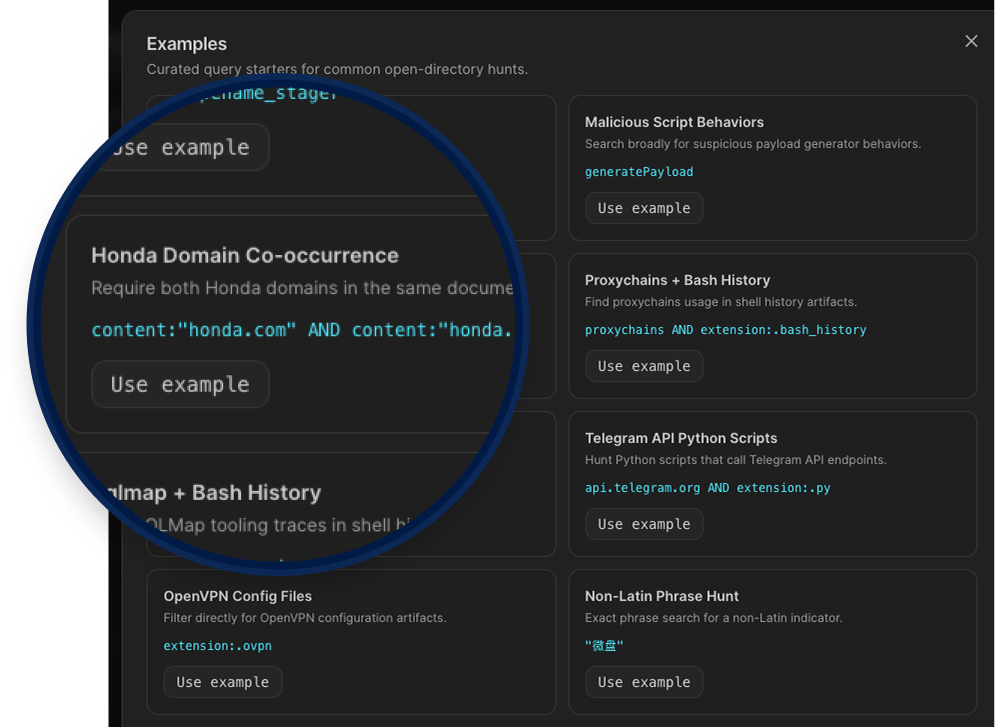
The search filters panel lets you narrow results across six dimensions: file name, extension, file type, hostname, file intent, and file function. Each filter supports free-text input and bucket selection, and you can combine multiple values using AND or OR logic, giving you the flexibility to cast a wider net or get very specific depending on what you're hunting for.
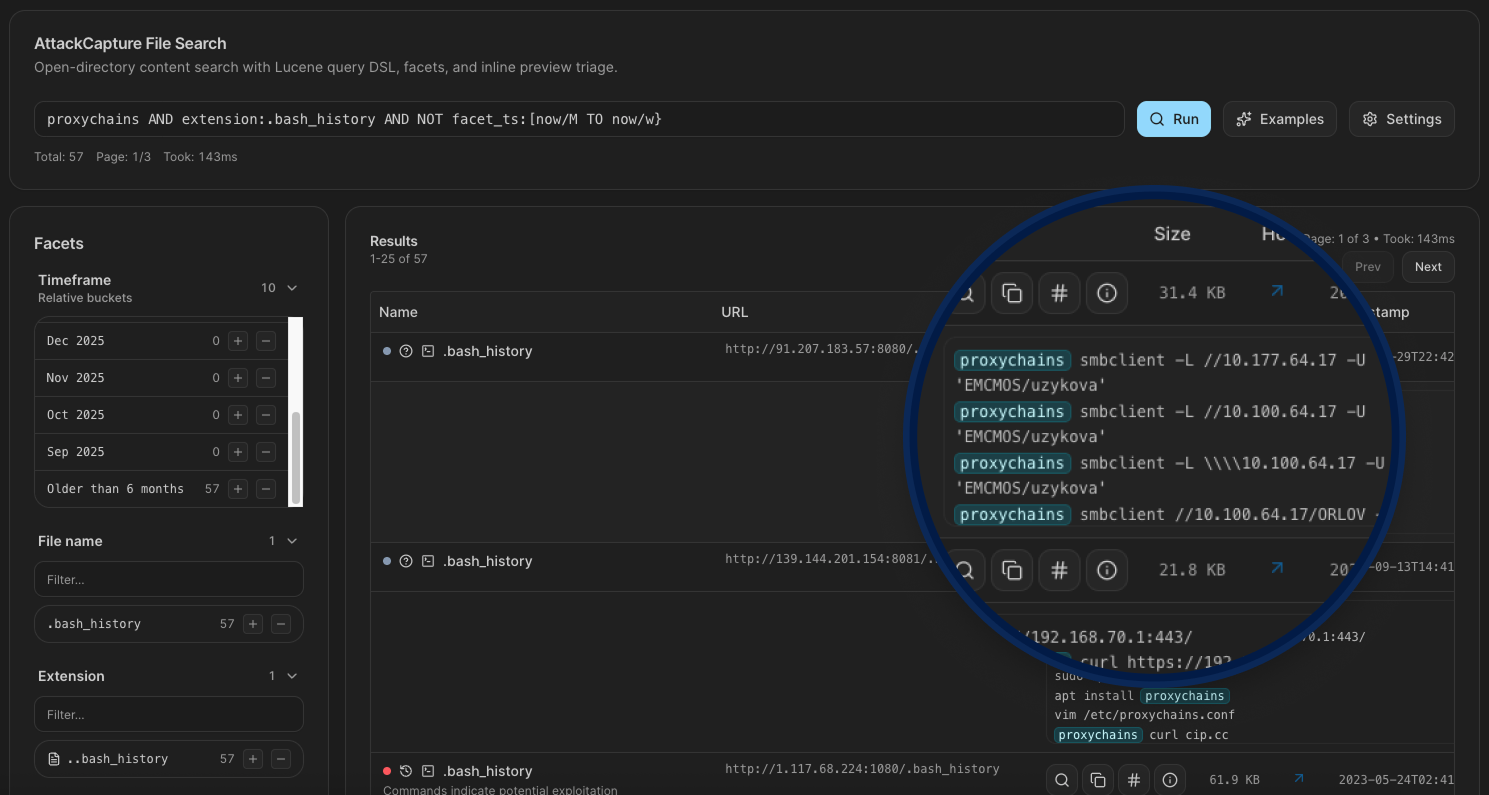
New Search Filters
Hunt 3.0 adds granular filtering to exposed open directory browsing inside AttackCapture. You can now filter files by:
Intent (Benign, Malicious, or Unknown),
Package type (currently nuclei),
Function (Config, Exploit, History, Readme, Target, or Unknown),
Locale, which gives you a direct signal on the operator's language and likely origin.
Instead of scrolling through hundreds of staged files trying to figure out what matters, you can cut straight to the exploits, configs, or target lists you actually care about.
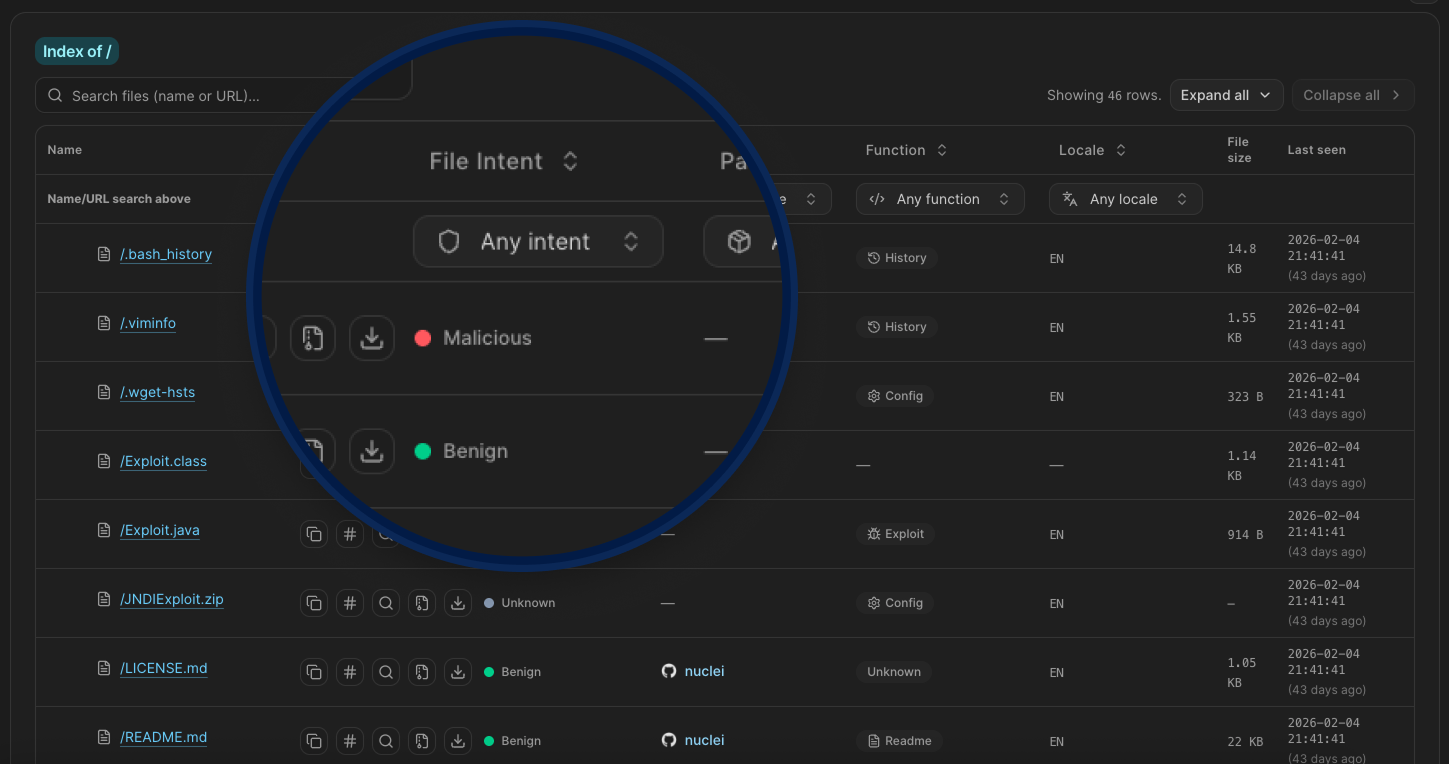
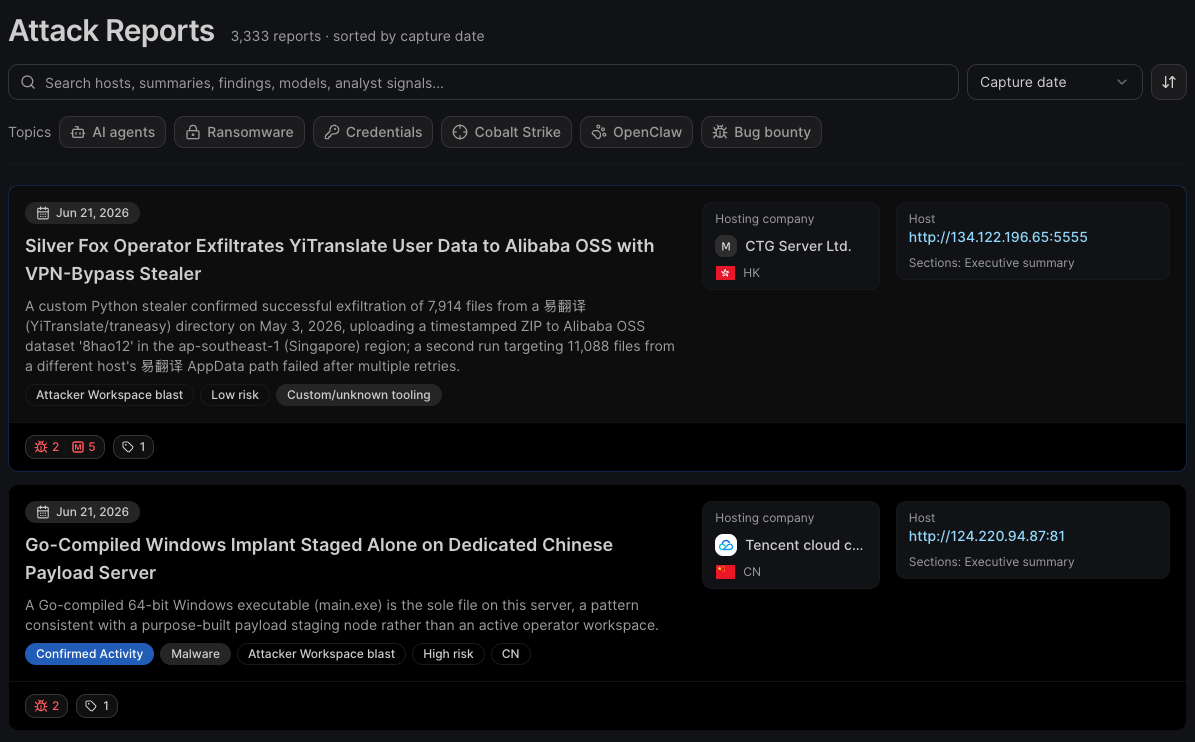
Attack Reports
When threat actors leave operational directories exposed, Hunt.io captures what's inside before it disappears. Attack Reports turns that raw exposure data into structured campaign reports, each tied to specific IPs, IOCs, exploited CVEs, and attribution indicators. Not inferred, not modeled. Documented from direct observation of attacker infrastructure.
This gives hunters a fast way to check if an IP connects to a known operation, what tooling the actor is running, and what else belongs to the same infrastructure cluster. The kind of context that usually takes hours to piece together is already done.
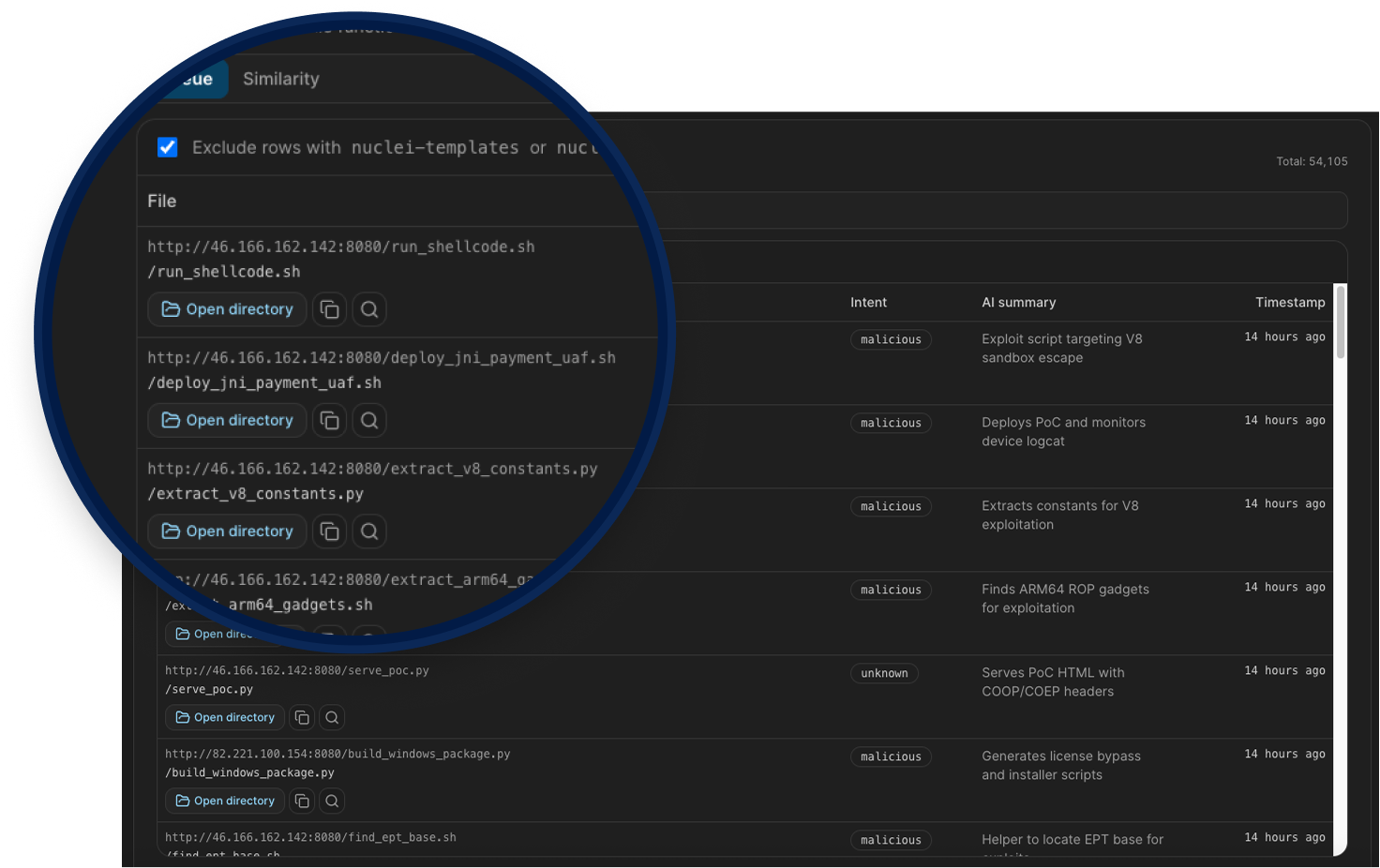
Exploit Capture
This is a dedicated queue inside AttackCapture that surfaces files AI-classified as exploits from exposed open directories, currently indexing over 54,000 files sorted newest first. From each entry, you can pivot directly into the parent open directory, preview file content, or copy the SHA256 hash for use in detections and YARA rules.
A toggle filters out nuclei template noise to keep the queue focused on what matters. The Similarity tab adds sidecar metadata for visible queue rows, helping you cluster related tooling across different attacker infrastructure.
For hunters and analysts, this is direct access to the actual tools attackers are staging and deploying in the wild.
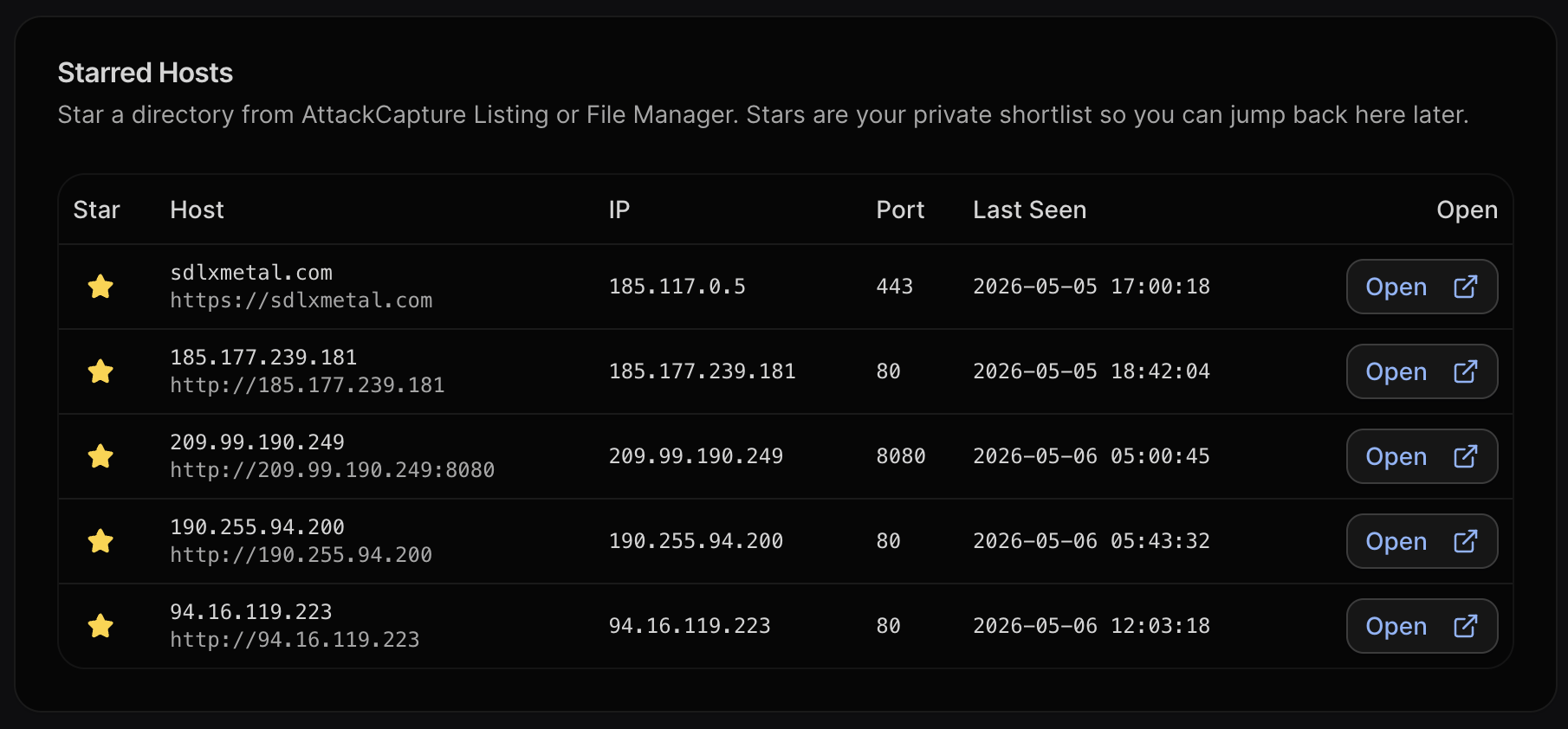
AttackCapture Private Stars
Star and save specific captures to revisit them later without losing your place mid-investigation. Starred hosts are private to your account, so you can build your own working list of infrastructure you're tracking without it bleeding into shared views.
Hunt v3 is a full rebuild, but the goal hasn't changed: give threat hunters better data, better context, and fewer dead ends. Every feature in this release was shaped by the investigations happening on the platform every day, and there's more coming.
→ You can try it yourself with a free 14-day trial, no credit card needed. If something feels off or you have an idea for what we should tackle next, we'd love to hear it.
One IP. One domain. One hash. In the hands of a good hunter, that's enough to unravel an entire campaign. But most tools stop at the lookup. Hunt 3.0 doesn't.
This release is built around the idea that every indicator is a doorway, and your job is to walk through it without hitting a dead end. We rebuilt the whole platform to make that possible, giving investigators full infrastructure context from a single indicator, inside one platform.
Here's a quick look at what's new:
| Highlights | What's New? |
|---|---|
| Data Improvements | Flattened Data Architecture, Cloudflare Buster, Passive DNS History, Threat Activity Enablers, Provider Radar with Registrar intelligence |
| Usability Improvements | Visual Netblock Browsing, Vulnerability Intelligence workflow (CVE drilldowns, cross-CVE navigation, enriched daily digest), AttackCapture Code Search (AI categorization, negative facets, keyword highlighting), Attack Reports, Exploit Capture, Threat Actor Time Range, JARM Lookup Pages, SQL Events Over Time |
| General Improvements | Full platform rebuild, Dashboard redesign, Authentication updates, Provider Radar renamed from Host Radar, AttackCapture search filter dimensions (Intent, Package type, Function, Locale), Exploit Capture Similarity tab, Alerts, Phishing Kit CSV Export, SQL Table Names |
| API | 60+ new endpoints across C2, AttackCapture, Vulnerability Intelligence, SQL, IP Enrichment, IOC Hunter, and DNS. OpenAPI 3.0 with JSON and YAML spec downloads. Remote MCP server at mcp.hunt.io with OAuth, dedicated MCP API keys, 18 tools available. |
API, Rebuilt
Hunt 3.0 ships over 60 endpoints covering the full platform. The API is built on OpenAPI 3.0 with JSON and YAML spec files available to download, so you can import directly into Postman or generate a client in Python, Go, or whatever your pipeline runs on.
C2 Feed - Download the full C2 infrastructure feed as gzip-compressed NDJSON, with options to exclude domains by popularity list or custom blocklist.
AttackCapture - Browse open directories, search staged files and code, pull exploit listings, query by SHA256, preview file content, download host archives, and pull AI-generated host and file briefs without touching the UI.
IP Enrichment - Full enrichment per IP including risk profile, port history, JARM, SSH, SSL, pivot rankings, IOC timeline, and AttackCapture exposure history.
Bulk Extract & Enrich - Extract IPs, domains, CIDRs, and SHA256s from raw text, then run triage summaries and drill-down history across C2, AttackCapture, and IOC Hunter in batch.
SQL - Run HuntSQL rules programmatically across all supported tables, with pagination, histogram mode, export, and streaming download support.
IOC Hunter - Search posts, IPs, hosts, and SHA256s to pull context from Hunt.io's research corpus, including daily activity counts for trend tracking.
Threat Actors - Query threat actor profiles, aliases, IP IOCs, enabler records, and provider-level data programmatically.
Signals - Pull enriched threat signal profiles and search across the signals dataset by IP, country, actor, tag, and more.
Vulnerability Intelligence - Query CVEs, pull weaponized and top threat views, and access daily threat counts for pipeline integration.
DNS Enrichment - rDNS lookups, DNS history, and Cloudflare Buster available via API, so you can pull domain-level infrastructure pivots directly into your pipelines.
If you're building detection pipelines, enrichment workflows, or custom tooling, the full endpoint list is in the API v3 documentation.
Remote MCP Server
Hunt.io now has a remote MCP server at
mcp.hunt.io with OAuth support, so you can connect AI tools like Claude directly to Hunt data without building a custom integration. Authentication uses your existing API key, dedicated MCP API keys can be created with fixed scopes, and PKCE S256 is supported for browser-based clients. 18 tools available out of the box. Organizations can manage MCP activation and access gating at the org level.
Here's what that looks like in practice. The screenshot below shows Claude connected to the Hunt.io MCP server, tracking IOCs from DPRK and Russian threat actors, pivoting on findings to map related infrastructure, and generating a full markdown report, all from a single prompt.
General Updates
Flattened Data Architecture
Hunt 3.0 introduces a new
ip table that wasn't available in our previous version. It holds the current state of an IP and its services as flat SQL fields, which means data that used to require separate queries and manual correlation now lives in one place.
Cloudflare Buster
Amplifies one bad domain into a broader infrastructure view. Pivoting on Cloudflare nameserver pairs helps investigators avoid dead ends, uncover adjacent hosts, and quickly expand threat actor infrastructure clusters.
Visual Netblock Browsing
Browsing Netblocks turns a CIDR into an interactive /24 map so you can quickly expand from one indicator to surrounding infrastructure.
It helps you find:
Malicious neighbors in adjacent /24 blocks
Deduce unknown malicious activity across the same netblock
Overlapping risk signals (C2s, AttackCapture, IOC Hunter, Signals)
Blocks that stand out for bulletproof-like, dense, repeated malicious patterns
Passive DNS History
Turns passive DNS telemetry into a clear timeline of A, AAAA, MX, NS, SOA, and TXT changes, so you can see what changed, when it changed, and how long it stayed in place.
It helps you quickly spot:
Hosting/provider migrations over time
Malicious pivots between IPs, name servers, and mail routes
Short-lived or rotating records that point-in-time lookups miss
Related infrastructure you can pivot into from historical values
Threat Activity Enablers
Turns abused legitimate services into a structured map of attacker infrastructure so teams can investigate faster.
It helps you find:
Reused tenant domains and URL patterns across Dynamic DNS, PaaS, CDN/object storage, and other service categories
High-churn Dynamic DNS/tunneling infrastructure used for disposable phishing and C2 operations
Trusted cloud and PaaS surfaces where malicious activity blends into normal platform traffic
Provider-level enabler patterns that complement Hosting Radar by showing why a hosting company appears hot
Vulnerability intelligence
Adds a connected workflow so you can move from trend detection to CVE-level investigation without context switching.
Linked views across the Vulnerability section: Daily digest, Top threats, and Weaponized now flow into the same CVE drilldown path.
Direct CVE drilldowns: CVE IDs open dedicated pages with tabs for Intel, Exploits, and Nuclei.
Cross-CVE navigation: CVE mentions inside vulnerability descriptions are linkified, so related CVEs are one click away.
Richer daily signal view: Daily digest now combines Hot in news, Reddit discussion, new KEV additions, and new exploits with rolling lookback windows.
Better prioritization signals: Top/Weaponized views surface threat score, CVSS, EPSS, KEV status, ransomware indicators, and exploit/detection evidence.
Integrated evidence links: CVE detail pages connect to IOC Hunter stories and primary sources like NVD, CISA KEV, EPSS, ExploitDB, GitHub, and ProjectDiscovery.
Registrar Radar
Host Radar is now Provider Radar, and includes Domain Registrar intelligence so you can track newly registered domains across 200+ registrars, monitor registration volume by TLD, spot unusual spikes in domain creation activity, and drill into specific registrars to see exactly what's being registered and when.
For hunters tracking threat actor infrastructure, this means catching domain provisioning patterns early, identifying registrars commonly abused for malicious campaigns, and correlating new domain activity with known attacker behavior before those domains go live in an attack.
JARM Lookup Pages
Searching a JARM hash now lands on a dedicated page instead of routing straight into SQL. The page shows the 30-day hit count, a top ports breakdown, and a recent sightings table with IP, port, and last seen timestamps. If you're fingerprinting a TLS stack to find reused infrastructure or pivot across a C2 cluster, the context is already there without having to write a query first.
Phishing Kit CSV Export
Brand and threat-actor phishing pages now include a CSV export of the full results table. Each row includes the URL, date, IP, country, and ASN. If you're tracking Microsoft phishing infrastructure or any other brand getting heavily targeted, you can pull the full dataset into your own workflow without copying rows manually.
Threat Actor Time Range
Threat actor pages now include a time range selector covering Last 7 days, Last 30 days, Last 90 days, Last 6 months, Last 12 months, and All time. IPs, hosts, and SHA256 IOCs all update to match the selected window, so you're not stuck with a fixed view when you need to scope an investigation to a specific period or pull the full historical picture.
IPv6 Search
IPv6 addresses now have their own search and detail page. If an indicator you're working with is IPv6, you can search it directly and navigate from there the same way you would an IPv4 address.
Dashboard Redesign
Hunt 3.0 ships with a redesigned dashboard. Both versions keep the dark theme, but the new design feels less dense with more breathing room between nav items, cards, and sections. Typography is better spaced, and the layout is easier to scan at a glance. The search bar moves to the top and now accepts CVE, JARM, SHA-256, and JA4X alongside the usual IP, domain, and ASN inputs.
The left nav was reorganized with cleaner section labels, Vulnerability and Provider Radar added as first-class sections, and Bulk Enrich under Platform. A system status indicator and workspace selector were added to the top bar, and the events/sec counter at the bottom left now includes a bar chart visualization.
Authentication Updates
The login page was also updated in v3. You can now sign in with Google, use a passkey, or go the traditional email route. The Google SSO option removes the friction of managing a separate password, and passkey support means you can authenticate without a password at all. For teams running Hunt.io as part of a daily workflow, this makes getting in faster and keeps credential management out of the picture.
SQL Search
SQL History
SQL Search now saves your query history so you can backtrack without rewriting from scratch. Past queries are stored with timestamps, filterable, and can be pinned or re-run directly from the history panel. Useful when you're mid-investigation and need to revisit a query you ran ten minutes ago without losing your current work.
Events Over Time
SQL queries now come with an Events over Time chart built right into the results, so you can see activity patterns without building a separate visualization. Hover any bar for the exact count on that date. In this example, a search for Mirai infections returned 39K events total, with a clear spike of 15K events on April 9, the kind of pattern that's easy to miss in a table but obvious in the chart.
Alerts
Save SQL queries, threat actor searches, and AttackCapture searches as persistent monitors that check for new matches at a configurable interval. New matches stay flagged until you acknowledge them, and browser notifications are optional. Useful when you're tracking a specific piece of infrastructure or an actor cluster and don't want to re-run the same query manually every day.
New SQL Table Names
SQL docs and table discovery now use canonical names across the board. If you have existing queries using the old names, they still work as aliases; nothing breaks. The updated naming is:
attackcapture.files (was open_directories)
malware.events (was malware)
certificates.inventory (was certificates)
domain.events.whois (was whois)
ip.current (was ip, port_latest)
ip.events.http (was http, httpv2)
urlx.inventory (was urlx)
SQL Performance
Query results now start rendering before the full count resolves. On large queries, you'll see rows appear as they come in instead of waiting on the total before anything shows up.
AttackCapture
Improved Code Search
Files are now AI-categorized automatically, giving you intent and function classification without manual tagging. Facet filtering is broader with more dimensions to work with, and you can now exclude results using negative facets to cut out the noise fast. Keyword highlighting in file previews helps you spot what you're looking for without having to open and read through each file manually.
The search filters panel lets you narrow results across six dimensions: file name, extension, file type, hostname, file intent, and file function. Each filter supports free-text input and bucket selection, and you can combine multiple values using AND or OR logic, giving you the flexibility to cast a wider net or get very specific depending on what you're hunting for.
New Search Filters
Hunt 3.0 adds granular filtering to exposed open directory browsing inside AttackCapture. You can now filter files by:
Intent (Benign, Malicious, or Unknown),
Package type (currently nuclei),
Function (Config, Exploit, History, Readme, Target, or Unknown),
Locale, which gives you a direct signal on the operator's language and likely origin.
Instead of scrolling through hundreds of staged files trying to figure out what matters, you can cut straight to the exploits, configs, or target lists you actually care about.
Attack Reports
When threat actors leave operational directories exposed, Hunt.io captures what's inside before it disappears. Attack Reports turns that raw exposure data into structured campaign reports, each tied to specific IPs, IOCs, exploited CVEs, and attribution indicators. Not inferred, not modeled. Documented from direct observation of attacker infrastructure.
This gives hunters a fast way to check if an IP connects to a known operation, what tooling the actor is running, and what else belongs to the same infrastructure cluster. The kind of context that usually takes hours to piece together is already done.
Exploit Capture
This is a dedicated queue inside AttackCapture that surfaces files AI-classified as exploits from exposed open directories, currently indexing over 54,000 files sorted newest first. From each entry, you can pivot directly into the parent open directory, preview file content, or copy the SHA256 hash for use in detections and YARA rules.
A toggle filters out nuclei template noise to keep the queue focused on what matters. The Similarity tab adds sidecar metadata for visible queue rows, helping you cluster related tooling across different attacker infrastructure.
For hunters and analysts, this is direct access to the actual tools attackers are staging and deploying in the wild.
AttackCapture Private Stars
Star and save specific captures to revisit them later without losing your place mid-investigation. Starred hosts are private to your account, so you can build your own working list of infrastructure you're tracking without it bleeding into shared views.
Hunt v3 is a full rebuild, but the goal hasn't changed: give threat hunters better data, better context, and fewer dead ends. Every feature in this release was shaped by the investigations happening on the platform every day, and there's more coming.
→ You can try it yourself with a free 14-day trial, no credit card needed. If something feels off or you have an idea for what we should tackle next, we'd love to hear it.
Related Posts
Related Posts
Related Posts