
Getting Started with Hunt.io
Hunt.io is a threat intelligence and infrastructure hunting platform. It maps malicious infrastructure across the internet so you can find command-and-control servers, attacker tooling, phishing operations, and the hosting behind them before they show up on a blocklist. This page gets you from a new account to your first search.
The platform runs at portal.hunt.io. The marketing site stays at hunt.io, and the API docs live at a.hunt.io.
Find your way around
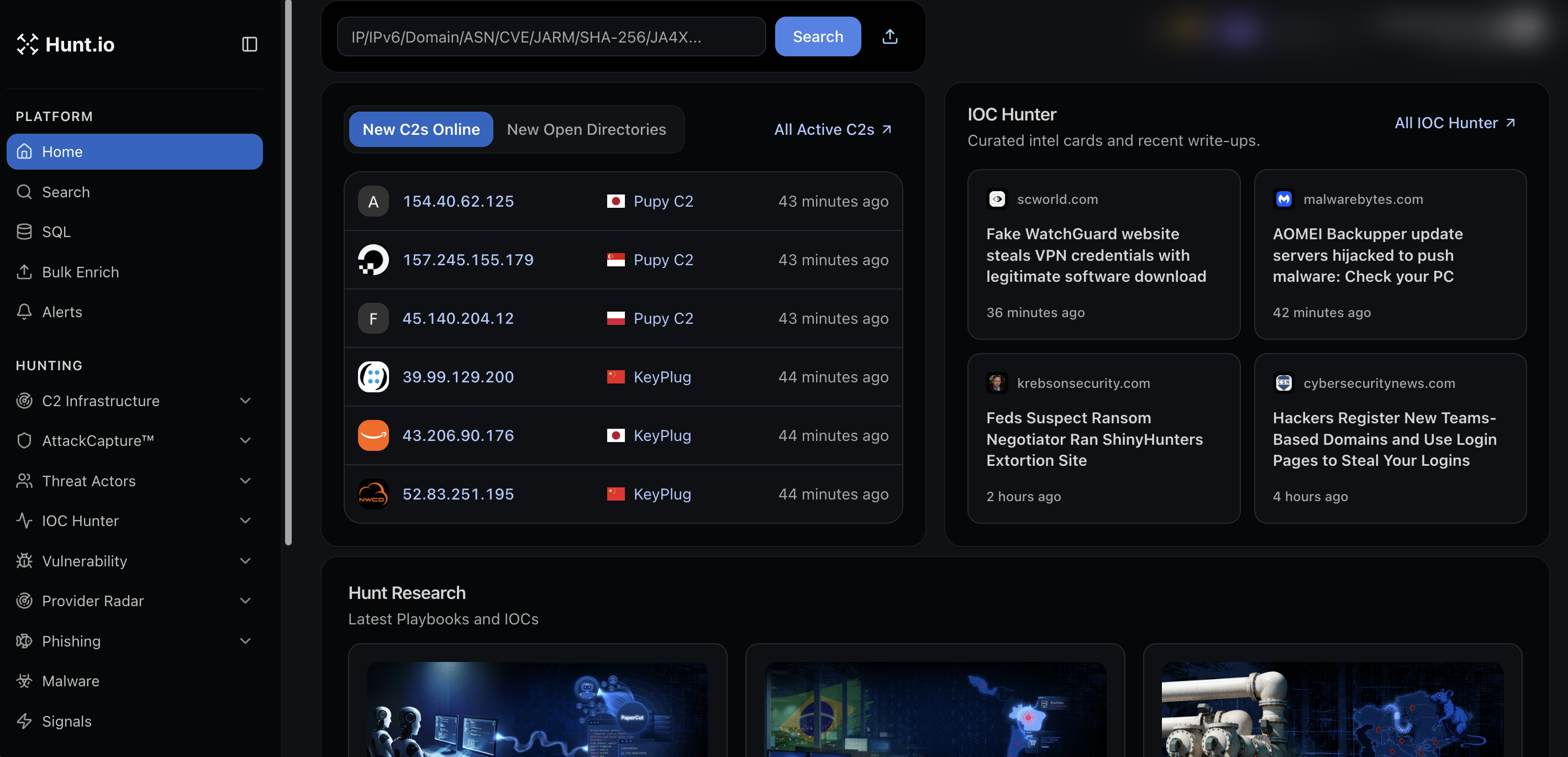
After sign-in you land on Home, the dashboard. The left sidebar is grouped into three parts:
Platform holds the tools you drive directly: Search, HuntSQL, Bulk Enrich, and Alerts.
Hunting holds the datasets you browse and pivot through: C2 Infrastructure, AttackCapture, Threat Actors, IOC Hunter, Vulnerability, Provider Radar, Phishing, Malware, and Signals.
Integrations holds the ways you pull data out: Feeds, MCP Setup, and API.
The dashboard itself gives you a live read on the platform: newly observed C2 servers, new open directories, recent IOC Hunter write-ups, and the latest Hunt research. The search bar at the top accepts an IP, domain, ASN, CVE, or certificate fingerprint and jumps you to the matching view.
Create an account
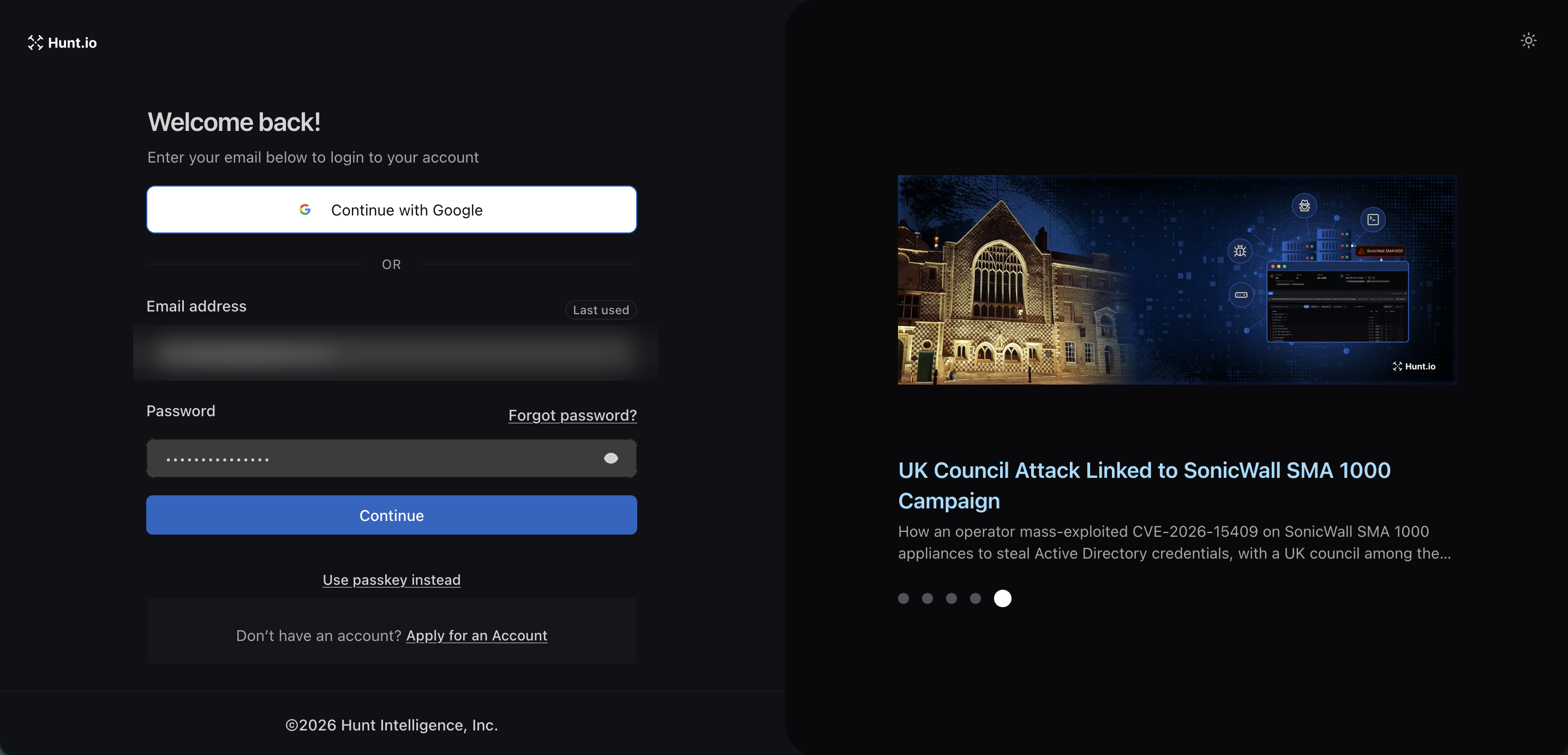
Open portal.hunt.io and choose how to get in from the sign-in screen:
Continue with Google to use an existing Google identity.
Email and password if you already have credentials.
Use passkey instead for passwordless sign-in.
Apply for an Account if you are new. This starts the account request flow.
Forgot your password? Use the "Forgot password?" link on the same screen.
A good first session
Run a lookup from the top search bar on an IP or domain you already care about.
Open the result and read the Reputation and Risk panel, then use the tabs to pivot into Domains, Associations, Signals, and History.
Browse C2 Infrastructure to see what is active right now.
Save a monitor in Alerts so you get told when something new matches your query.
Getting Started with Hunt.io
Hunt.io is a threat intelligence and infrastructure hunting platform. It maps malicious infrastructure across the internet so you can find command-and-control servers, attacker tooling, phishing operations, and the hosting behind them before they show up on a blocklist. This page gets you from a new account to your first search.
The platform runs at portal.hunt.io. The marketing site stays at hunt.io, and the API docs live at a.hunt.io.
Find your way around
After sign-in you land on Home, the dashboard. The left sidebar is grouped into three parts:
Platform holds the tools you drive directly: Search, HuntSQL, Bulk Enrich, and Alerts.
Hunting holds the datasets you browse and pivot through: C2 Infrastructure, AttackCapture, Threat Actors, IOC Hunter, Vulnerability, Provider Radar, Phishing, Malware, and Signals.
Integrations holds the ways you pull data out: Feeds, MCP Setup, and API.
The dashboard itself gives you a live read on the platform: newly observed C2 servers, new open directories, recent IOC Hunter write-ups, and the latest Hunt research. The search bar at the top accepts an IP, domain, ASN, CVE, or certificate fingerprint and jumps you to the matching view.
Create an account
Open portal.hunt.io and choose how to get in from the sign-in screen:
Continue with Google to use an existing Google identity.
Email and password if you already have credentials.
Use passkey instead for passwordless sign-in.
Apply for an Account if you are new. This starts the account request flow.
Forgot your password? Use the "Forgot password?" link on the same screen.
A good first session
Run a lookup from the top search bar on an IP or domain you already care about.
Open the result and read the Reputation and Risk panel, then use the tabs to pivot into Domains, Associations, Signals, and History.
Browse C2 Infrastructure to see what is active right now.
Save a monitor in Alerts so you get told when something new matches your query.
Getting Started with Hunt.io
Hunt.io is a threat intelligence and infrastructure hunting platform. It maps malicious infrastructure across the internet so you can find command-and-control servers, attacker tooling, phishing operations, and the hosting behind them before they show up on a blocklist. This page gets you from a new account to your first search.
The platform runs at portal.hunt.io. The marketing site stays at hunt.io, and the API docs live at a.hunt.io.
Find your way around
After sign-in you land on Home, the dashboard. The left sidebar is grouped into three parts:
Platform holds the tools you drive directly: Search, HuntSQL, Bulk Enrich, and Alerts.
Hunting holds the datasets you browse and pivot through: C2 Infrastructure, AttackCapture, Threat Actors, IOC Hunter, Vulnerability, Provider Radar, Phishing, Malware, and Signals.
Integrations holds the ways you pull data out: Feeds, MCP Setup, and API.
The dashboard itself gives you a live read on the platform: newly observed C2 servers, new open directories, recent IOC Hunter write-ups, and the latest Hunt research. The search bar at the top accepts an IP, domain, ASN, CVE, or certificate fingerprint and jumps you to the matching view.
Create an account
Open portal.hunt.io and choose how to get in from the sign-in screen:
Continue with Google to use an existing Google identity.
Email and password if you already have credentials.
Use passkey instead for passwordless sign-in.
Apply for an Account if you are new. This starts the account request flow.
Forgot your password? Use the "Forgot password?" link on the same screen.
A good first session
Run a lookup from the top search bar on an IP or domain you already care about.
Open the result and read the Reputation and Risk panel, then use the tabs to pivot into Domains, Associations, Signals, and History.
Browse C2 Infrastructure to see what is active right now.
Save a monitor in Alerts so you get told when something new matches your query.
Frequently asked questions
Frequently asked questions
Do I need a credit card to try it?
Is there an API?
What can I search for?
Where do I sign in to Hunt.io?
Related
Related
Hunt adversary infrastructure in real time. Surface C2 servers, enrich IOCs,
and map attacker activity at scale with our unified threat hunting platform.

Hunt adversary infrastructure in real time. Surface C2 servers, enrich IOCs,
and map attacker activity at scale with our unified threat hunting platform.
Hunt adversary infrastructure in real time. Surface C2 servers, enrich IOCs,
and map attacker activity at scale with our unified threat hunting platform.